
Broken Conversations – A Practical Guide for Improving Chatbot UX

Conversation Flow
Covers how naturally and logically the conversation progresses, including loops, misunderstood intents, awkward greetings, and abrupt endings. Also includes error recovery and system responsiveness: how smoothly the chatbot handles mistakes and how quickly it replies.
When talking to a chatbot, users apply the mental model of talking to a human. When the chatbot repeats itself, fails to understand natural responses, or forces the user to adopt its own terminology, the result is a “computer says no” experience: rigid and unhelpful. The chatbot feels mechanical rather than engaged, and it signals that it is not actually responding to what the user means.
The result is a frustrated user.

Scenario 1: Robotic repetition
A user chats with a chatbot to resolve an issue. They ask a question, receive a response, then follow up with something slightly different or more specific. The chatbot repeats its previous answer word for word, even though the user’s intent has clearly changed.

Scenario 2: Conversational fillers misinterpreted
A user chats with a chatbot and uses common conversational acknowledgements to signal understanding or approval. The chatbot interprets these literally as data input and attempts to validate them, leading to errors.

Scenario 3: Feeling unheard
A user chats with a chatbot to ask a question or resolve an issue. Mid-flow, they try to stop or redirect the conversation, but the chatbot does not respond appropriately and the conversation either becomes unnecessarily long or ends prematurely.
Scenario 4: Premature timeout
A user is interacting with a chatbot and takes time to read a long response or consider their options. Before they can reply, the session times out or closes. In some cases the timeout occurs just as the user finishes typing or selects an option, with the timeout message appearing prominently and interrupting the flow.
Scenario 5: Feedback that goes nowhere
Chatbot providers often add a feedback request at the end of the interaction. Users may expect that if they indicate the experience was poor, the chatbot will do something meaningful next, to help with their problem.
Scenario 6: Limited, constrained vocabulary
A user interacts with a chatbot using everyday language or short one-word requests. The chatbot either fails to understand, or only responds correctly when the user uses a specific internal term. In some cases, the chatbot substitutes the user’s own wording with its internal terminology.
Scenario 1:
Robotic repetition
A user chats with a chatbot to resolve an issue. They ask a question, receive a response, then follow up with something slightly different or more specific. The chatbot repeats its previous answer word for word, even though the user’s intent has clearly changed.

Examples
Didn’t you just say exactly that?
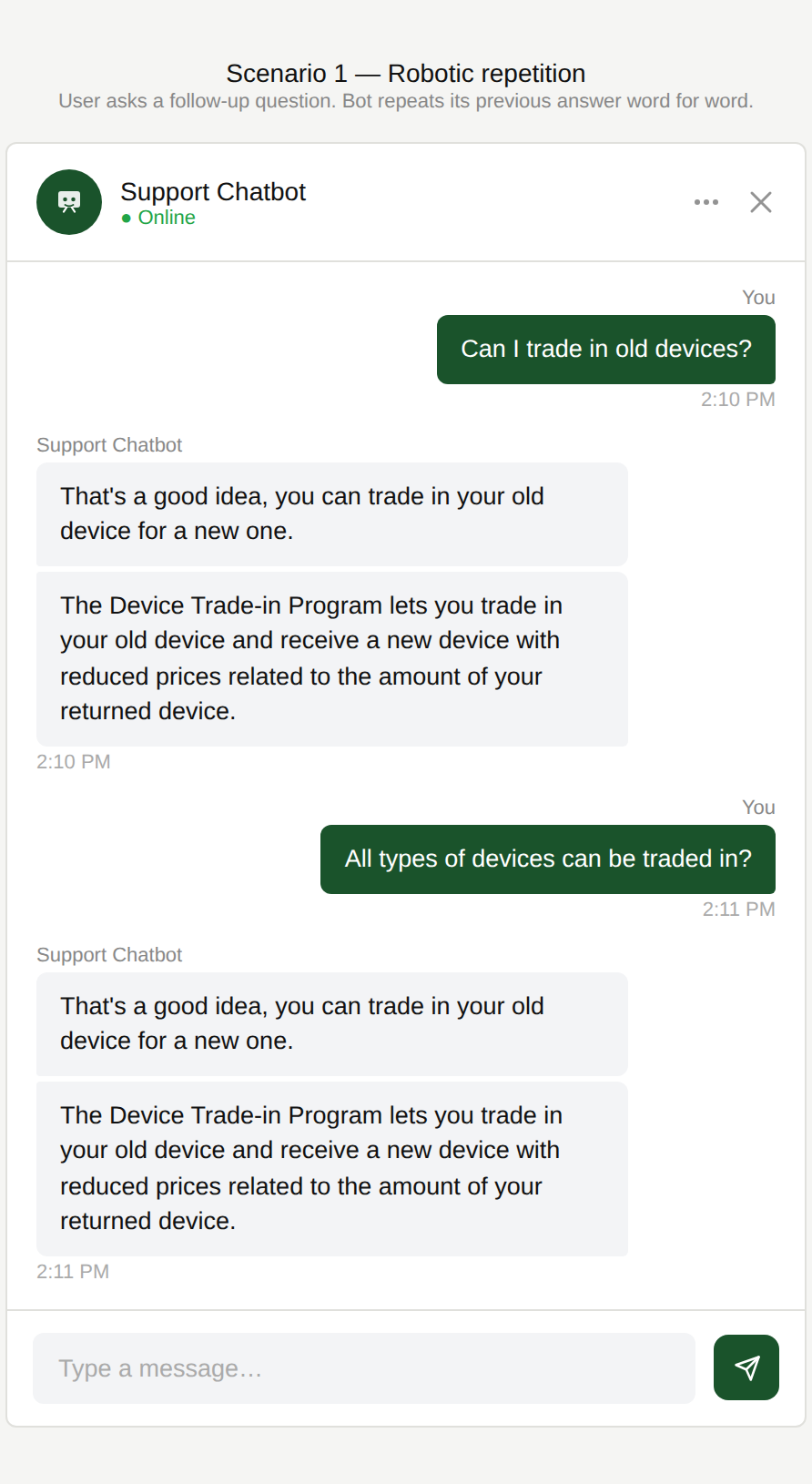
The user asks whether they can trade in their device. The chatbot responds with a general explanation of the trade-in programme. The user follows up to ask whether all device types are eligible, and the chatbot repeats its previous answer word for word.
That’s not helpful?
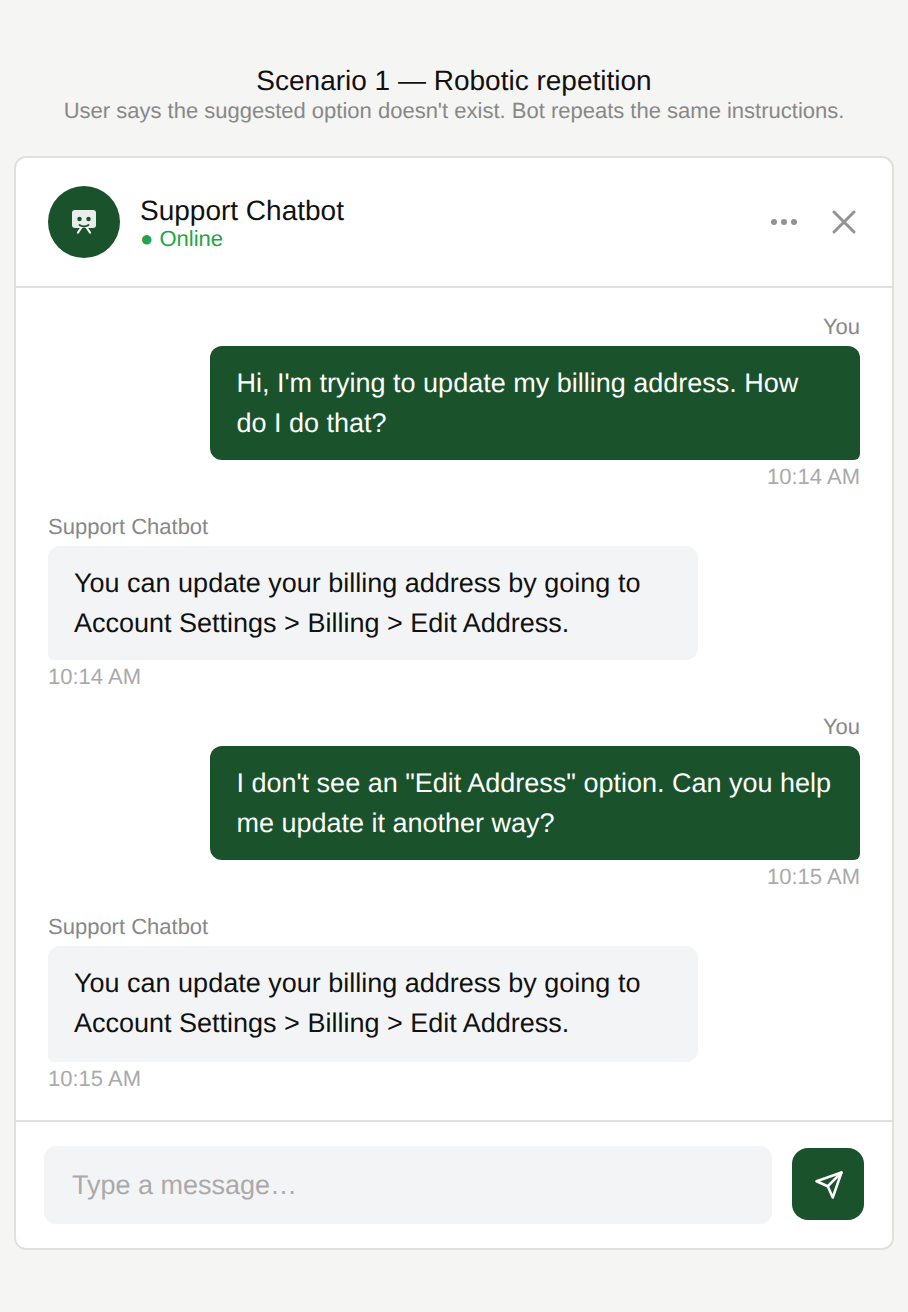
The user asks how to update their billing address. The chatbot replies with navigation instructions. The user responds that the “Edit Address” option does not exist in their menu and asks for an alternative. The chatbot repeats the same navigation instructions word for word.
Are you going to say that each time?
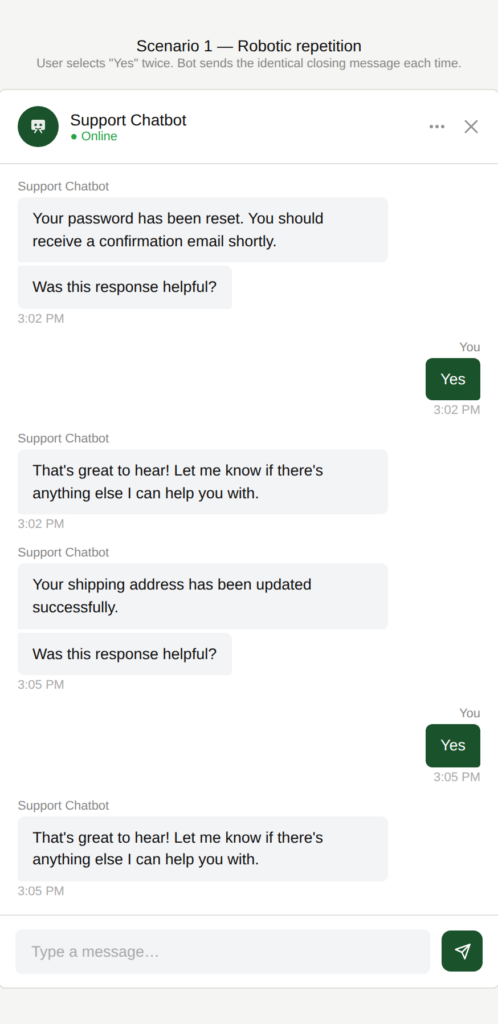
Each time the chatbot asks whether its response was helpful, the user selects “Yes”. The chatbot replies with the same message every time: “That’s great to hear! Let me know if there’s anything else I can help you with.”
Why is this an issue?
The chatbot fails to adapt its responses based on conversational signals:
- Follow-up questions are treated as new requests rather than refinements.
- Rephrasing or clarification requests are ignored.
- Confirmation signals repeatedly trigger the same static, canned responses.
Why do we care?
The chatbot feels robotic and not responsive to the user’s input and context:
- User frustration: Repeating the same answer creates a “computer says no” feeling and ignores the user’s attempt to move forward.
- Task failure: Follow-up questions often indicate that the original response was incomplete or impractical.
- Mechanical experience: Repetition makes the chatbot feel scripted and less human-friendly.
- Lower perceived value: The chatbot feels no more helpful than a static FAQ.
What is the remedy?
The chatbot should treat repetition and follow-ups by the user as signals to adapt, not replay.
- Detect conversational signals: Recognize follow-ups, rephrasing, and clarification requests as indicators that the user needs more or different information.
- Avoid verbatim repetition: Do not repeat the same response word-for-word. Address the new aspect of the question.
- Ask clarifying questions when needed: If the chatbot cannot confidently infer how the follow-up differs, ask a short, targeted clarification instead of repeating.
- Vary canned responses: Use a small set of approved alternatives for confirmations, thanks, and closings.
- Acknowledge repetition explicitly: Example: “I may be repeating myself. Can you tell me which part didn’t solve it?”
- Escalate after repeated failure signals: After 2 to 3 unsuccessful loops, offer a human agent or ticket creation.
Are there any exceptions to this rule?
There are justified exceptions when repetition may be acceptable or even necessary:
- Clarifying safety-critical info: Instructions about medication, emergencies, or technical steps may be repeated to ensure understanding.
- The user explicitly requests repetition: The user may explicitly ask for a repetition for teaching, memorization, or emphasis.
- Confirming key details: Repeating IDs, dates, amounts, or selected options to confirm accuracy.
Outside of these exceptions, repetition should be avoided.

Scenario 2:
Conversational fillers misinterpreted
A user chats with a chatbot and uses common conversational acknowledgements to signal understanding or approval. The chatbot interprets these literally as data input and attempts to validate them, leading to errors.
Examples
What file are you referring to?
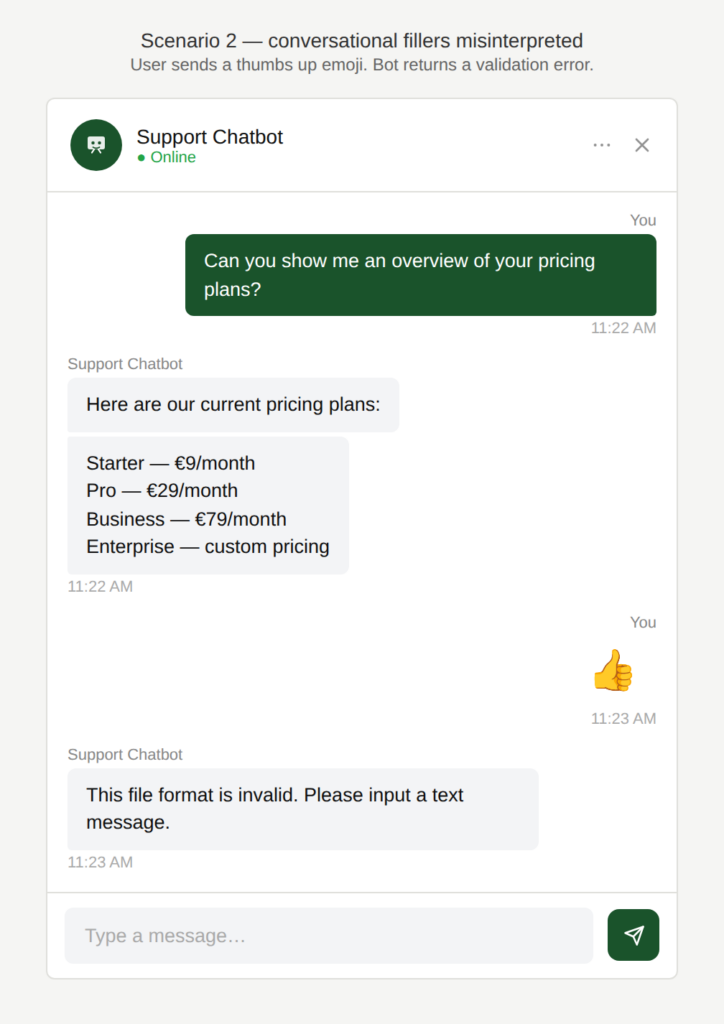
The user responds to a chatbot message with a thumbs up emoji. Rather than recognising this as a positive acknowledgement, the chatbot attempts to validate it as a text input and returns an error.
Wait for my actual response, maybe?
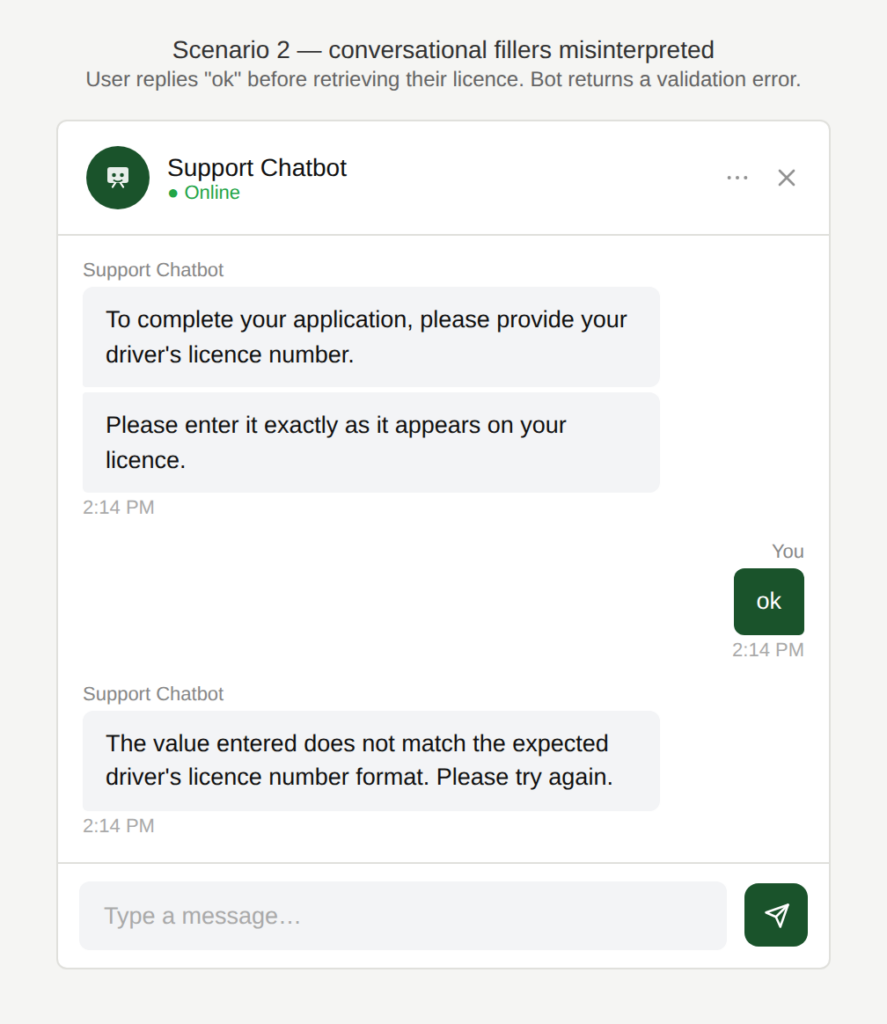
The chatbot asks the user to provide their driver’s licence number. The user replies “ok” before going to retrieve it. The chatbot treats “ok” as the submitted value and returns a format validation error.
Why is this an issue?
The chatbot fails to interpret common conversational signals and treats all user messages as literal task input:
- Acknowledgements are misclassified as data submissions.
- Validation logic is triggered prematurely.
- The conversation breaks in ways that feel unnatural and confusing.
Why do we care?
The chatbot behaves like a rigid form rather than a conversational partner:
- User confusion: Error messages appear when the user has not attempted to submit data.
- Broken conversational flow: Users use emojis and short confirmations to move conversations along. They should not derail the interaction.
- Increased friction: The user must correct or work around the chatbot’s misinterpretation.
- Erosion of trust: The chatbot feels overly literal and unintelligent.
What is the remedy?
The chatbot should distinguish between conversational signals and actual data entry:
- Recognize common acknowledgment signals: Recognize common acknowledgements (👍, ✅, “ok”, “yes”, “sure”, “got it”, etc.) as confirmations, not input. Respond appropriately: “No problem—take your time.”
- Use supportive prompting after the acknowledgment signal: Example: “Great — please enter the OTP once you receive it.” Avoid validating input until a plausible data format is detected.
- Recover gracefully from misinterpretation: If an acknowledgement is misread, reset: “Looks like you weren’t entering the number yet. Tell me when you’re ready.”
Are there any exceptions to this rule?
We have not come across any valid, acceptable exceptions.
Scenario 3:
Feeling unheard
A user chats with a chatbot to ask a question or resolve an issue. Mid-flow, they try to stop or redirect the conversation, but the chatbot does not respond appropriately and the conversation either becomes unnecessarily long or ends prematurely.
Examples
How do I end this?
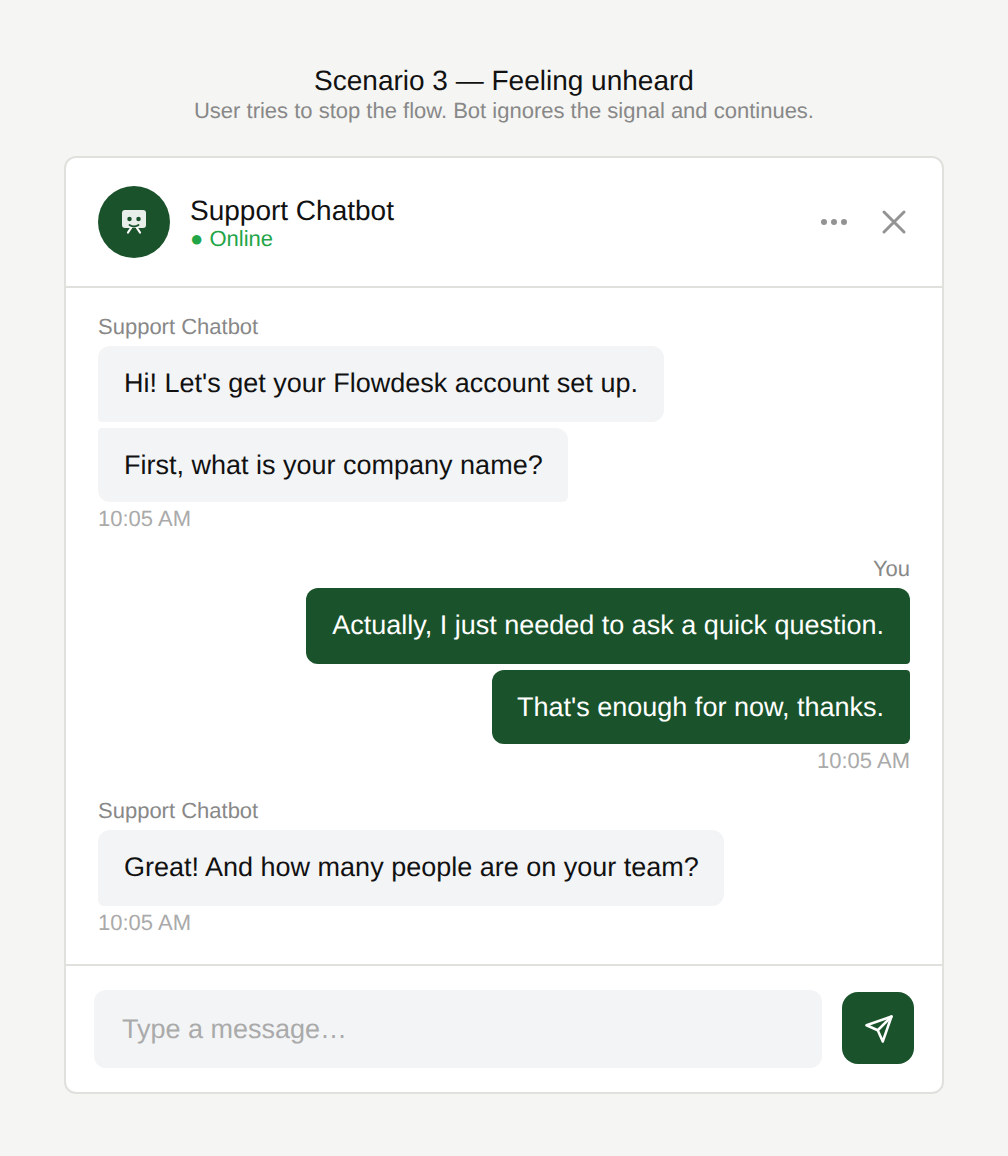
The user tries to end the current topic with a phrase like “that’s enough” or “no thank you”. The chatbot ignores the signal and continues as if nothing was said.
Didn’t I just say that?
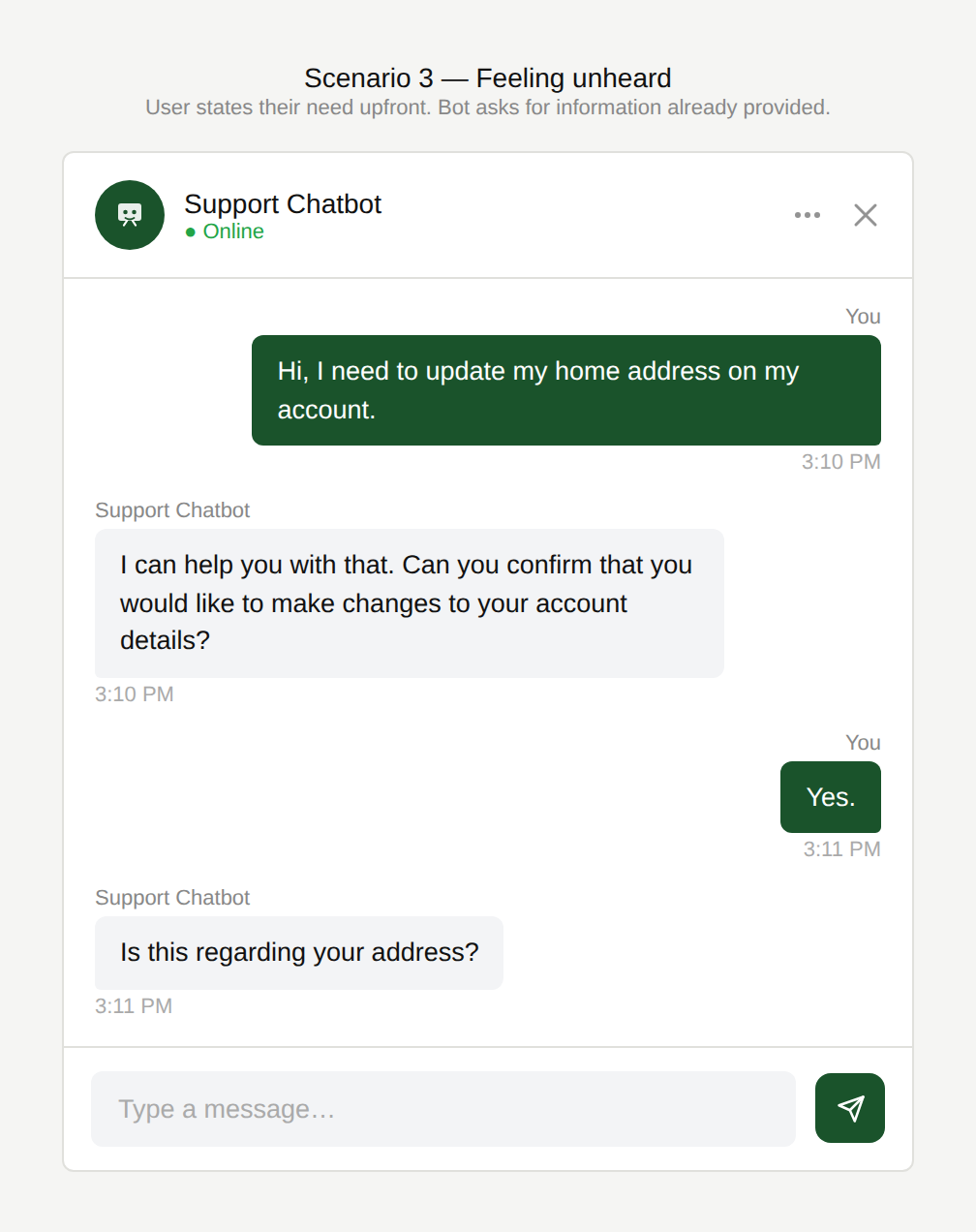
The user clearly states from the outset that they want to update their address. The chatbot first asks them to confirm they wish to update their account details, then follows up by asking whether this is about their address; information the user had already provided.
Did you not understand my issue?
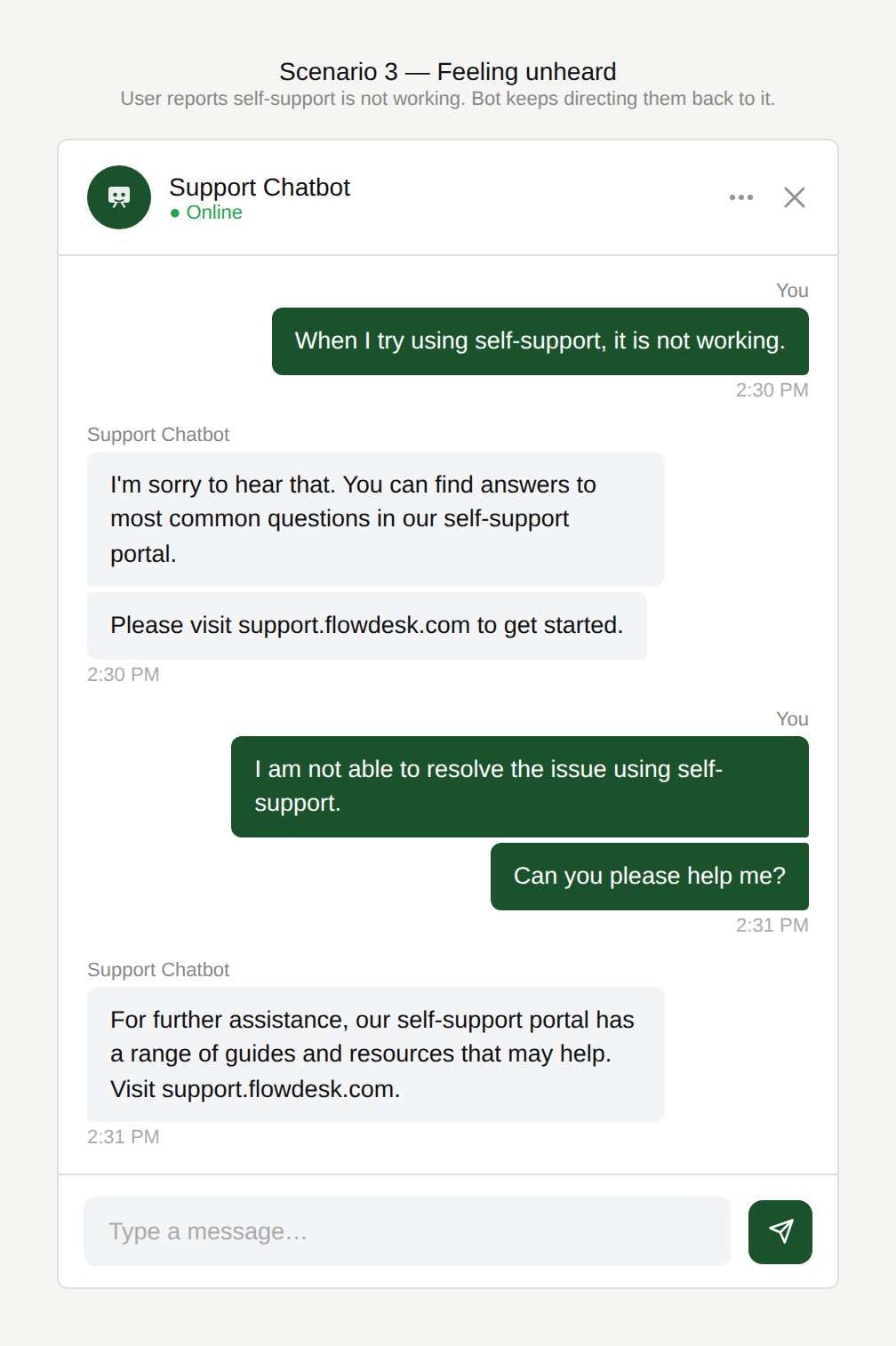
The user reports an issue with the self-support function. The chatbot responds by directing them to use self-support to resolve it and effectively sending the user into an endless loop with no way out.
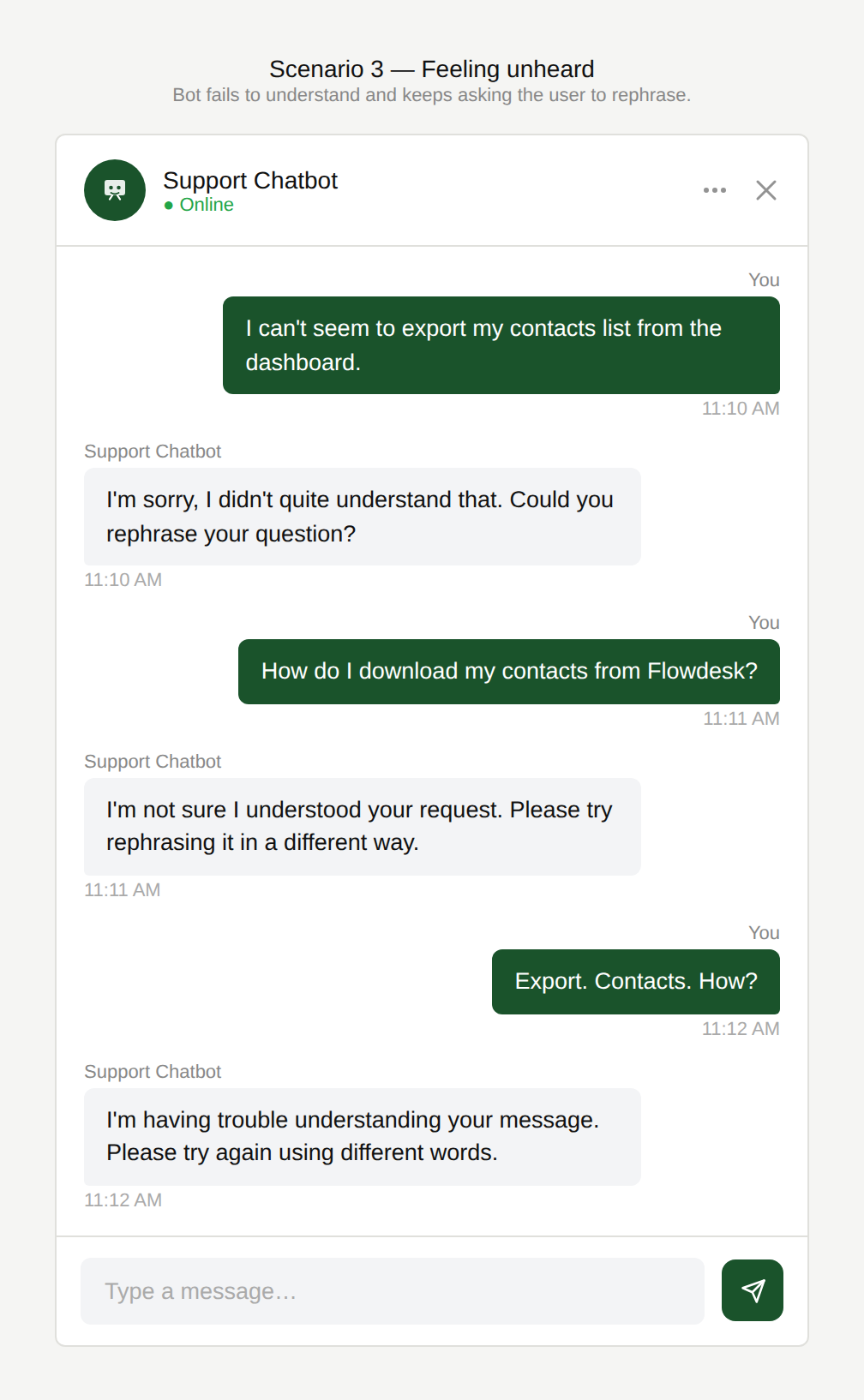
How else can I say this?
The chatbot fails to understand the user’s message and enters error recovery mode. Instead of escalating or offering alternatives, it repeatedly asks the user to rephrase, trapping them in a loop with no way forward.
Why is this an issue?
The chatbot fails to recognise, acknowledge and act on user intent and conversation signals:
- Stop/exit phrases are not recognized (e.g. “no thanks”, “that’s enough”).
- Redundant confirmations even when the user was already specific.
- Misunderstanding the real problem: User feedback about failed solutions is ignored.
- Looping behavior that prevents resolution and makes users repeat themselves.
Why do we care?
Perceived “not listening” creates looping, friction, and unresolved outcomes:
- Loss of control: The user must be able to end or exit a flow naturally.
- Inefficiency: Conversations become inefficient and frustrating.
- Trust and empathy: Ignoring “no thank you” or looping makes users feel unheard and disrespected.
- Task failure: the user is not able to complete their task.
What is the remedy?
Listen for intent, adapt quickly, and never trap the user in loops:
- Support common stop/decline phrases: Detect “no”, “stop”, “cancel”, “that’s enough”, “never mind”, “no thank you” and respond with an exit confirmation: “Okay, I won’t change anything. Anything else you need?”
- Provide explicit escape actions: Buttons like “End chat”, “Go back”, “Start over”, “Talk to an agent”.
- Reduce redundant confirmations: If the user already gave specifics (“update address + phone”), skip generic confirmation and move directly to the next required step. Use confirmation for high-impact actions (saving changes, submitting requests), not for every step.
- Break loops with escalation or alternate troubleshooting: After one or two failed attempts, acknowledge the problem and change strategy, ask a clarifying question, offer escalation, or collect details for a ticket).
Are there any exceptions to this rule?
There are justified exceptions when seeming to ignore the user might be acceptable, such as:
- The request is genuinely ambiguous. For example: “update my information” with no specifics.
- Compliance-required flows: Explicit consent might be mandatory (“Please confirm yes to proceed”).
Even then, keep confirmations minimal and explain why they’re needed. Avoid loops.
Scenario 4:
Premature timeout
A user is interacting with a chatbot and takes time to read a long response or consider their options. Before they can reply, the session times out or closes. In some cases the timeout occurs just as the user finishes typing or selects an option, with the timeout message appearing prominently and interrupting the flow.
Example
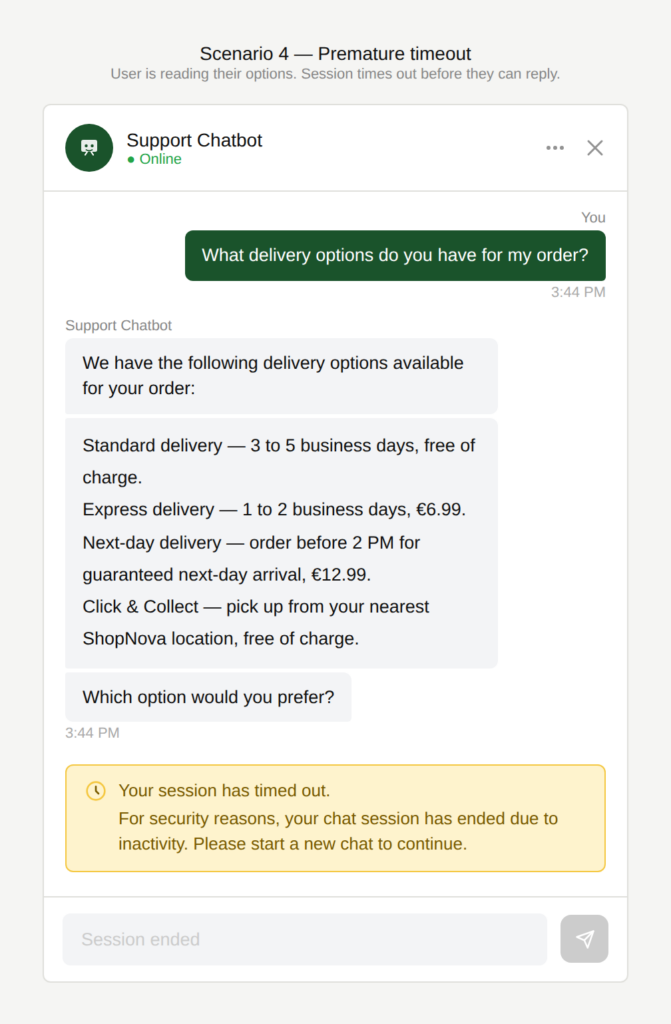
Can’t you give me time to choose?
Before the user can read through the chatbot’s response and pick an option, the session times out.
Why is this an issue?
The chatbot times out too quickly and without sufficient warning.
- Session ends abruptly while the user is still reading or thinking.
- Timeout warning is abrupt and provides limited or no recovery options.
- No clear way to resume, extend, or restart the conversation smoothly.
Why do we care?
A chatbot should adapt to human pace, not punish it:
- Loss of effort: Users may lose typed input or mental context, which is frustrating.
- Interrupted task flow: Premature timeouts may break concentration and momentum.
- Accessibility & real-world use: Users often multitask or need time to read carefully.
- Perceived quality: Frequent timeouts make the chatbot feel unstable or unforgiving..
What is the remedy?
Timeouts should protect users, not surprise them:
- Extend inactivity timeouts: Set timeouts generously, especially after long responses or option lists.
- Pause timeout while the user is active: Detect reading, typing, or scrolling as activity, not just message sending.
- Warn before timing out: Display a gentle warning with a countdown: “Still there? The chat will close in 60 seconds.”
- Allow session extension: Let users keep the session alive by tapping a button (“Keep chat open”).
- Offer recovery options on timeout: When “Chat ended” is shown, provide options to resume previous chat or start a new chat.
- Preserve draft input: If timeout happens while typing, retain the typed message when restarting.
Are there any exceptions to this rule?
There are justified exceptions when an accurate response to the user’s question might not be desired or possible, such as:
- Security-sensitive sessions: Banking, identity verification, or personal data flows may require stricter timeouts but warnings and recovery options are still essential.
Scenario 5:
Feedback that goes nowhere
Chatbot providers often add a feedback request at the end of the interaction. Users may expect that if they indicate the experience was poor, the chatbot will do something meaningful next, to help with their problem.
Example
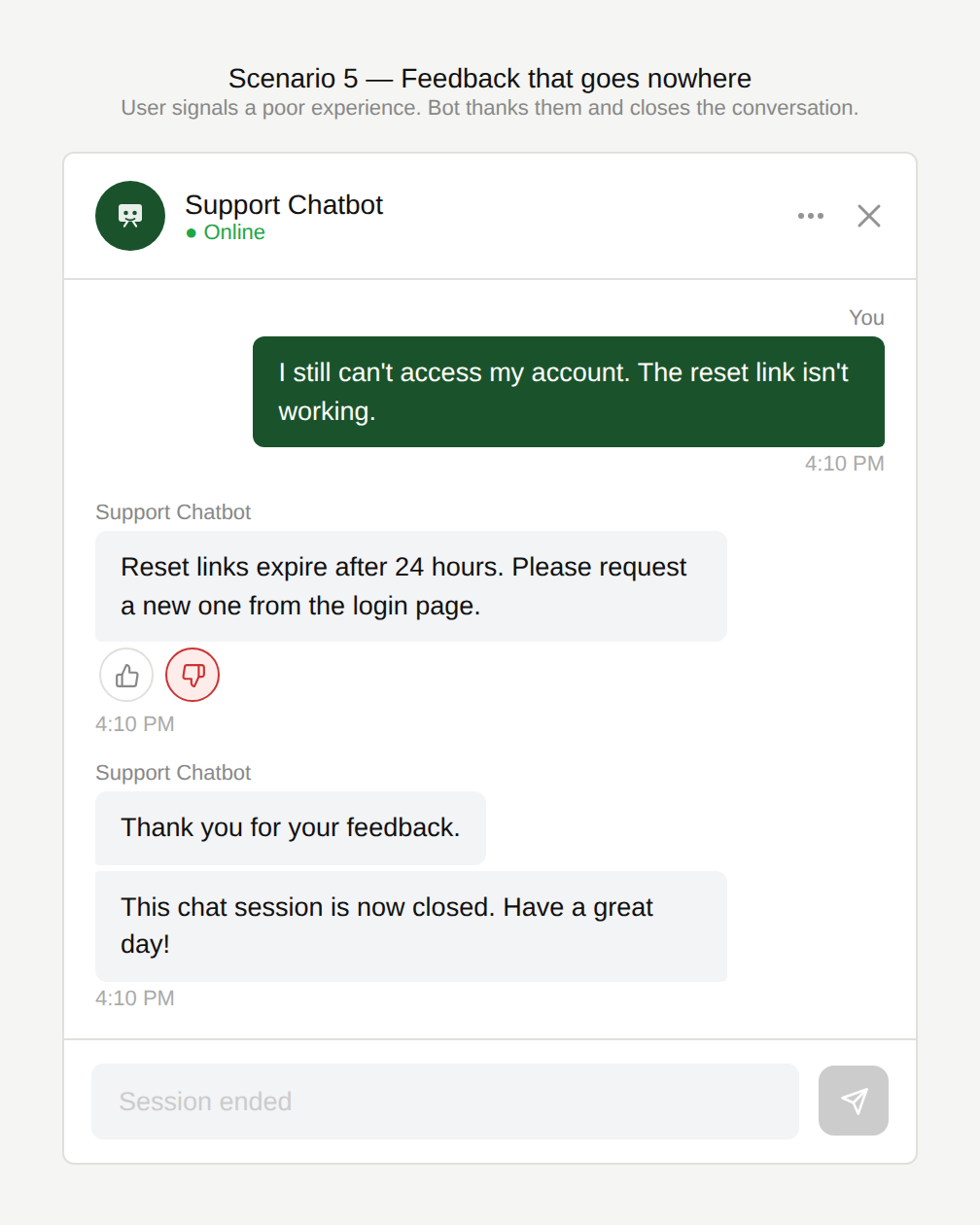
Don’t you want to suggest a remedy?
Chatbot providers often add a feedback prompt at the end of an interaction. When users indicate the experience was poor, they naturally expect the chatbot to do something meaningful in response like following up or helping to resolve the issue. Instead, the chatbot simply acknowledges the feedback and moves on.
Why is this an issue?
The chatbot asks for performance feedback without acting on it:
- Feedback is triggered automatically, regardless of whether the task was completed.
- Negative feedback does not change the flow (no retry, clarification, or escalation).
- The user is left feeling that their response has no impact.
Why do we care?
Asking for feedback in chat feels like part of the conversation, not a satisfaction survey, and it creates an implicit promise of improvement or assistance that isn’t fulfilled:
- Broken expectations: Users assume poor feedback will lead to help, correction, or escalation.
- Frustration: Being asked for feedback but then doing nothing about it feels superficial.
- Lost recovery opportunity: Negative feedback is a strong signal the chatbot should change strategy.
- Reduced trust: Users may stop engaging with feedback requests entirely.
What is the remedy?
The chatbot should treat negative feedback as a signal to act, either by improving the response or actively helping the user move toward a resolution:
- Trigger feedback only after clear resolution: Ask for feedback when the task is completed or explicitly closed.
- Use negative feedback as a recovery signal: If the user indicates it wasn’t helpful, immediately ask a clarifying question, offer an alternative solution or a handoff to a human agent.
- Make the intent of the feedback explicit (if no action will follow): For example: “This helps us improve; it won’t affect this conversation.”
Are there any exceptions to this rule?
We have not come across any valid, acceptable exceptions.
Scenario 6:
Limited, constrained vocabulary
A user interacts with a chatbot using everyday language or short one-word requests. The chatbot either fails to understand, or only responds correctly when the user uses a specific internal term. In some cases, the chatbot substitutes the user’s own wording with its internal terminology.
Examples
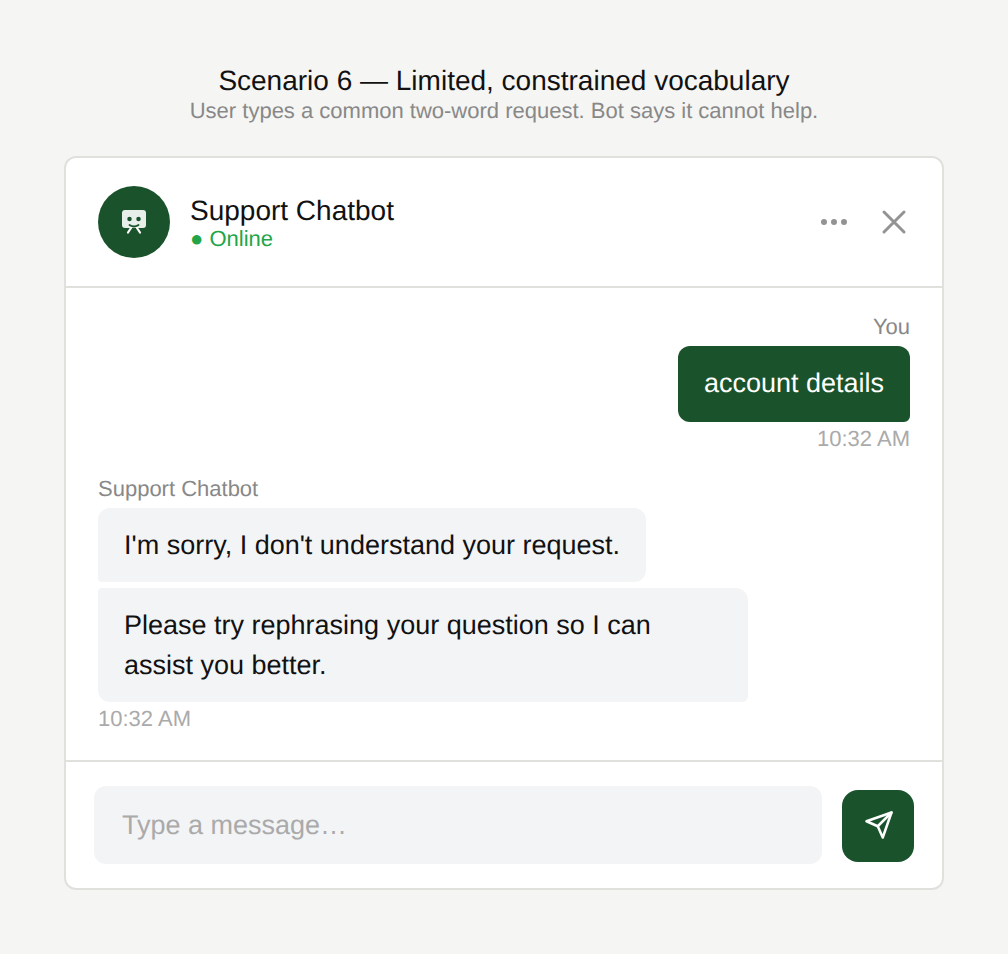
Do I have write it out?
The user types “account details” as a standalone request. The chatbot responds that it cannot understand the input and offers no further assistance.
Is that what I asked about?
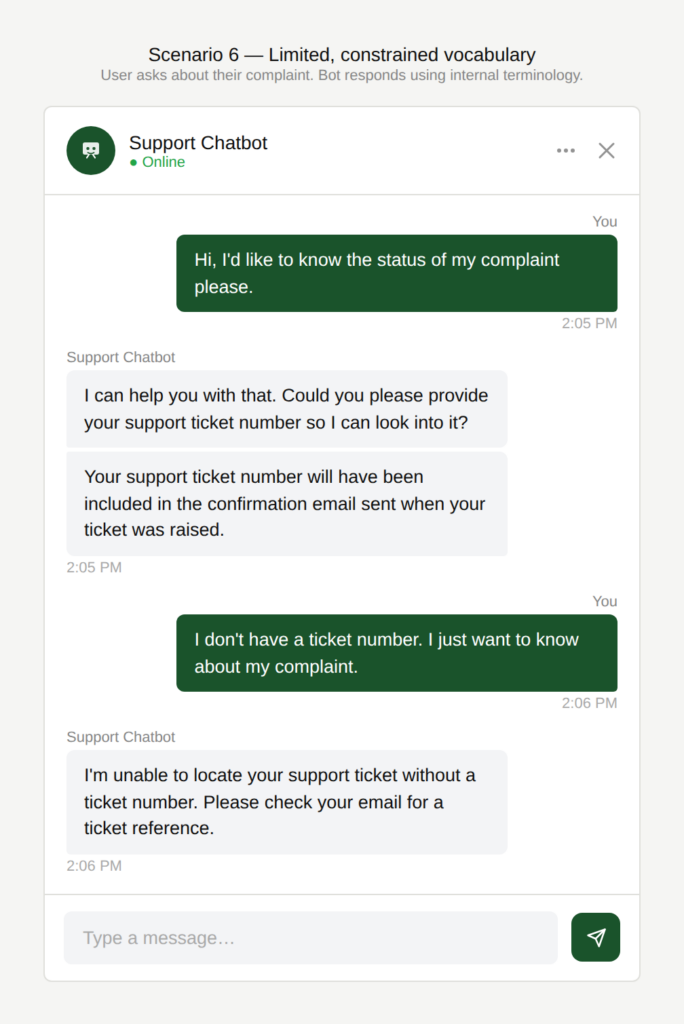
The user asks about the status of their complaint. The chatbot responds using the term “support ticket” rather than reflecting the user’s own language, creating an unnecessary disconnect.
What term do you understand?
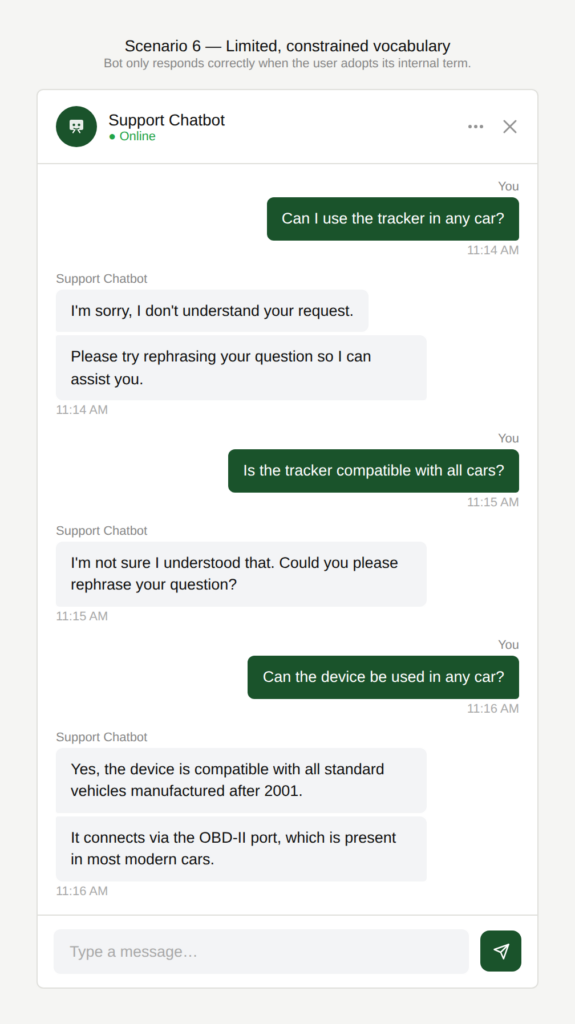
The user asks whether a tracker works in any car. The chatbot fails to understand the request. Only when the user rephrases using the internal term “device” does the chatbot respond helpfully.
Why is this an issue?
The chatbot’s language understanding and wording are too rigid:
- It fails to recognize common synonyms or variations in wording.
- It struggles with short noun-only requests.
- It may appear to “correct” the user’s language to match its terminology.
Why do we care?
Users should not have to adapt their vocabulary to the chatbot:
- Ease of use: The user shouldn’t have to learn the chatbot’s vocabulary to get help.
- Inefficiency: Failed understanding leads to repeated attempts and reformulations.
- Perceived lack of intelligence: Missing common synonyms makes the assistant feel limited.
- User frustration: Having to guess the “right” wording creates friction.
- Tone: Replacing a user’s words with internal labels can feel like a correction. When the chatbot confirms that the user wishes to inquire about the status of a “ticket” after they said “complaint”, it signals that the user used the wrong word.
What is the remedy?
A conversational interface should adapt to the user’s language, not the other way around:
- Expand intent coverage with synonyms and variations: Add training data for common alternative terms (“account details”, “profile info”, “my data”, etc.) including acronyms, and spelling variants.
- Support short noun-only queries: If the user enters just a keyword (“complaint”, “account”), respond with options rather than failing.
- Use consistent user-first terminology: Mirror the user’s wording (“complaint”) while optionally adding the internal term subtly: “I can check your complaint status (support ticket). What’s your reference number?”
- Ask clarification instead of failing: If a term is ambiguous, ask what exactly the user is referring to.
- Analytics-driven improvement loop: Log “no match” queries and regularly add the most frequent missed terms.
Are there any exceptions to this rule?
We have not come across any valid, acceptable exceptions.