
Broken Conversations – A Practical Guide for Improving Chatbot UX

Human Handoff
Looks at how well the chatbot manages the transition from automated conversation to a human agent, including when the handoff is triggered, how clearly it is communicated, and what happens to the user during and after the transfer.
Human handoff refers to the moment a chatbot transfers a user to a live agent. This transition is often the right call: sensitive data, complex problem-solving, unusual edge cases, and negotiation are all situations where users may prefer or need a human. But the handoff itself is a fragile moment. When it is handled poorly, the frustration it causes can undo whatever goodwill the chatbot has built up to that point.
Common failure points include the user not being given a choice about whether to be transferred, the transfer stalling without any status update, and the end of an agent conversation leaving the user uncertain about what just happened or what to do next.
Whichever of these occurs, the result is the same: a frustrated user.

Scenario 1: No control over human handoff
A user is chatting with a chatbot to resolve a support issue. The chatbot either transfers the user to a human agent without asking, or it fails to offer a way for the user to request that transfer themselves.

Scenario 2: Broken handoff to a human agent
A user is chatting with a chatbot to get help with an issue. The chatbot initiates a handoff to a human agent, but instead of a smooth transition the experience becomes slow and disjointed.

Scenario 3: Unclear return to chatbot
A user is connected to a human agent who successfully resolves their issue. When the user asks a follow-up question or raises a new topic, it is no longer clear who is responding. There is no visible indication of whether the agent is still active or the chatbot has taken over, and no way for the user to choose.
Scenario 1:
No control over human handoff
A user is chatting with a chatbot to resolve a support issue. The chatbot either transfers the user to a human agent without asking, or it fails to offer a way for the user to request that transfer themselves.

Examples
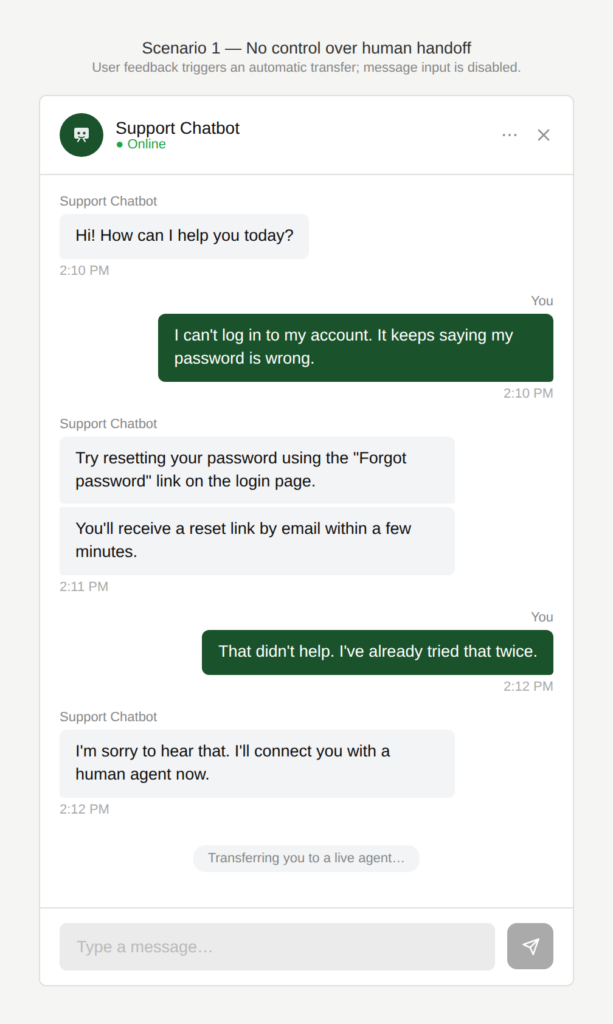
What if I don’t want to talk to a human?
The user indicates that the response was not helpful. The chatbot immediately triggers a handoff to a human agent, disabling the message input and leaving the user unable to continue the conversation
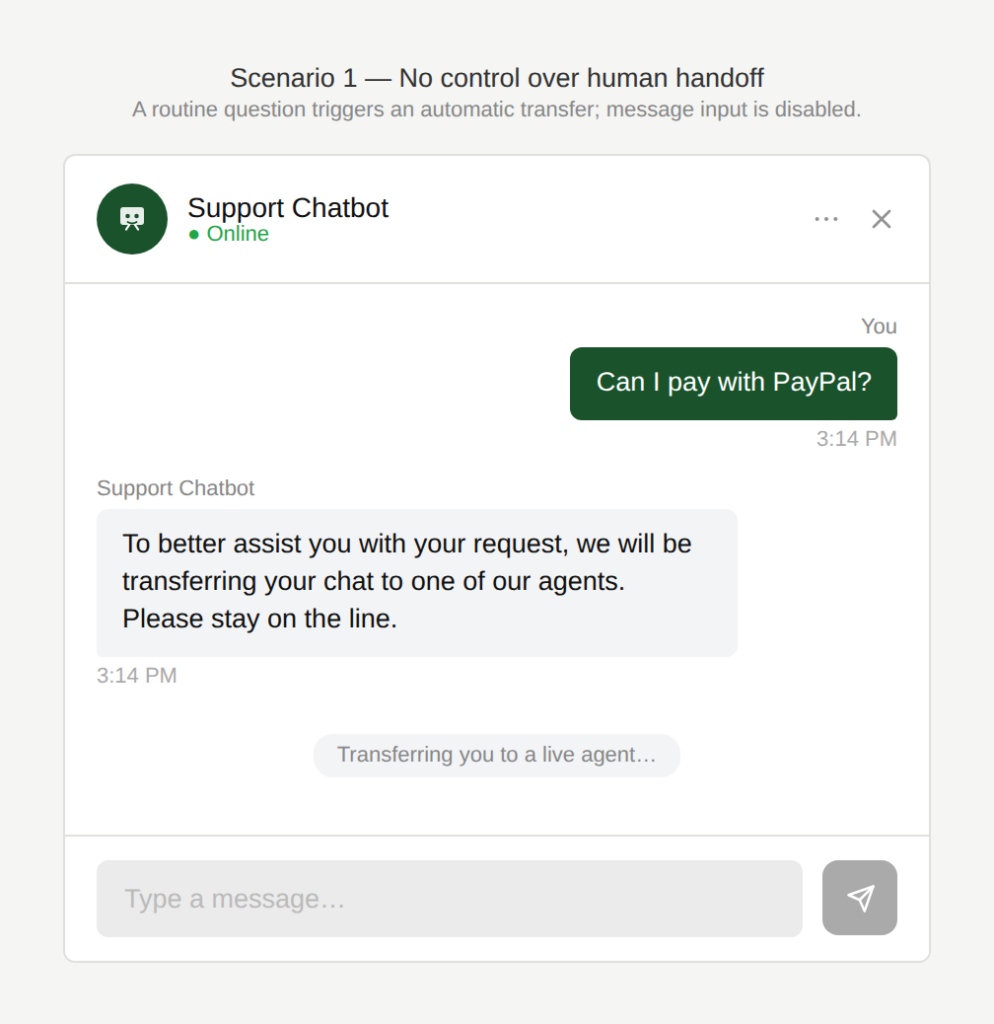
Can’t you even try to help me?
The user makes a request they expect the chatbot to handle, but it falls outside the chatbot’s scope. The chatbot immediately triggers a handoff to a human agent, disabling the message input and leaving the user unable to continue the conversation.
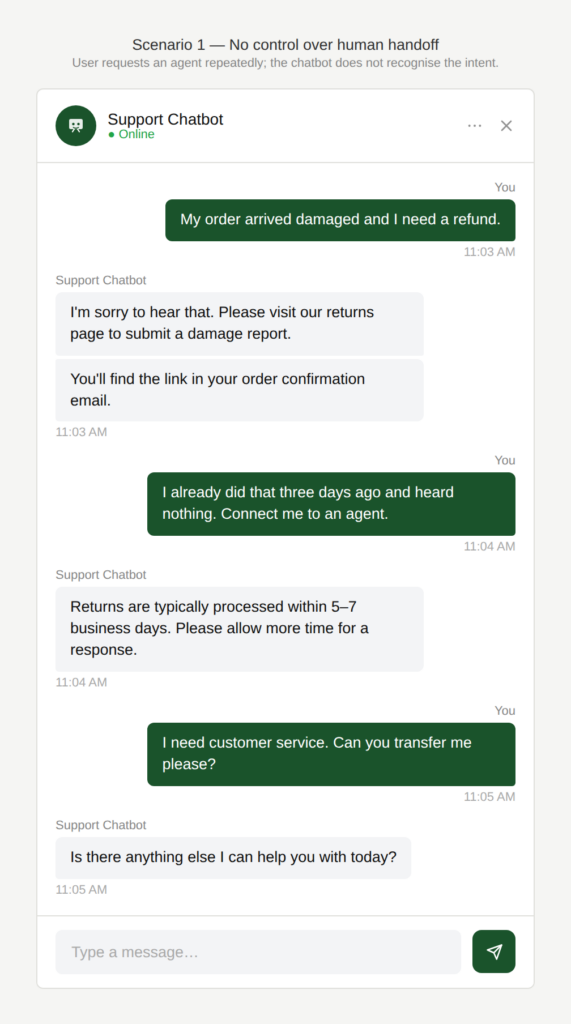
Won’t you let me talk to a human?
The user is frustrated with the chatbot and wants to speak to a human agent, but phrases like “connect me to an agent” or “I need customer service” go unrecognised. The chatbot keeps responding as if the conversation is ongoing, leaving the user stuck.
Why is this an issue?
The chatbot doesn’t give the user control over escalation to a human agent:
- Forced handoff: Without the user’s consent, the chatbot transfers to the user a human.
- No option to skip handoff: The chatbot disables the input field, and the user can’t opt out of the handoff or return to the chatbot.
- Blocked handoff: The chatbot does not recognize explicit requests to talk to a human and doesn’t provide a clear escalation path.
- Poor transparency: The chatbot suggests or triggers a handoff without explaining why it happens or what will happen next (wait time, what info is sent, what the agent can do).
- Too quick a handoff: The user feels that the chatbot didn’t try hard enough.
Why do we care?
Users are either forced into handoff or blocked from it entirely:
- Loss of user agency: The users should be the ones to decide whether they want to continue with the chatbot, switch to a human agent or use another channel altogether.
- Inefficiency: Forced escalation can slow users down (waiting for a human agent).
- Frustration: Blocked escalation causes frustration and potential repeated attempts.
- Erosion of trust: Unclear escalation rules feel arbitrary (“why is it transferring now?”). Users feel their time with the chatbot is a waste if they are sent to a human agent anyways.
- Limited conversational capability: In a natural dialogue, a human agent who receives unhelpful feedback would follow up, asking why, or acknowledging a possible misunderstanding, giving the user a chance to rephrase. A chatbot that simply hands off loses that opportunity entirely.
What is the remedy?
Give control back to the user and make the escalation feel transparent and supportive rather than forced or blocked:
- Make the escalation optional, not automatic: When the chatbot struggles, offer options like: “Try again with chatbot” / “Talk to an agent” / “Create a ticket”.
- Always keep the message box active: Allow users to cancel or pause handoff and continue chatting.
- Explain the reason for the handoff: For example: “I can’t access account-specific data.”
- Recognize common escalation intents: Support phrases including words such as: “agent”, “human”, “customer service”, “representative”, “help”, “speak to someone” etc.
- Use smart escalation triggers (but with user confirmation): After a number of failed attempts, a certain amount of time spent or negative user feedback, suggest an escalation such as: “Want me to connect you to an agent?”
- Offer alternatives when agents aren’t available: Share the hours of live chat operation, offer ticket creation, callback, email support, etc.
- Show what happens next: Let the user know what wait time to expect, what info is shared with the agent etc.
Are there any exceptions to this rule?
There are justified exceptions when forced handoffs (or disabling the chatbot) can be acceptable, such as:
- Security or compliance requires it: Identity verification, sensitive account changes, legal disputes etc. may require a forced handoff to a human.
- Safety-critical situations: Indications of self-harm, abuse, urgent emergencies etc., where strict escalation rules apply, may also force-trigger a handoff.
Even in these exceptions, the chatbot should still be transparent: “I’m sorry. I can’t complete this in chat. I’m connecting you to an agent for additional support.”

Scenario 2:
Broken handoff to a human agent
A user is chatting with a chatbot to get help with an issue. The chatbot initiates a handoff to a human agent, but instead of a smooth transition the experience becomes slow and disjointed.
Examples
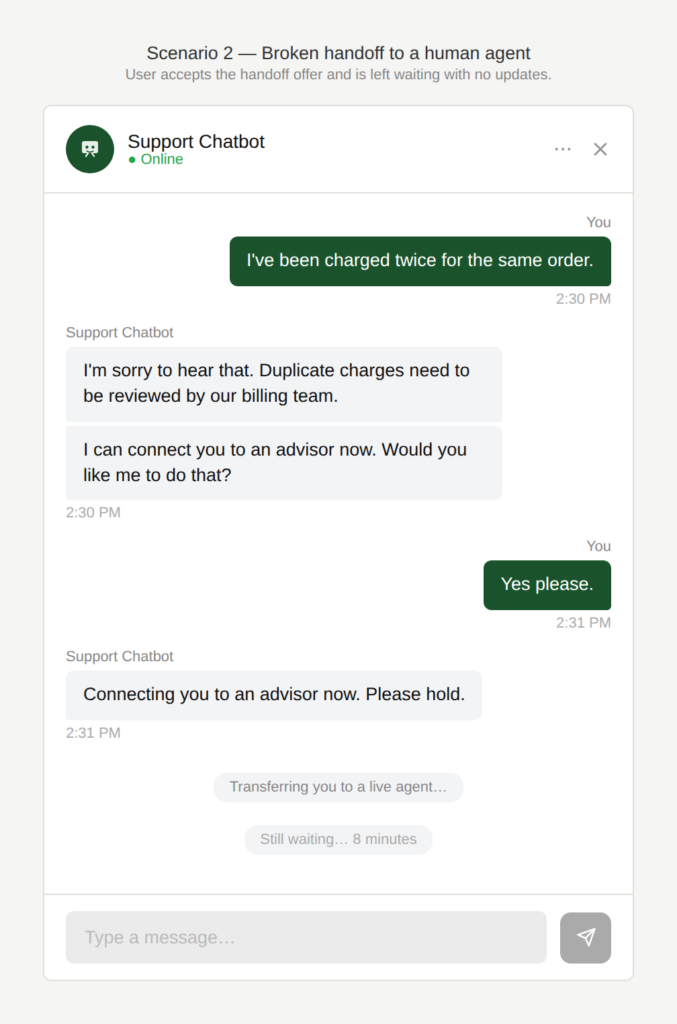
How long will the wait be?
The chatbot offers to connect the user to a human agent and the user accepts. Instead of a timely connection, nothing happens. The user is left waiting with no updates and no indication of how long the wait will be.
Is someone going to join?
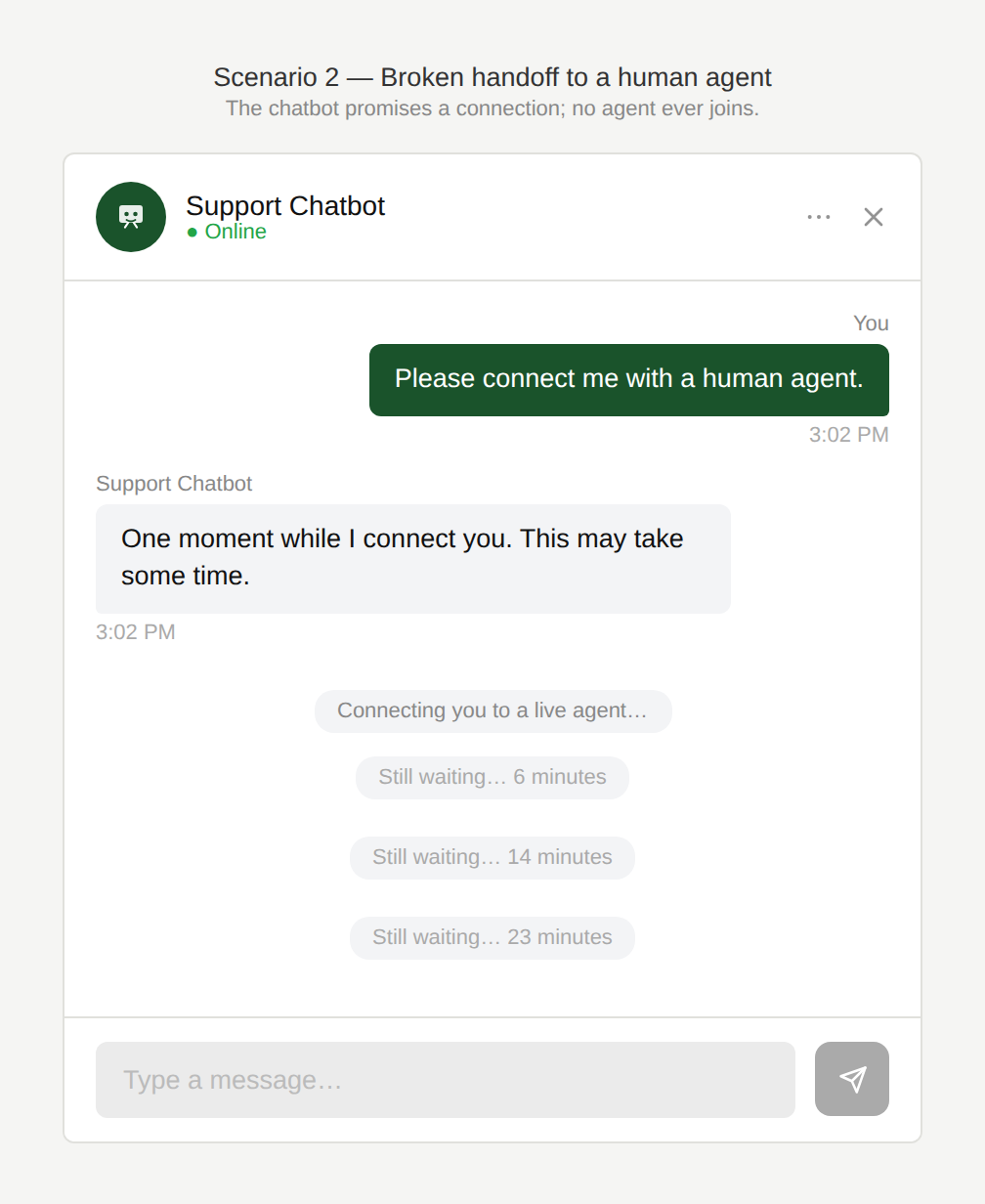
The chatbot offers to connect the user to a human agent and the user accepts. The chatbot confirms the connection is being made but warns it may take some time. No agent ever joins, and the user is left waiting indefinitely with no further updates.
Can’t you access all the information
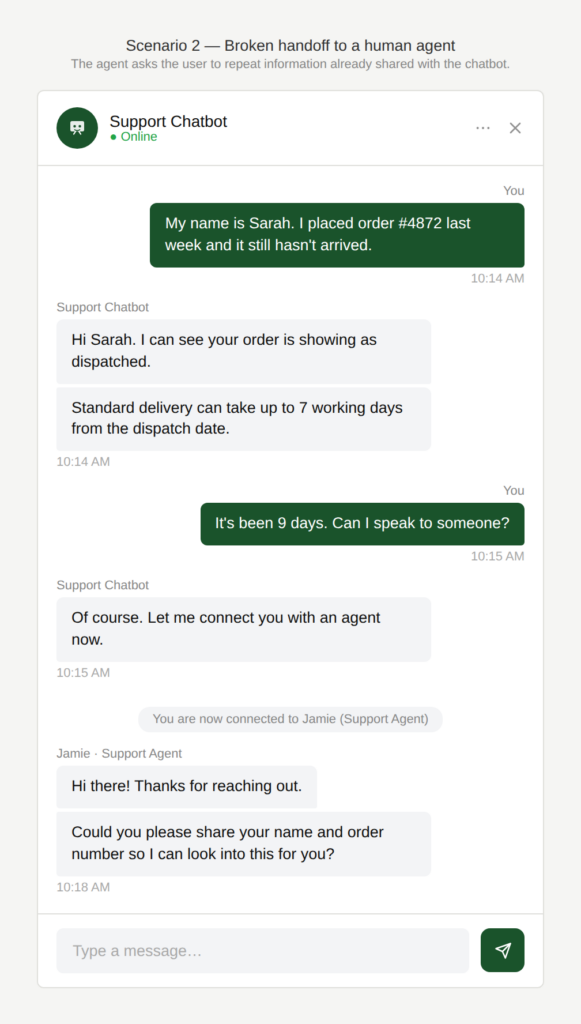
I already shared?
The user has had a lengthy, unproductive conversation with the chatbot and requests a human agent. When the agent joins, they ask the user to repeat information already shared with the chatbot.
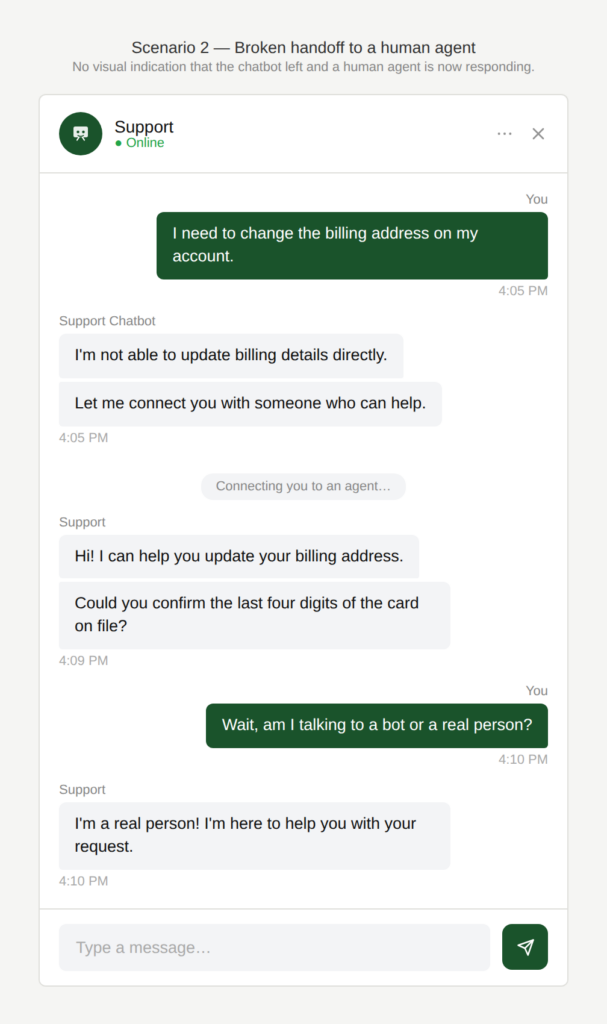
Am I talking to the bot or a human?
The chatbot suggests connecting the user to a human agent and the handoff takes place, but there is no visual indication that the chatbot has left and an agent is now responding.
Why is this an issue?
The handoff from chatbot to human agent is slow, opaque, and poorly coordinated:
- Users are told they will be connected to a human agent, but handoff doesn’t happen.
- Long waiting times before an agent joins, with no status updates.
- No wait-time estimate or queue position shown.
- Loss of conversation context between chatbot and agent. The user is forced to repeat information they already shared.
Why do we care?
A human handoff is often triggered when the chatbot has already failed to resolve the issue, so a slow or disjointed transition compounds frustration and undermines trust in the entire support experience.
- Erosion of trust: If the chatbot promises a handoff and it doesn’t happen, users lose confidence in the reliability of the chatbot.
- User control: Without wait-time info, users can’t decide whether to wait, try the chatbot again, or use another channel.
- Frustration: Waiting without feedback increases frustration.
- Inefficiency: Getting to a potential resolution takes too long.
- Poor experience continuity: The user expects the agent to be informed, not start from zero.
What is the remedy?
The handoff process should be transparent and fast, and preserve all context gathered during the chatbot interaction.
- Show estimated wait time or queue status + live updates: Example: “An advisor will join in about 10 minutes” or “You’re #4 in line” and update when it changes.
- Confirm successful handoff state: Explicitly show “You’re now waiting for an agent” and what the user can do meanwhile.
- Provide alternatives while waiting: Offer: “Continue with chatbot”, “Leave a message”, “Create a ticket”, “Email/callback”, “get notification when it’s your turn” etc.
- Office-hours awareness: If no agents are available, don’t pretend a handoff will happen. Offer realistic options: “Advisors are available Mon–Sat 9:00–19:00. I can create a ticket now.”
- Timeout + fallback: If no agent joins after X minutes, notify the user and propose next steps: “Still waiting. Want to keep waiting, switch back to chatbot, or leave a message?”
- Preserve conversation context: Ensure the agent receives the chat summary so the user doesn’t need to repeat everything.
Are there any exceptions to this rule?
We have not come across any valid, acceptable exceptions.
Scenario 3:
Unclear return to chatbot
A user is connected to a human agent who successfully resolves their issue. When the user asks a follow-up question or raises a new topic, it is no longer clear who is responding. There is no visible indication of whether the agent is still active or the chatbot has taken over, and no way for the user to choose.
Examples
When did the human leave?
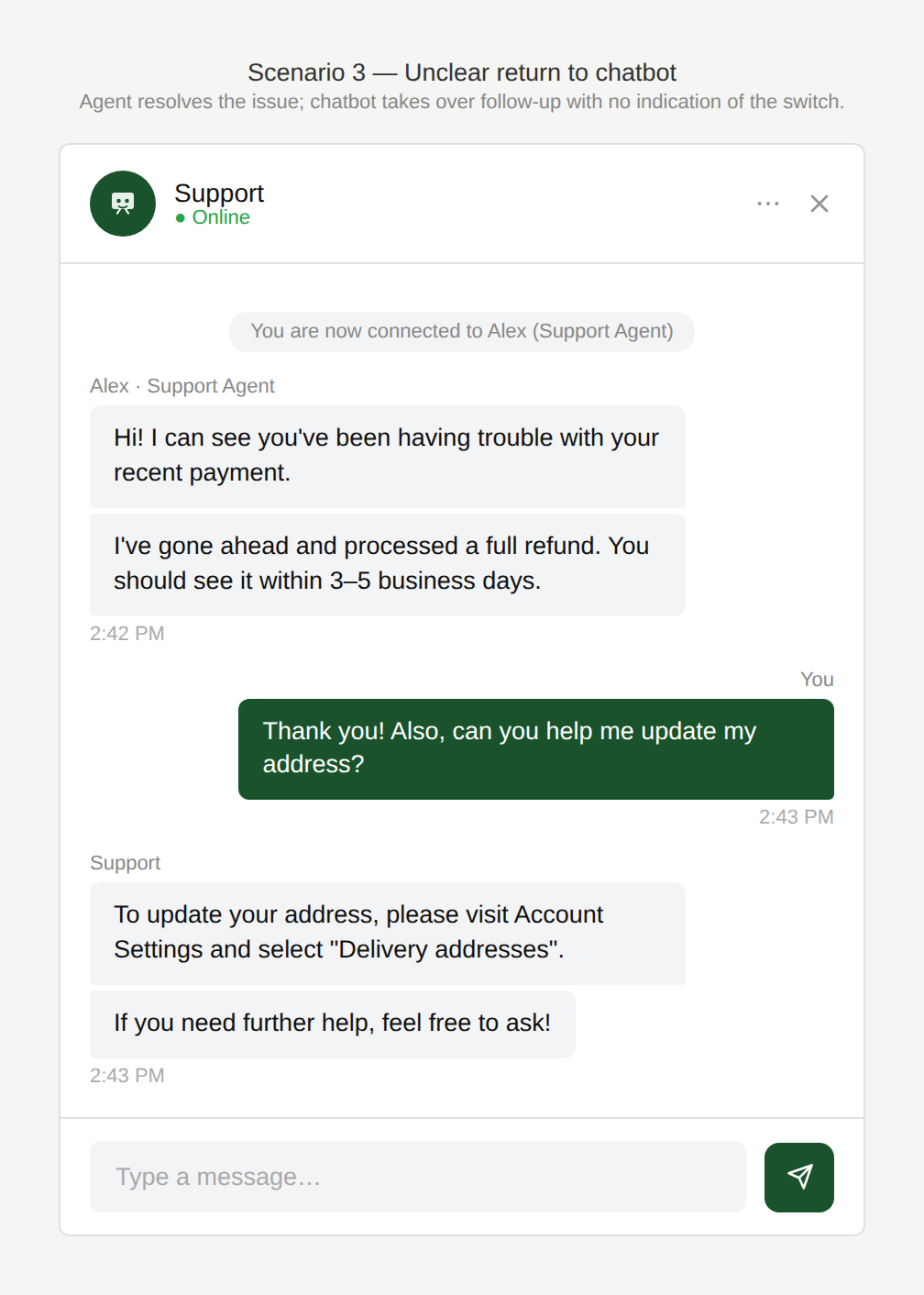
After the agent resolves the issue, the user asks a follow-up question. The response comes from the chatbot with no indication that the agent has left and the chatbot has taken over.
Why is this an issue?
After an interaction with a human agent, the experience lacks a clear “return handoff” state:
- The user doesn’t know if the human agent is still active or if they’ve been switched back to the chatbot.
- The UI doesn’t clearly show who is responding.
- There is no explicit transition back to the chatbot.
- The user can’t choose whether their next message goes to the chatbot or the human.
Why do we care?
The handoff should not create confusion about who is handling the conversation:
- Expectation management: The user may phrase questions differently depending on whether it’s AI or a person.
- Inefficiency: The user may repeat themselves or re-explain context if the recipient changes unexpectedly.
- Trust and confidence: Unclear ownership makes the support flow feel messy and unreliable.
- User control: The user should be able to decide whether they want to return to the chatbot.
What is the remedy?
Transitions between AI and human agents should be explicit and transparent. The user should always know who they are talking to and have control over who handles their next request:
- Clearly indicate the active participant: Show whether the user is chatting with AI or a human by using labels, names or avatars.
- Explicit “agent ended the chat” message: Example: “Alex has left the chat. You’re now back with AI assistant.”
- Let users choose the recipient: Add a toggle or buttons near the input: “Ask AI” / “Ask agent”.
- Define session rules transparently: For example: “The agent will remain available for the next 10 minutes” (with a visible timer).
Are there any exceptions to this rule?
We have not come across any valid, acceptable exceptions.