
Broken Conversations – A Practical Guide for Improving Chatbot UX

Context-Awareness, Personalisation and Relevance
Measures the chatbot’s ability to maintain and adapt to context within a session, across sessions, or during escalation to a human agent. Includes personalization, dynamic suggestions, and how relevant and tailored the responses feel to the user.
Many users are frustrated by chatbot interactions that fall short of the fluidity of human conversation. Users expect a chatbot to remember what was discussed earlier in the session and to leverage existing brand data rather than asking for the same information twice. Failing to meet these expectations results in a lack of personalization; it’s a common grievance and a missed opportunity to streamline the user journey and provide meaningful value.
These failures lead to responses that lack relevance and, ultimately, leave the user frustrated.

Scenario 1: Context lost or incorrect
A user asks a chatbot a question and then follows up with a query that relies on earlier context. Instead of maintaining the thread, the chatbot responds with information from the wrong topic, ignores previous inputs, or requests irrelevant data. The conversation feels as though it has “reset” or confused multiple subjects.

Scenario 2: Disregard for user context or channel
A user chats with a chatbot and receives instructions or information that fail to account for their current digital environment, such as their specific device, active channel, or current page location.

Scenario 3: Redundant data entry
A user chats with a chatbot while logged in or authenticated, but is forced to manually provide information already available in their account profile instead of the chatbot pre-filling or confirming existing data.
Scenario 4: Failure to personalise
A user chats with a chatbot within a logged-in experience, but receives generic responses that fail to leverage their account history, preferences, or specific data to provide tailored recommendations or insights.
Scenario 1:
Context lost or incorrect
A user asks a chatbot a question and then follows up with a query that relies on earlier context. Instead of maintaining the thread, the chatbot responds with information from the wrong topic, ignores previous inputs, or requests irrelevant data. The conversation feels as though it has “reset” or confused multiple subjects.

Examples
Didn’t I just tell you that?
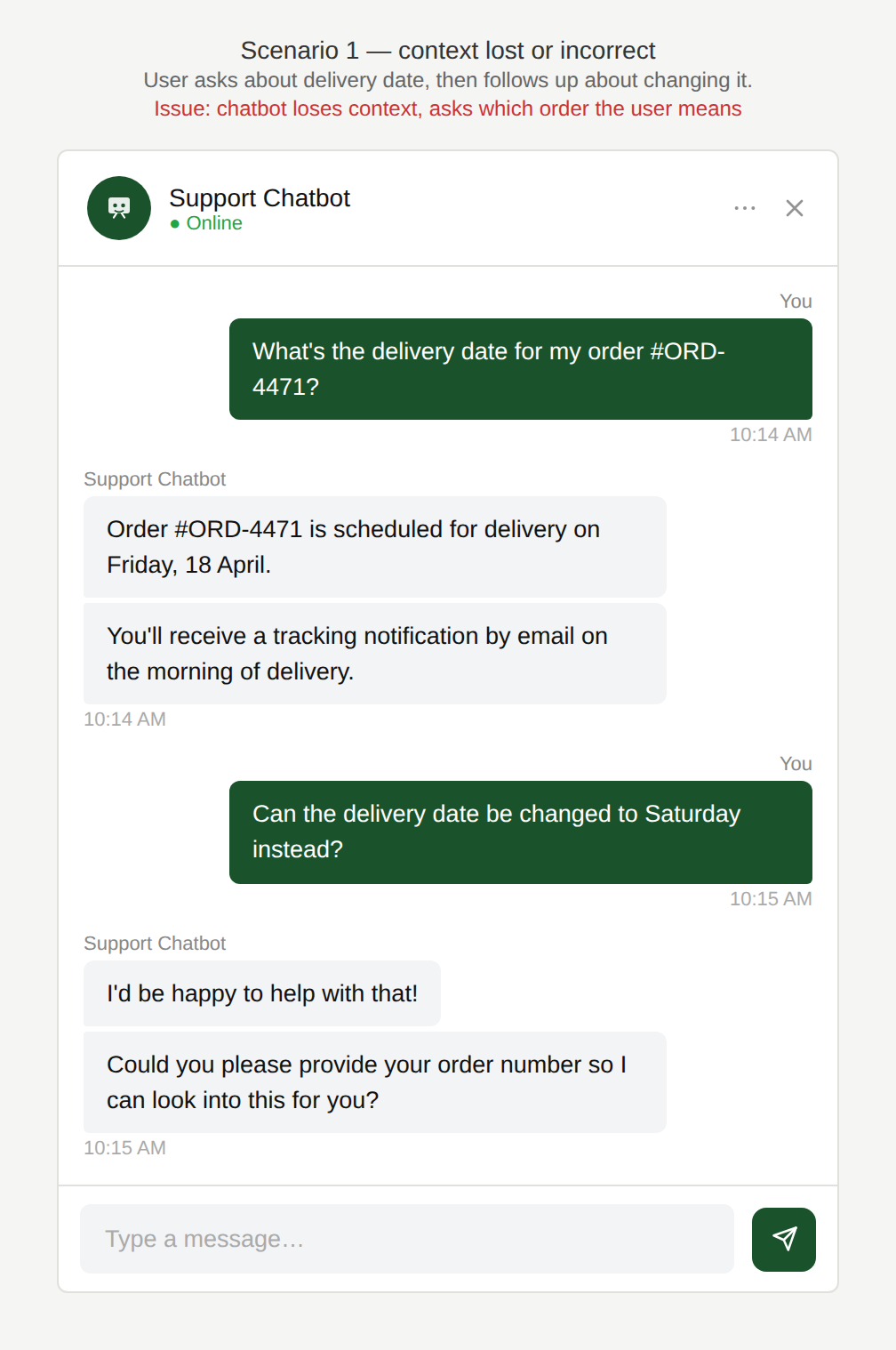
The user asks for the status of an order and is provided the delivery date but when they ask whether it can be changed, the chatbot responds by asking which order the user is referring to.
Is that necessary in order to respond to my simple question?
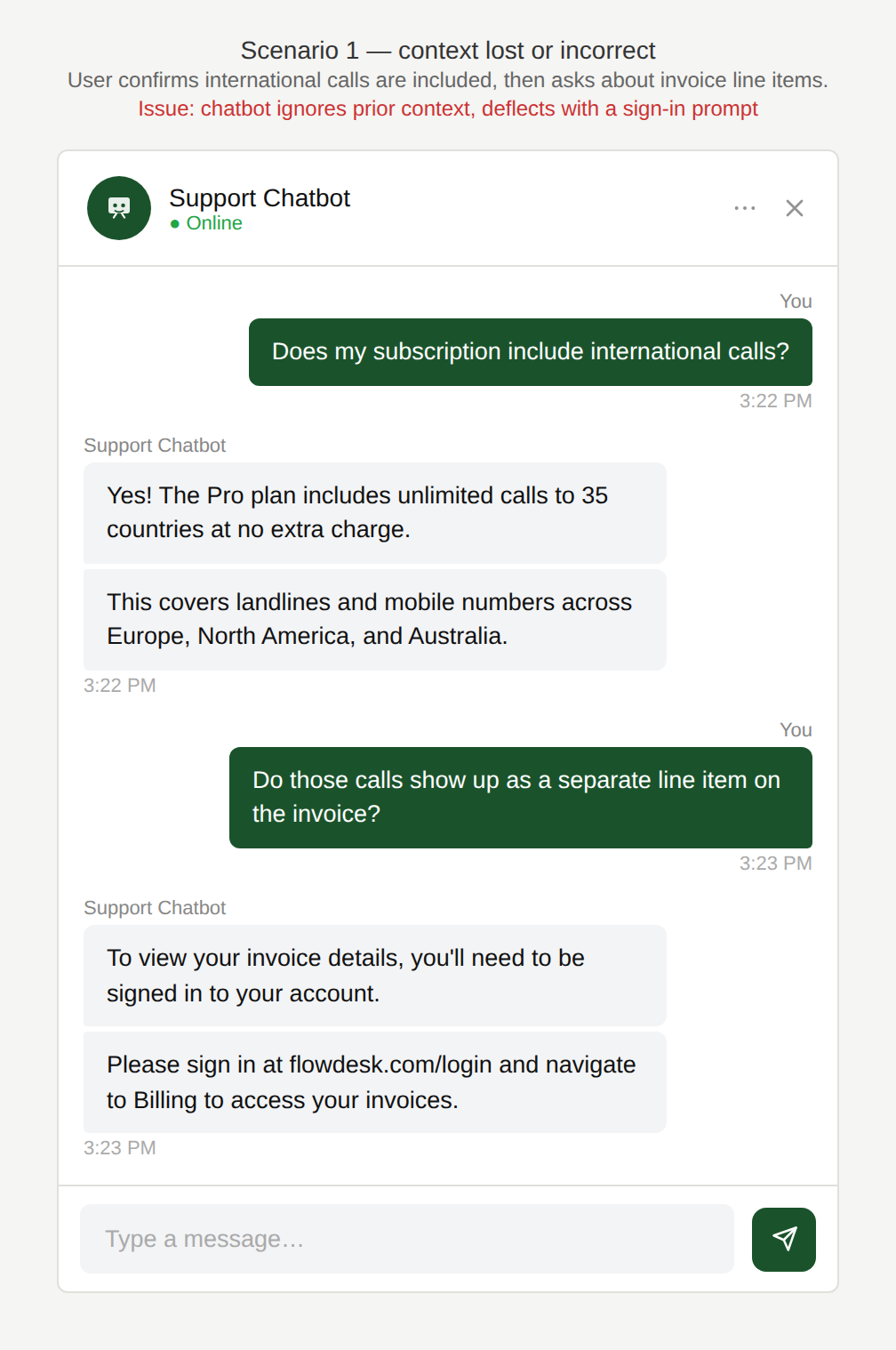
The user asks whether the subscription includes international calls which the chatbot confirms. The user then asks if those calls appear as a separate line on the invoice. The chatbot responds by asking the user to sign in.
Why is this an issue?
The chatbot does not maintain and apply conversational context correctly:
- Follow-up questions are interpreted against the wrong topic.
- Previously established information is ignored.
- The chatbot requests information that is not relevant to the user’s current intent.
Why do we care?
The conversation feels disjointed and unreliable to the user:
- Task failure: The user doesn’t get an answer for their situation, only generic or incorrect information.
- Erosion of trust: Context fails make the chatbot feel unreliable and “random”.
- Inefficiency: The user has to restate details repeatedly or correct the chatbot.
- Expectation mismatch: Users often use pronouns to refer to previous topics, assuming the chatbot maintains conversation history and can resolve those references.
What is the remedy?
The chatbot should reliably track, apply, and recover conversational context across turns:
- Use conversation memory correctly (and visibly): Keep track of the active topic and key parameters to maintain context across turns.
- Resolve references and pronouns: Treat “it/that/this” as referring to the most recent relevant noun from the conversation.
- Don’t request irrelevant information: Only ask for data that clearly helps solve the current task, and explain the reason: “To check VAT on your bill, I need your account number.”
- Confirm context when confidence is low: Quick check: “Are you asking about the last international calls on your bill, or something else?”
Are there any exceptions to this rule?
There are justified exceptions where a perceived context loss is possible, such as:
- Compliance or security requirements: These may force the chatbot to ask seemingly unrelated questions, which users can misinterpret as a lack of contextual awareness or ‘not listening’.

Scenario 2:
Disregard for user context or channel
A user chats with a chatbot and receives instructions or information that fail to account for their current digital environment, such as their specific device, active channel, or current page location.
Examples
So I need to switch to the website?
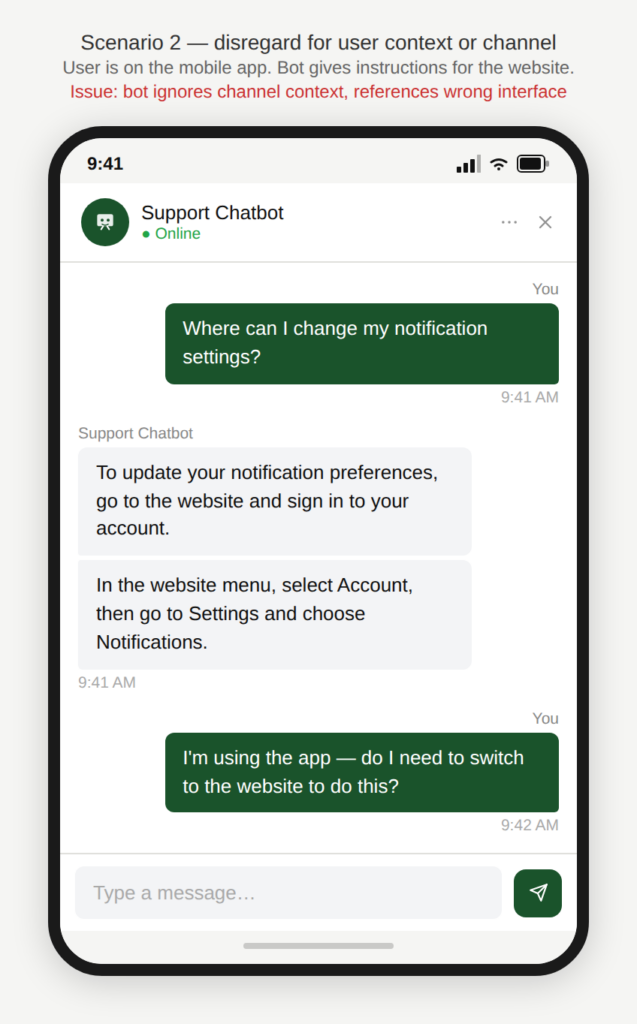
A user is chatting with a support chatbot on the app and asks where to change settings. The chatbot references the website (“In the website menu, select Account…”).
What tab are you referring to?
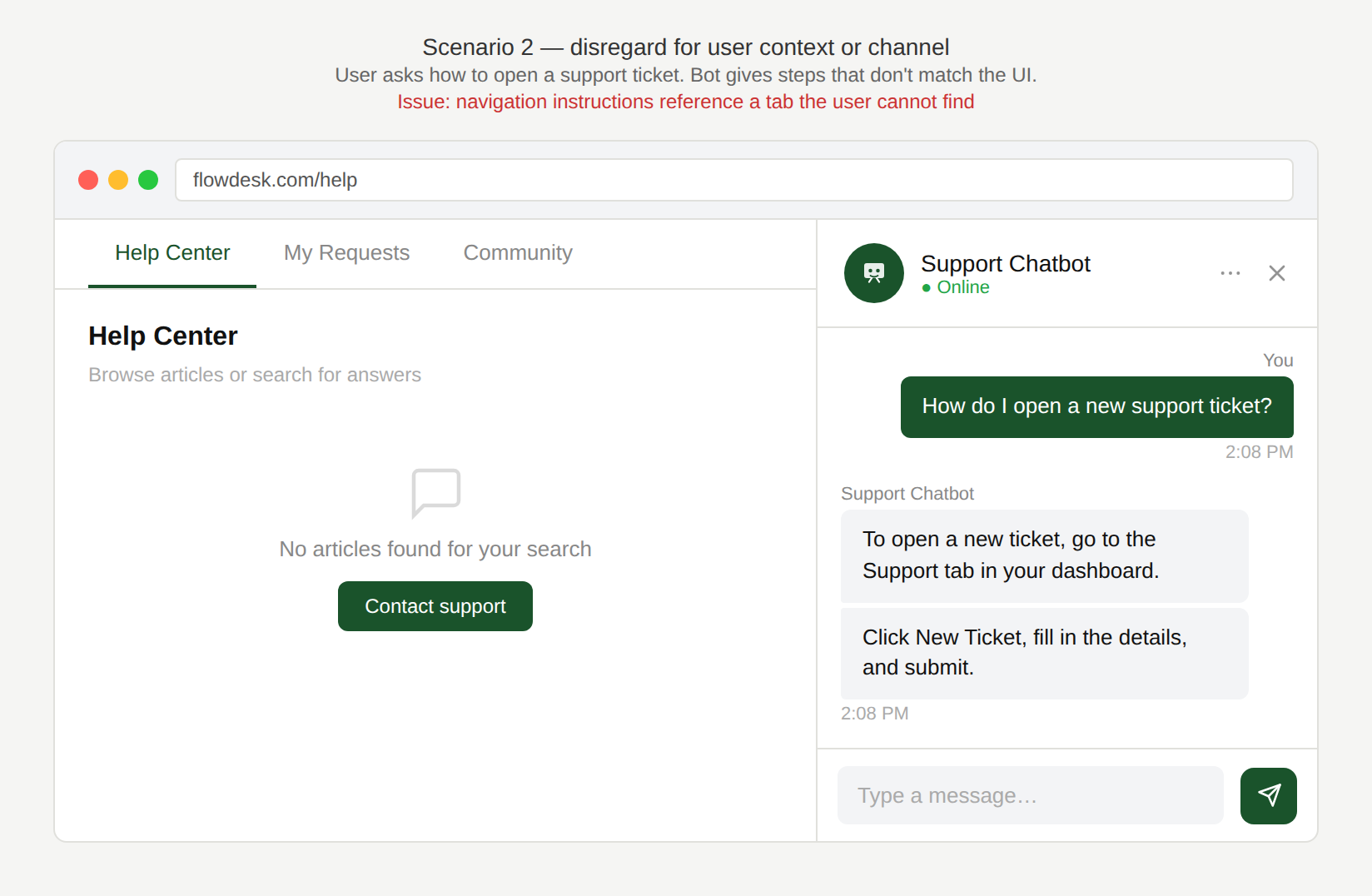
A user asks how to open a new support ticket. The chatbot replies with navigation steps that don’t match what the user can currently see (“go to the Support tab”).
Isn’t that the exact page I am already looking at?
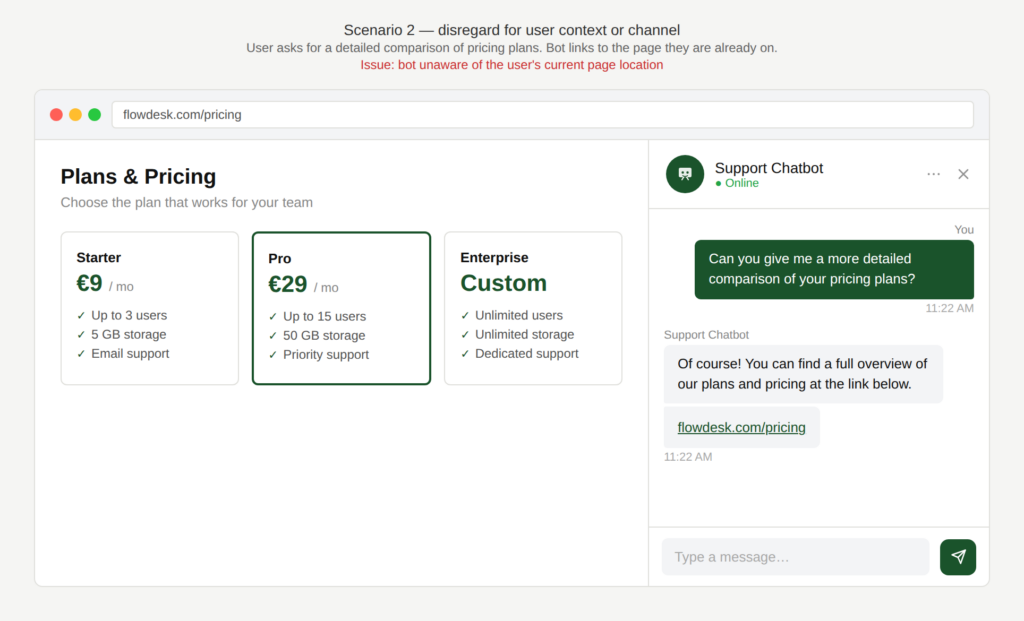
A user asks for a detailed overview of the pricing plans. The chatbot responds with a link to the page they’re already on.
Why is this an issue?
The chatbot gives guidance that is invalid for the user’s current context:
- Navigation guidance is invalid or impossible to follow.
- Users are sent in circles or instructed to find elements that do not exist.
- The chatbot appears unaware of the user’s context.
Why do we care?
Effective support guidance depends on situational awareness, The user should be able to follow instructions in the interface they are currently using:
- Users get stuck: Wrong navigation steps prevent task completion.
- Confusion and frustration: Users assume they missed something or the chatbot misunderstood.
- Erosion of trust: Low “situational awareness” makes the chatbot feel generic and not worth using.
- Channel consistency: Support guidance must work across channels or clearly adapt per channel.
What is the remedy?
The chatbot should tailor its guidance to the user’s current channel and location, or clearly bridge the gap when it cannot:
- Detect and adapt to channel: Provide channel-specific flows (Website / iOS app / Android app / Messenger), based on where the chat is launched.
- Confirm context when detection is uncertain: If the chatbot can’t detect the device type, ask: “Are you in the app or on the website?” (one-tap choice).
- Avoid loops: Do not link to the page the user is already on. If the user is already in the right place, point to the next action or highlight the relevant section.
- Provide parallel instructions if needed: Example: “On the website, open Services. In the app, tap Menu → Services.”
- Offer an alternative route: Include search-based navigation (“Use the search bar and type ‘New request’”) when menus differ.
Are there any exceptions to this rule?
We have not come across any valid, acceptable exceptions.
Scenario 3:
Redundant data entry
A user chats with a chatbot while logged in or authenticated, but is forced to manually provide information already available in their account profile instead of the chatbot pre-filling or confirming existing data.
Examples
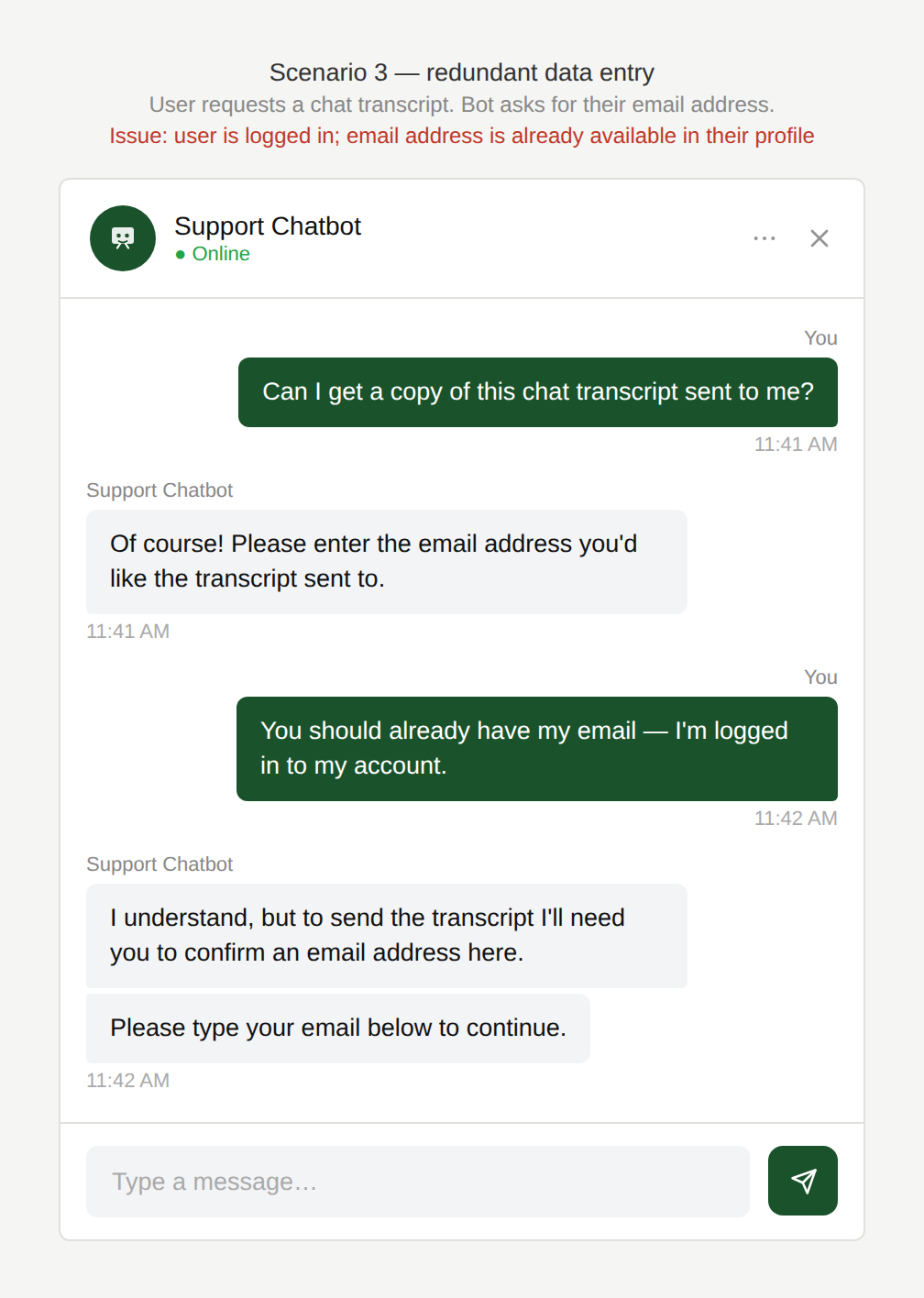
Don’t you know my email?
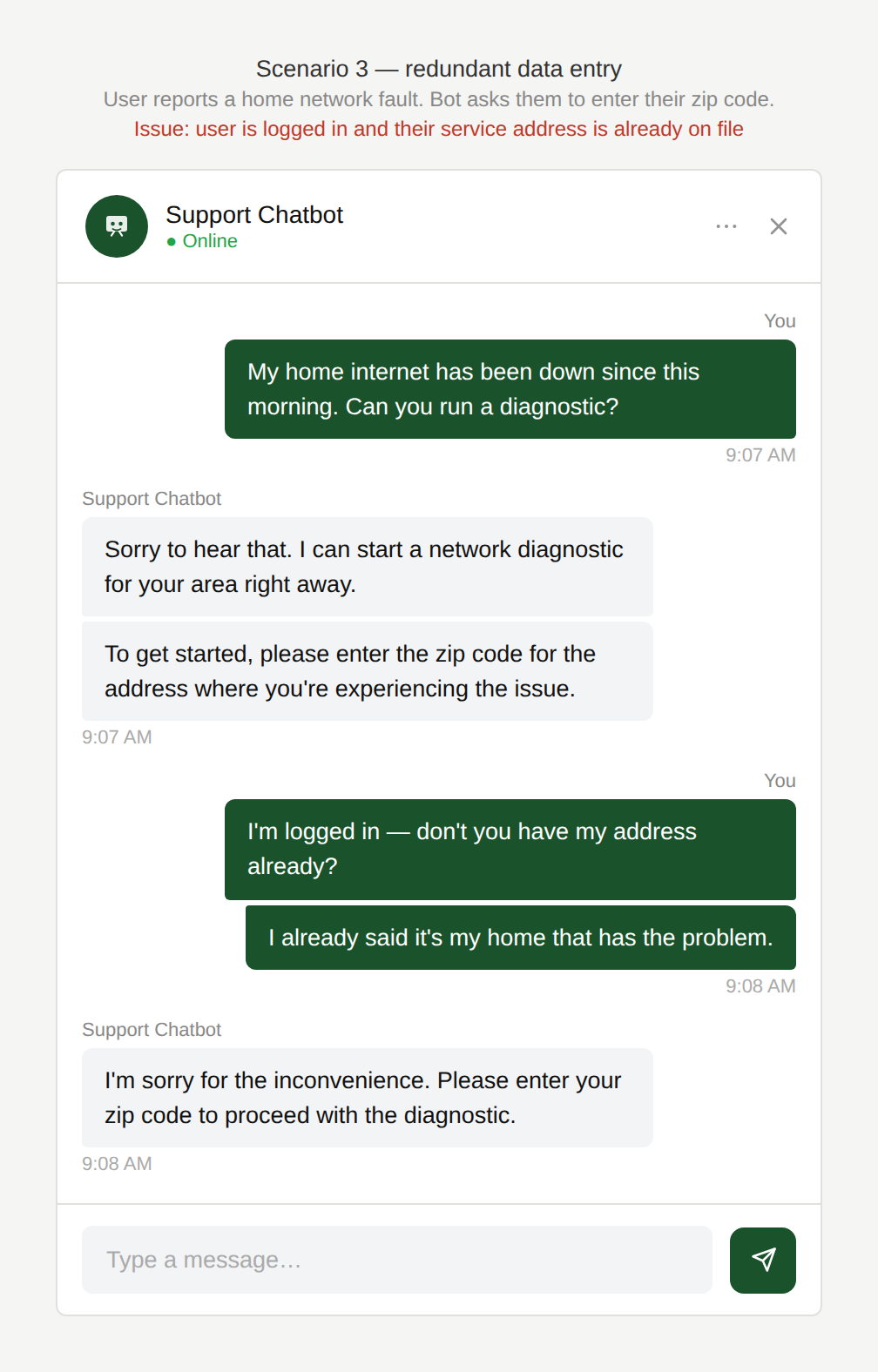
The user has a network issue in their home and the chatbot initiates a diagnostic service. However the user is obliged to first enter their zipcode even though they originally stated that the network in their home is faulty and they are logged in.
Don’t you have access to my address?
The user chooses to have the chat transcript sent to them via email. The chatbot asks them to enter the email address they would like to have it sent to even though the user is logged in and their email address is available in their profile.
Why is this an issue?
The chatbot does not leverage authenticated user data and the user must manually re-enter known data, creating friction and avoidable errors:
- The user is forced to re-enter information the system already knows.
- Manual entry introduces unnecessary friction and errors.
- The chatbot behaves as if the user were anonymous, despite authentication.
Why do we care?
When users are authenticated, they expect the chatbot to recognize them and reduce effort, not add to it:
- Extra effort and frustration: Re-entering known data feels unnecessary and slows the user down.
- Higher error rate: Manual input is more error-prone.
- Lower perceived intelligence: The user expects personalization when they are logged in.
- Task drop-off risk: The more form-filling the chatbot requires, the more likely users abandon.
What is the remedy?
The chatbot should treat authentication as an opportunity to simplify interactions, not ignore it:
- Prepopulate known fields by default: Email, zipcode, account ID, primary phone number etc. should be auto-filled when available.
- Confirm rather than ask: Replace open questions with confirmations e.g. “Send transcript to name@email.com? (Change)” OR “Is this about +49…1234? (Choose another)”
- Handle multiple values gracefully: If the user has multiple phone numbers, addresses, etc. show a short selectable list. Avoid forcing users to type unless necessary.
- Use permission-aware data access: Only access what’s needed for the task, and explain why sensitive data is being used when appropriate.
- Provide clear fallbacks: If profile information isn’t available, then request it e.g.: “I don’t have your zipcode on file. Please enter it to check network status.”
Are there any exceptions to this rule?
There are justified exceptions when an accurate response to the user’s question might not be desired or possible, such as:
- Compliance or security requirements may require explicit re-entry e.g. identity verification.
In these instances, the chatbot should clearly explain why the information is needed and ensure the request is as lightweight as possible.
Scenario 4: Failure to personalise
A user chats with a chatbot within a logged-in experience, but receives generic responses that fail to leverage their account history, preferences, or specific data to provide tailored recommendations or insights.
Examples
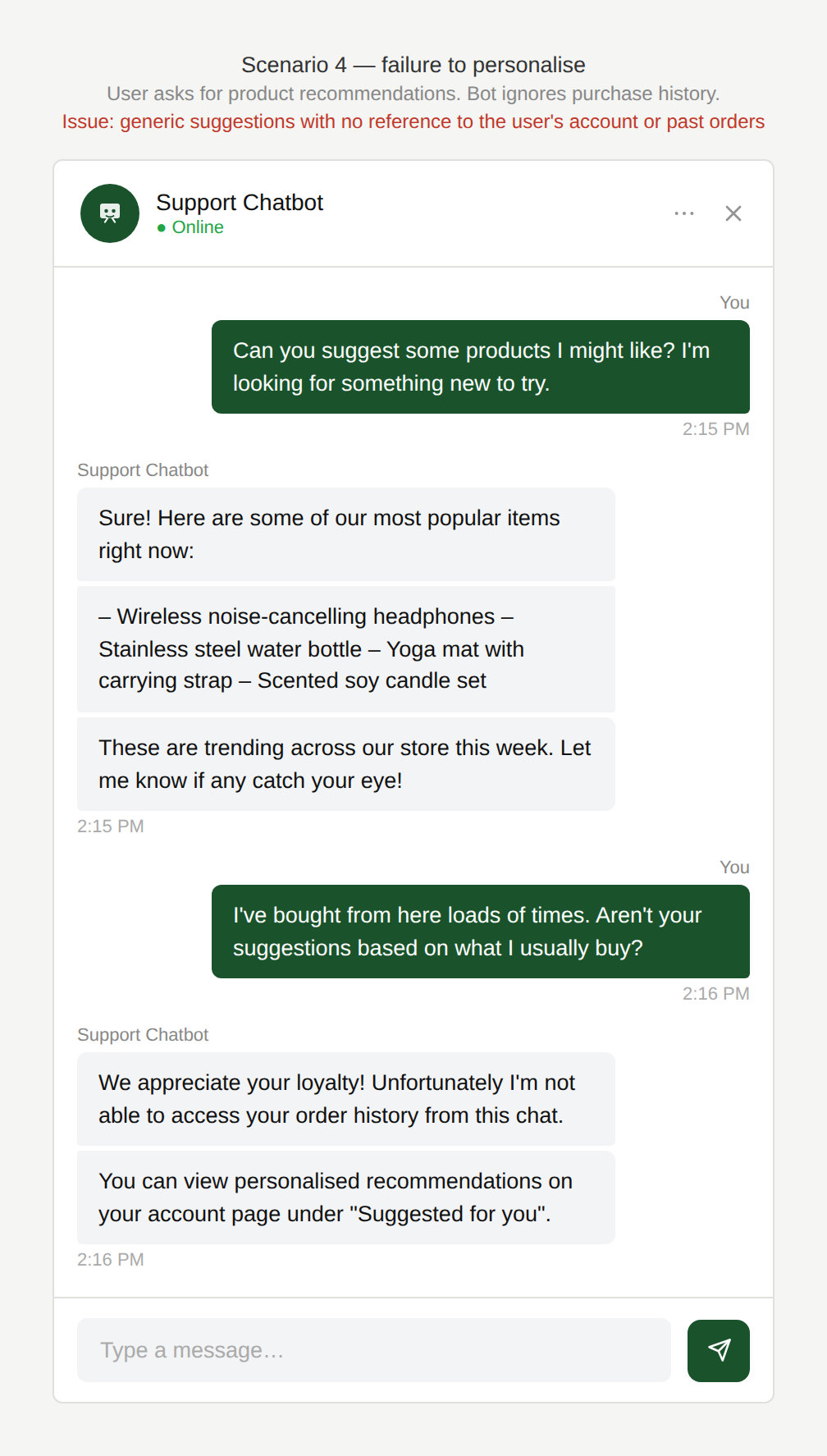
Can’t you provide more relevant ideas?
The user regularly uses the same e-commerce site and asks the in-product chatbot for some recommendations. The chatbot responds with generic suggestions which did not take the user’s previous purchase history into account.
Can’t you be more specific to my case?
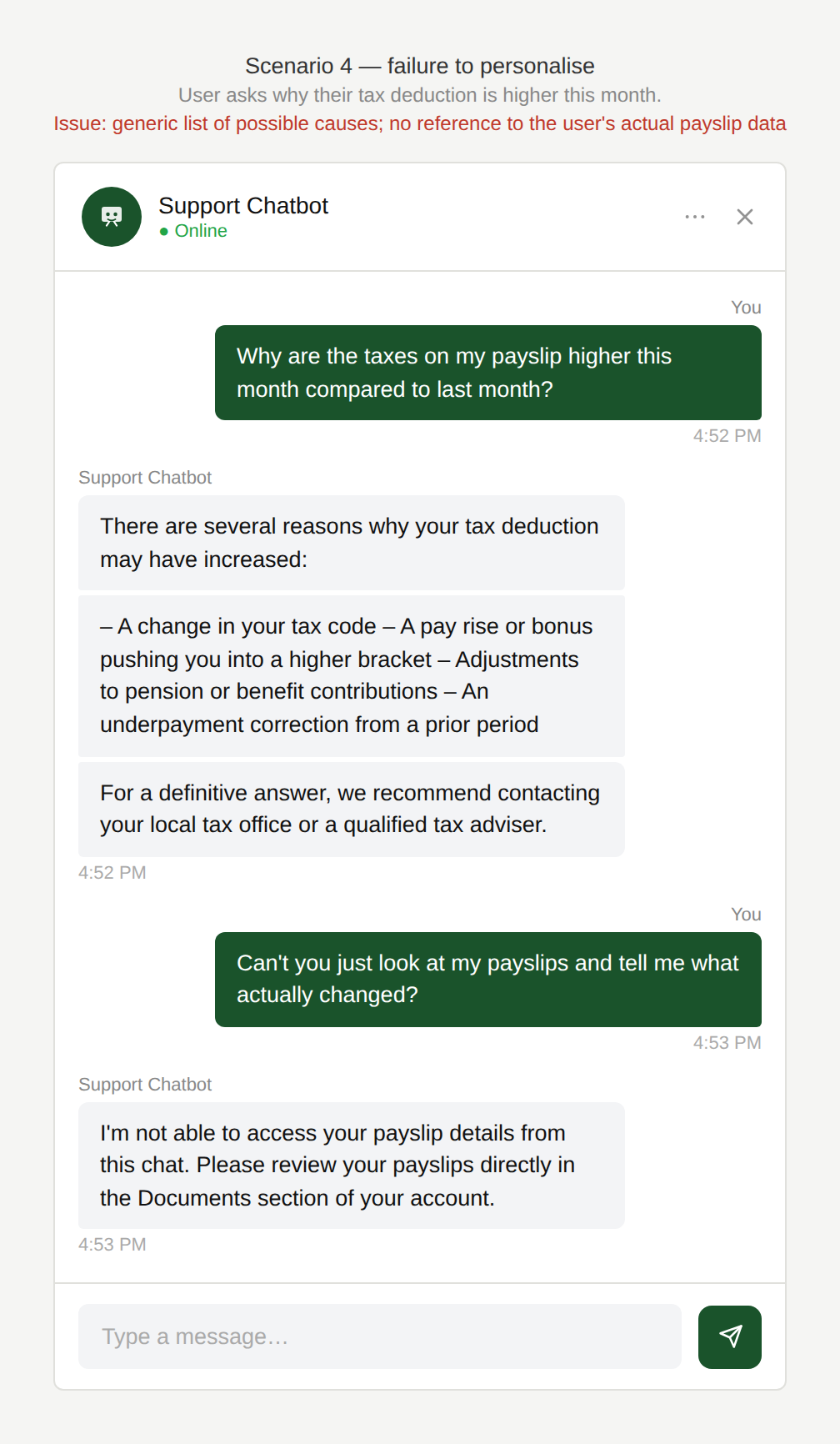
The user asks the chatbot why the taxes on their payslip are higher this month than the previous months. The chatbot responds generically how this might be due to one or more of four factors and tells the user to contact their local tax office to get more information.
Why is this an issue?
The chatbot provides broad, non-personalised responses where personalisation would be expected:
- Responses remain broad and informational instead of specific and helpful.
- The chatbot does not support decision-making or problem diagnosis.
- Users are left to interpret generic advice on their own, despite being logged in.
Why do we care?
The chatbot responses feel generic and informational rather than helpful or advisory:
- AI expectation gap: Users expect “AI in-product” to be smarter than FAQs and more tailored than static help pages.
- Poor decision support: Generic answers do not help the user with their specific request.
- Perceived intelligence: Generic answers make the chatbot feel low value.
What is the remedy?
The chatbot should use available context to provide guidance that feels relevant, actionable, and tailored:
- Use account context where available: Pull relevant signals to tailor responses to the user’s specific situation.
- Provide personalised explanations and recommendations: Explain why something applies to the user (e.g. which line item or change caused higher taxes). Offer recommendations grounded in the user’s history or usage.
- Be transparent about the data usage: Briefly explain why a recommendation or explanation is shown e.g. “Based on your recent purchases, you might like…”
Are there any exceptions to this rule?
There are justified exceptions when an accurate response to the user’s question might not be desired or possible, such as:
- Privacy or consent constraints: Personalisation should respect user preferences and data-use policies e.g. if the user did not consent to their data being used like this or data privacy policies prevent it.
In these instances, the chatbot should clearly explain its limitations.