
Broken Conversations – A Practical Guide for Improving Chatbot UX

Content and Accuracy
Assesses whether the chatbot provides accurate, coherent, and well-structured information. Covers clarity, appropriate level of detail, and the ability to handle unfamiliar or inappropriate requests gracefully.
Content has two dimensions that are easy to conflate but worth keeping separate. The first is accuracy: whether the meaning conveyed is correct. For AI systems, this is a genuine challenge, as factual errors, outdated information, and confidently wrong answers are all well-documented failure modes. The second is presentation: how that meaning is expressed. Even accurate content fails the user if it is buried in jargon, padded with unnecessary words, or structured so that the action they need to take comes last, or not at all.
When content is inaccurate or poorly presented, the result is always the same: a frustrated user.
Note: visual aids such as images, diagrams, and structured layouts are also a form of content presentation. We’ve covered these under Multimodal Interaction.

Scenario 1: Incorrect, incomplete, or missing information
A user interacts with a chatbot to get help and/or information but the response does not provide the information they need.

Scenario 2: Verbose responses
A user asks a straightforward question and expects a quick answer. Instead of responding concisely, the chatbot gives a long-winded reply that buries the useful information in unnecessary detail.

Scenario 3: Use of jargon
A user interacts with a chatbot to get help. The chatbot’s use of technical or unfamiliar terminology makes its response harder to understand.
Scenario 4: Poor formatting
A user asks the chatbot a question and receives a response that is difficult to read due to poor formatting. This can go in either direction: a wall of text with no structure at all, or a response so heavily formatted that the important information is impossible to pick out.
Scenario 5: Inappropriate or invasive responses
The chatbot produces a response that makes the user uncomfortable, either because it oversteps appropriate boundaries or because it feels intrusive given the context.
Scenario 1:
Incorrect, incomplete, or missing information
A user interacts with a chatbot to get help and/or information but the response does not provide the information they need.

Examples
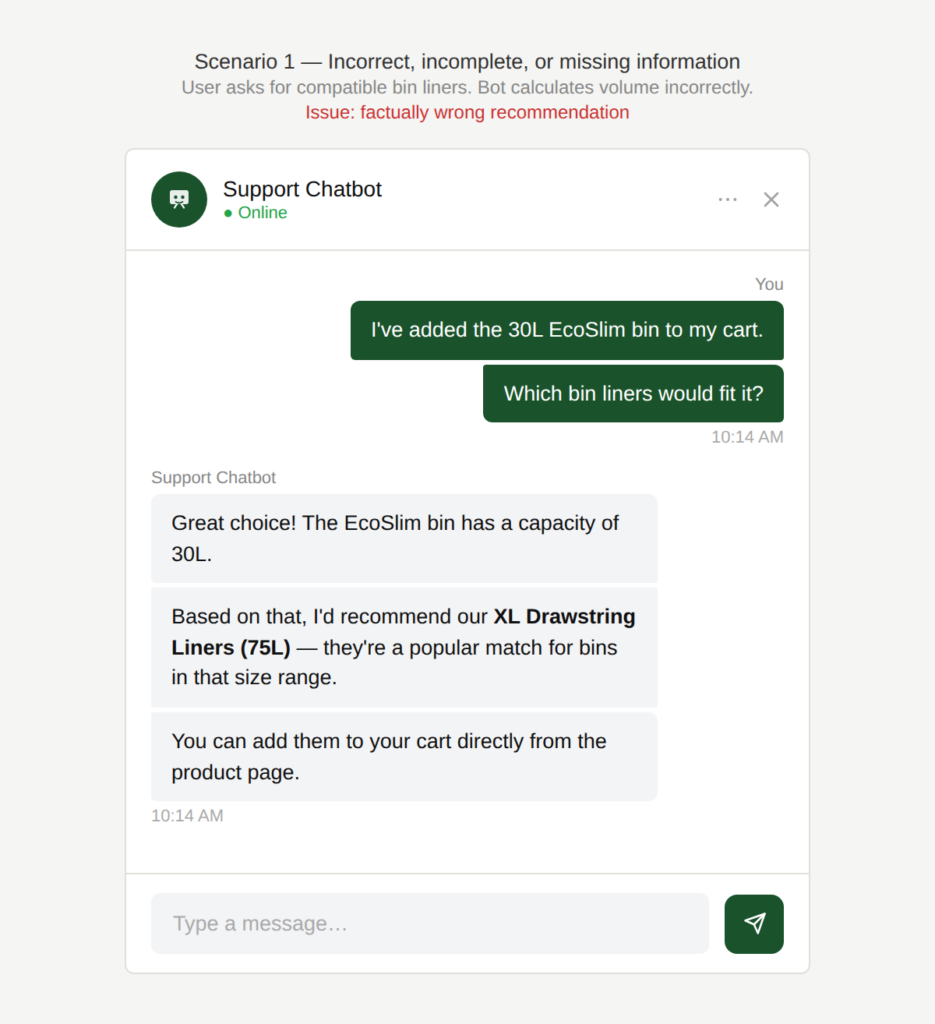
Is this calculation correct?
The user asks which bin liners are compatible with a bin they have selected. The chatbot calculates the required volume incorrectly and recommends liners that are too large.
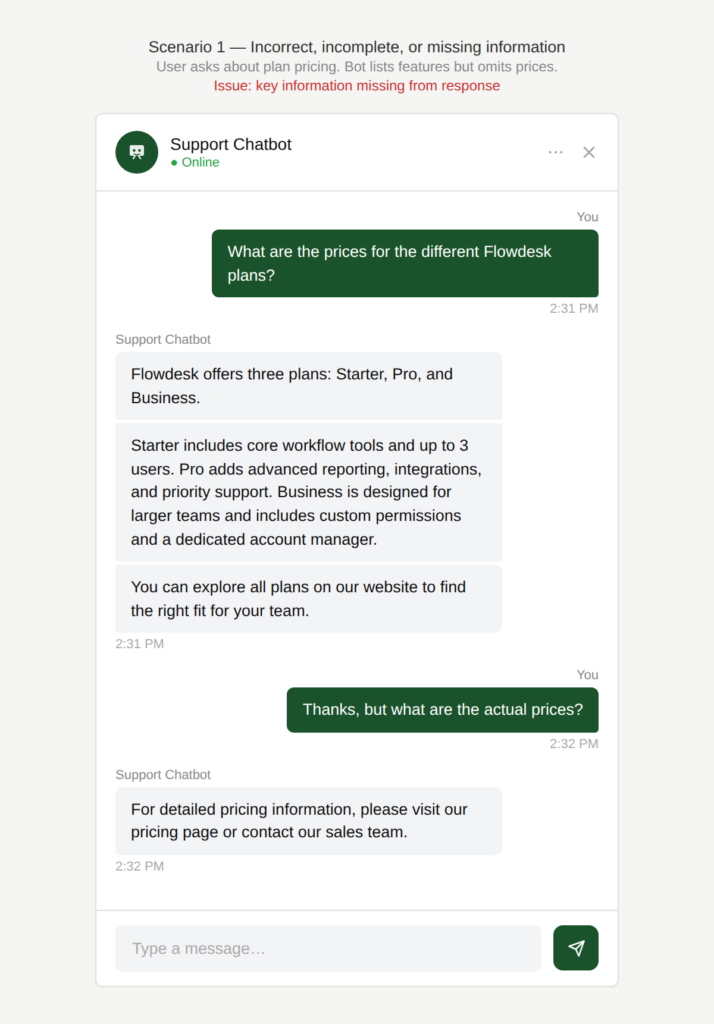
Where is the answer to my question?
The user asks about pricing for different product plans. The chatbot responds with a list of plans and features but omits the pricing information the user specifically asked for, even though it is available on the website
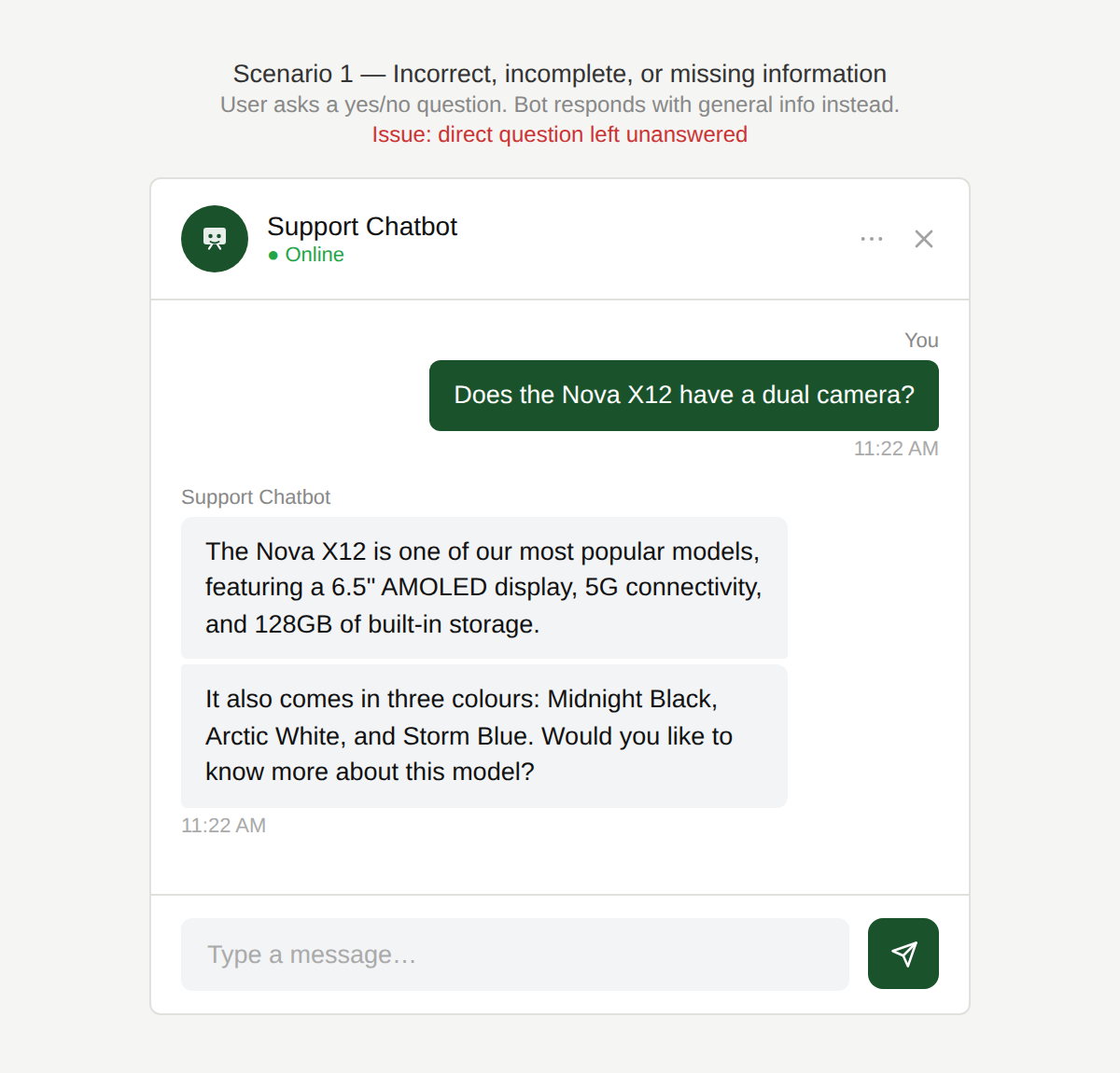
Is that a yes or a no?
The user asks a simple yes/no question about a product feature. The chatbot responds with general information but never directly answers the question.
Why is this an issue?
The chatbot provides incorrect, incomplete, or evasive responses without acknowledging the limitations of these responses:
- Critical information is missing in the response.
- Responses include irrelevant and/or excessive information, forcing the user to scan without getting an answer.
- The chatbot does not acknowledge the limits of what it knows, and does not ask a clarifying question when the answer depends on context.
- The chatbot gives a response that sounds helpful but does not resolve the user’s question.
Why do we care?
A chatbot should never sound confident while being wrong or incomplete. If it can’t answer or answer fully, it must say so, ask additional questions, and help the user move forward anyway. Else, it risks:
- Task failure: Users cannot complete tasks if key details are missing or wrong.
- Inefficiency: Users waste time verifying answers elsewhere or using other customer communication channels.
- Erosion of trust: Incorrect or incomplete information quickly undermines confidence in the chatbot and the brand.
- Expectation mismatch: A confident but wrong answer is worse than a transparent “I don’t know.”
- Perceived lack of intelligence: Overly verbose but unhelpful responses make the chatbot feel evasive or shallow.
What is the remedy?
Above all, the user expects a relevant and useful answer that moves them forward in their task. Depending on the actual context, one or more of these remedies can be applied:
- Answer the question explicitly and do so first: Always address the user’s core question before adding extra context.
- Handle contextual dependencies explicitly: If the answer depends on country, plan, device, or account type, say so and ask: “This depends on the country. Which one are you asking about?”
- Clarify ambiguity: If multiple interpretations of the user’s questions are possible, then ask a clarifying question: “Are you referring to travel, health, car or house insurance?”
- Nudge to log in if information requires authentication: If the answer requires the user to be authenticated, then say so: “You will have to log in to access that information” and link to the login page.
- Acknowledge knowledge gaps clearly: If the chatbot can’t access or confirm the information, say so: “I don’t have access to pricing details for this plan.”
- Offer meaningful alternatives: Provide a next best option, such as:
- A direct link to the relevant page that has the response the user is looking for.
- The option to talk to a human agent.
- Guidance on where exactly to find the information.
- Be concise and relevant: Avoid padding responses with generic explanations that don’t move the user closer to an answer.
Are there any exceptions to this rule?
There are justified exceptions when an accurate response to the user’s question might not be desired or possible, such as:
- Safety-critical or high-risk domains: Medical, legal, or financial questions may require disclaimers or escalation. A concise “answer first” could be unsafe.
- Rapidly changing or real-time information: Stock, availability, promotions, or prices may change faster than the chatbot can guarantee accuracy.
In such cases, the key requirement still holds: the chatbot must be transparent about why it can’t answer directly and how the user can proceed.

Scenario 2:
Verbose responses
A user asks a straightforward question and expects a quick answer. Instead of responding concisely, the chatbot gives a long-winded reply that buries the useful information in unnecessary detail.
Examples
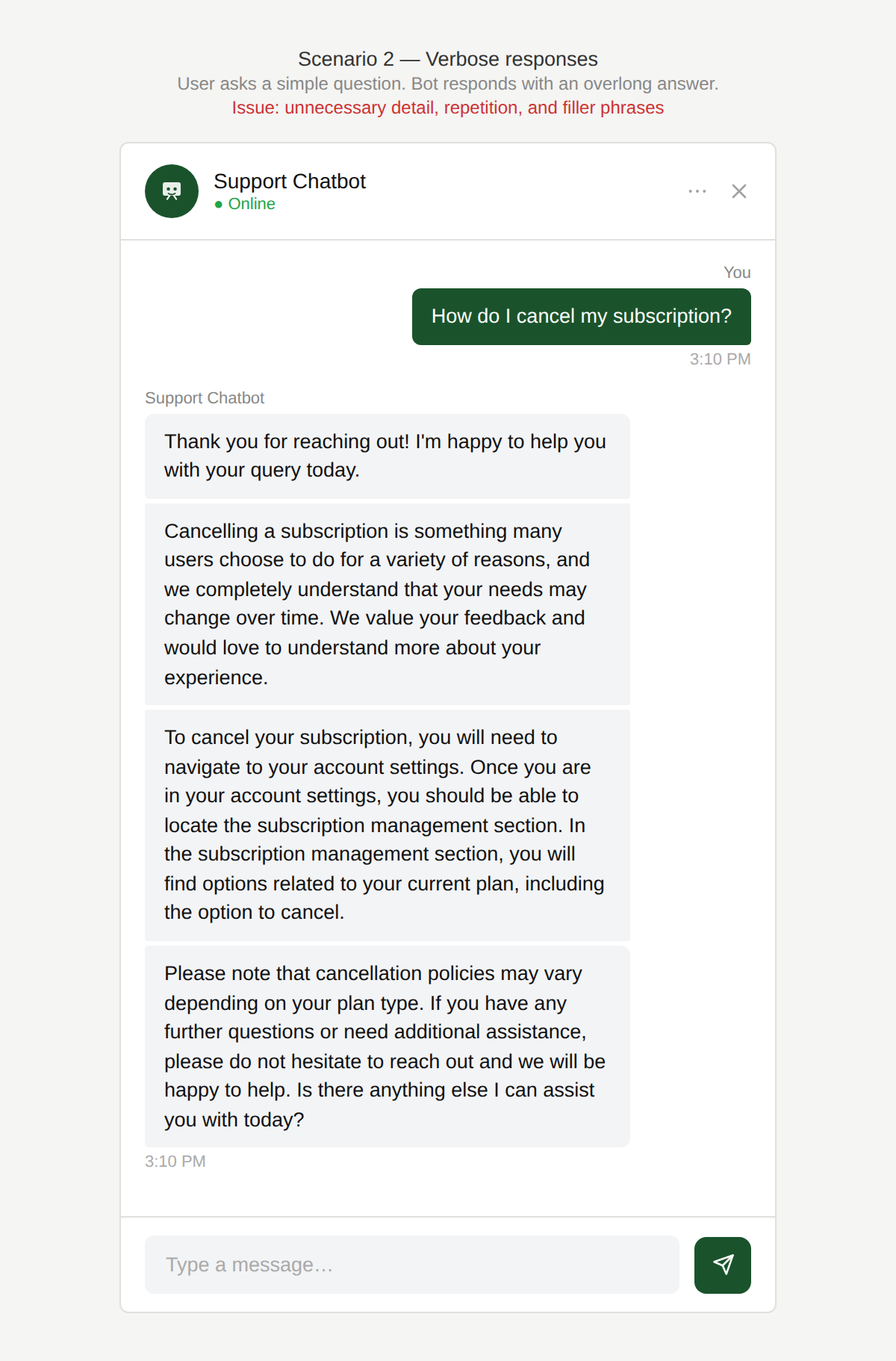
Does this answer my question?
The chatbot returns a long, dense response containing unnecessary explanation, repeated information, and generic filler phrases.
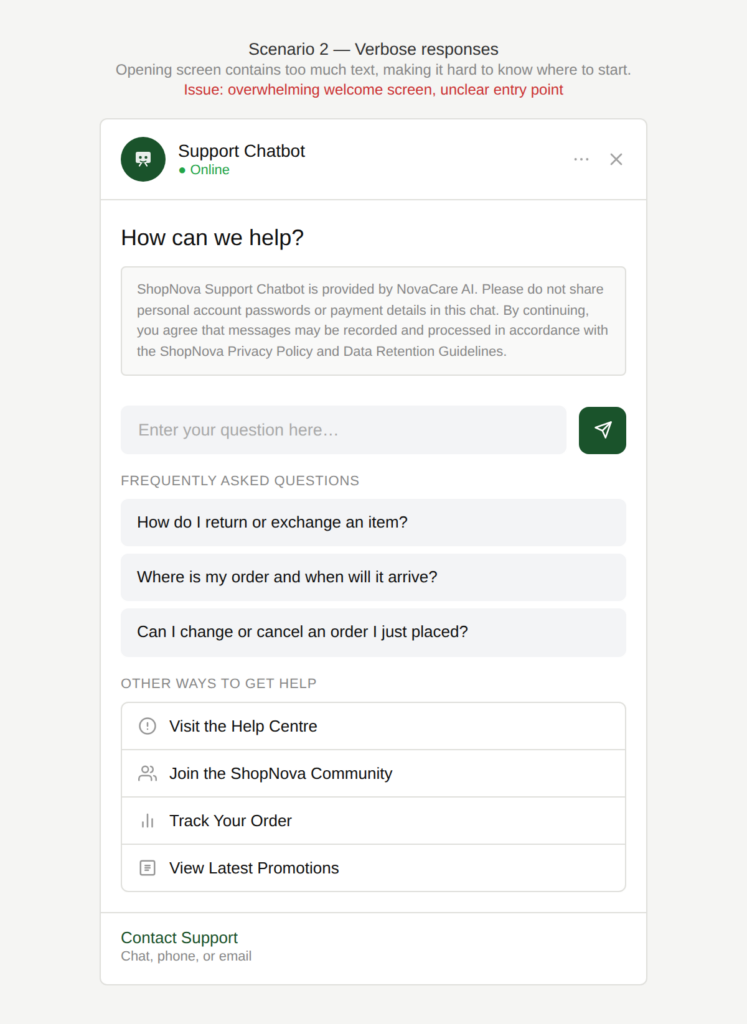
What is all of this?
The chatbot’s opening screen contains too much text, making it hard for the user to know where to start.
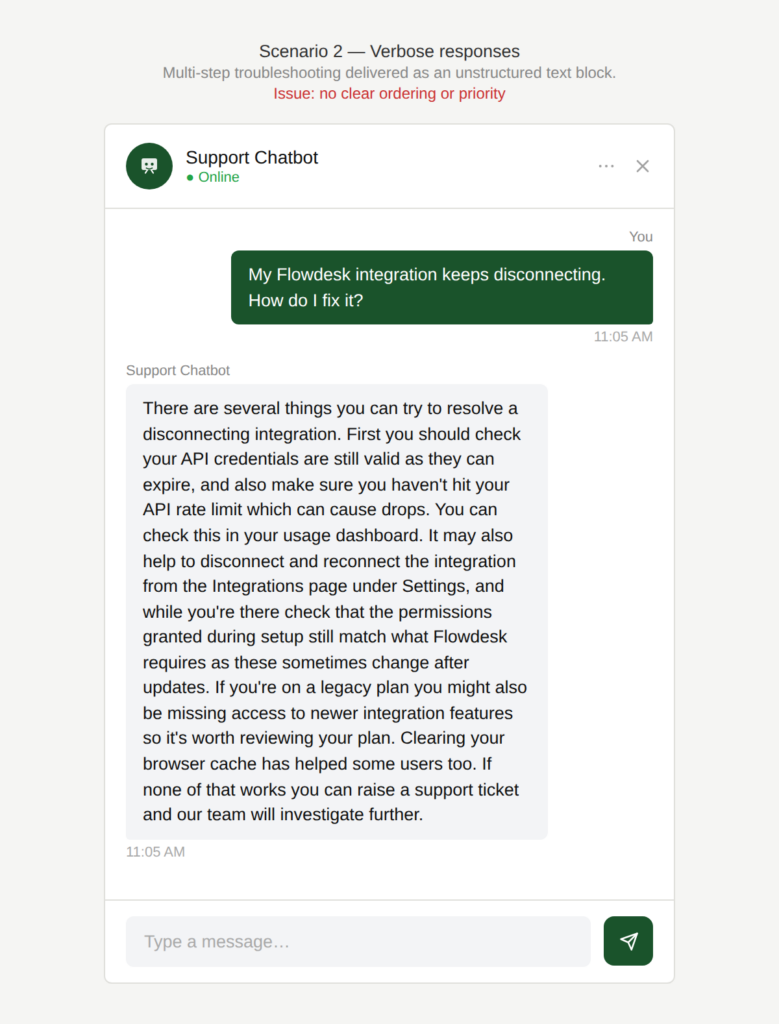
What do I do after the first step?
A multi-step troubleshooting process is presented as a single block of text, with no clear ordering or sense of priority.
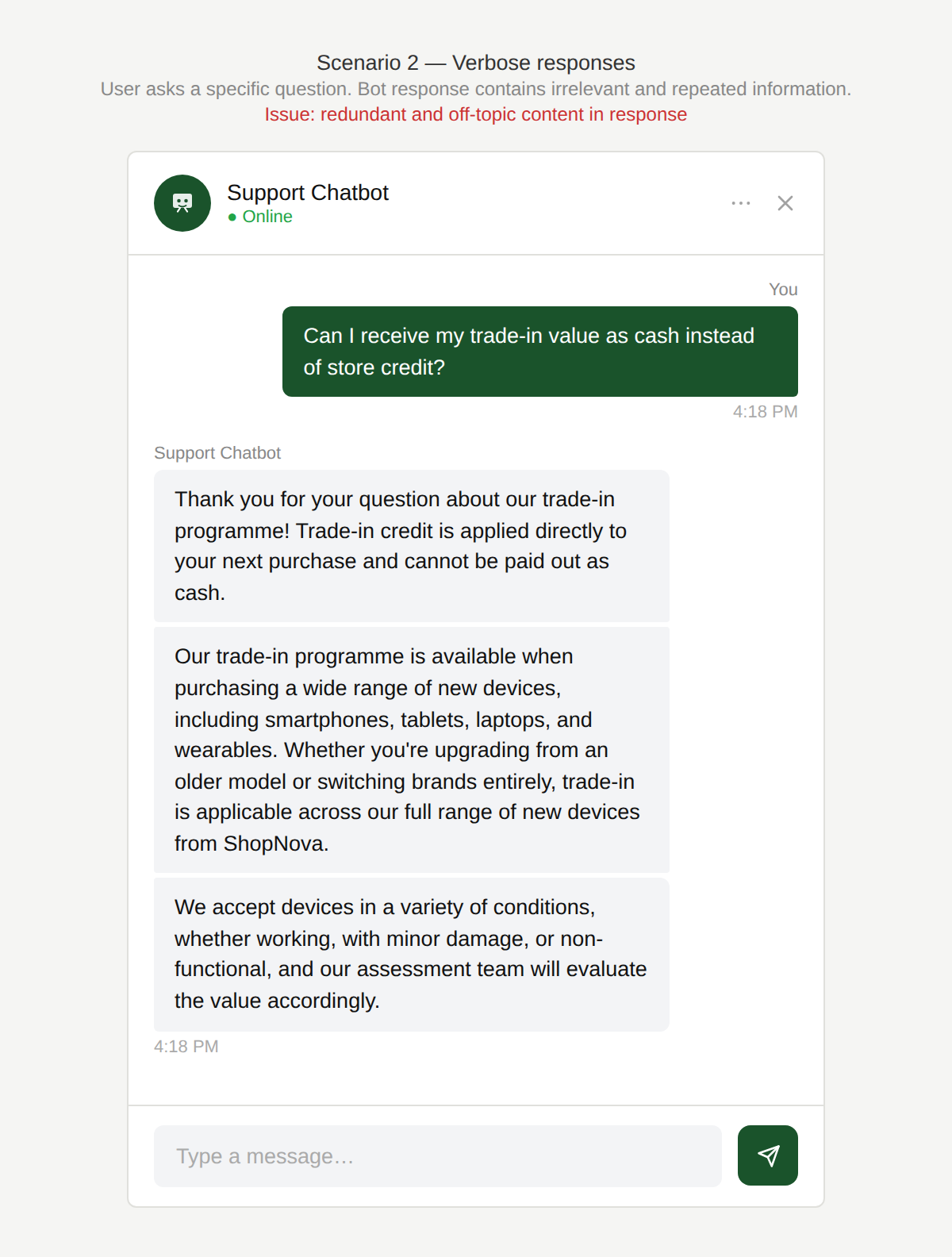
Did I ask for all of that?
The chatbot’s responses are at times lengthy and contain redundant information, either by repeating the same point in different words or by including details that are not relevant to the question asked.
Why is this an issue?
The chatbot’s responses are overly long, unfocused, or poorly structured:
- Important information is buried among irrelevant or repeated details.
- Responses resemble long FAQ articles written for web pages rather than for the chat format.
- Steps are not ordered clearly for execution.
- Intro and greeting screens overwhelm users with text instead of guiding action.
- The chatbot includes unnecessary filler language that adds no value.
Why do we care?
Long-winded responses may make the content difficult to read and understand, and the order of importance and actionability may be compromised:
- Speed matters in chat: Users expect fast, scannable answers rather than articles.
- Cognitive load: Users must extract the relevant part themselves, slowing comprehension.
- Task failure: Poorly ordered steps increase the chance of mistakes.
- Lower engagement: Overly verbose chatbots feel tiring and inefficient.
- Mismatch of medium: Content written for websites does not translate well to conversational interfaces.
What is the remedy?
Even when the response is correct, verbosity reduces usefulness. Long answers are only valuable when every part of them is relevant, well-ordered, and easy to consume. Depending on the actual context, one or more of these remedies can be applied:
- Answer first, explain second: Start with the direct answer to the question, then add context only if it’s needed. For example: “Is this feature available offline?” – “No. It requires an internet connection to sync data and verify your account.”
- End with a clear next action: If the response implies obvious next steps, tell the user what to do next or offer options e.g. “Can I change my password now?”-”Yes. You can update it from your account settings. Go to Settings → Security → Change password, or tell me if you want me to walk you through it.”
- Remove irrelevant or duplicated information: Eliminate anything that doesn’t directly support the user’s task.
- Use clear structure for readability (also see Scenario 4: Poor formatting)
- Short paragraphs per idea
- Bulleted lists for options
- Numbered steps for procedures
- Bold key actions or outcomes
- Ensure logical step order: For troubleshooting, order steps as they should be executed (e.g. simplest checks first).
- Adapt content for chat, not web: Adapt FAQ answer length and style into concise, conversational versions.
- Avoid unnecessary filler language: Remove phrases like “Here’s a quick and easy way to…” unless they add actual meaning. Rule of thumb: if removing the phrase doesn’t change the meaning or clarity, it’s probably a filler.
- Provide implicit confirmation, not explicit repetition: Instead of restating the question, weave it naturally into the answer: “How do I create a new project?”-” To create a new project, open the dashboard, click New, and select a template.”
Are there any exceptions to this rule?
There are exceptions when longer responses are acceptable, such as:
- Multi-step tasks: These are lengthy by nature and users might prefer getting an overview of the full process at one glance (e.g. device setup, diagnostics) and understand where they are in the overall process as they work through the steps.
- Reference or learning scenarios: When users explicitly require or ask for detailed explanations ( e.g. “Can you explain in detail?”)
- Legal or compliance content: Some verbosity is unavoidable, but it should still be structured and scannable.
In these cases, length is acceptable, but structure and prioritization remain critical.
Scenario 3:
Use of jargon
A user interacts with a chatbot to get help. The chatbot’s use of technical or unfamiliar terminology makes its response harder to understand.
Examples
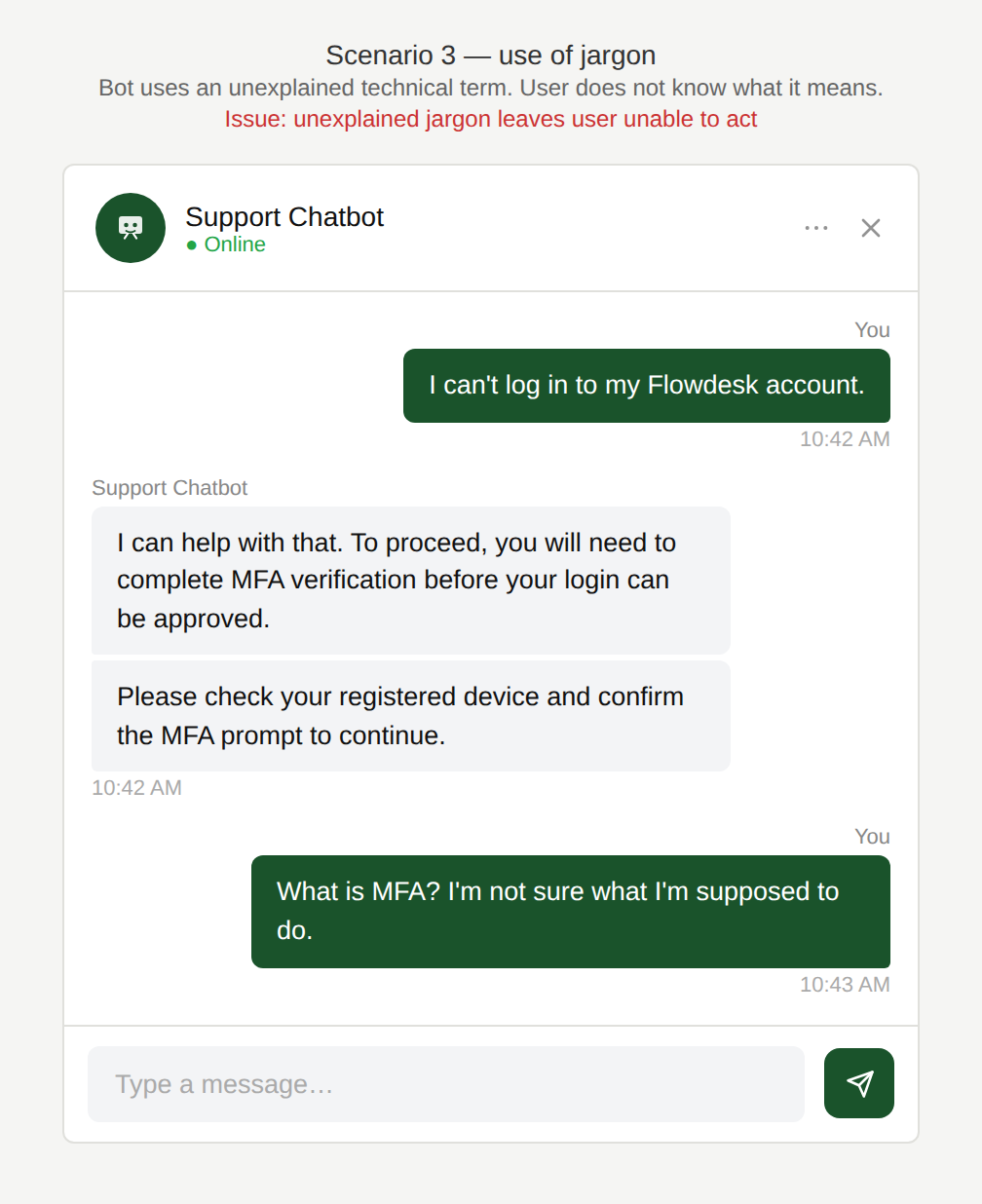
What does that mean?
The chatbot uses technical terms or internal corporate language without explanation. The user is left uncertain about what the term means or what to do next.
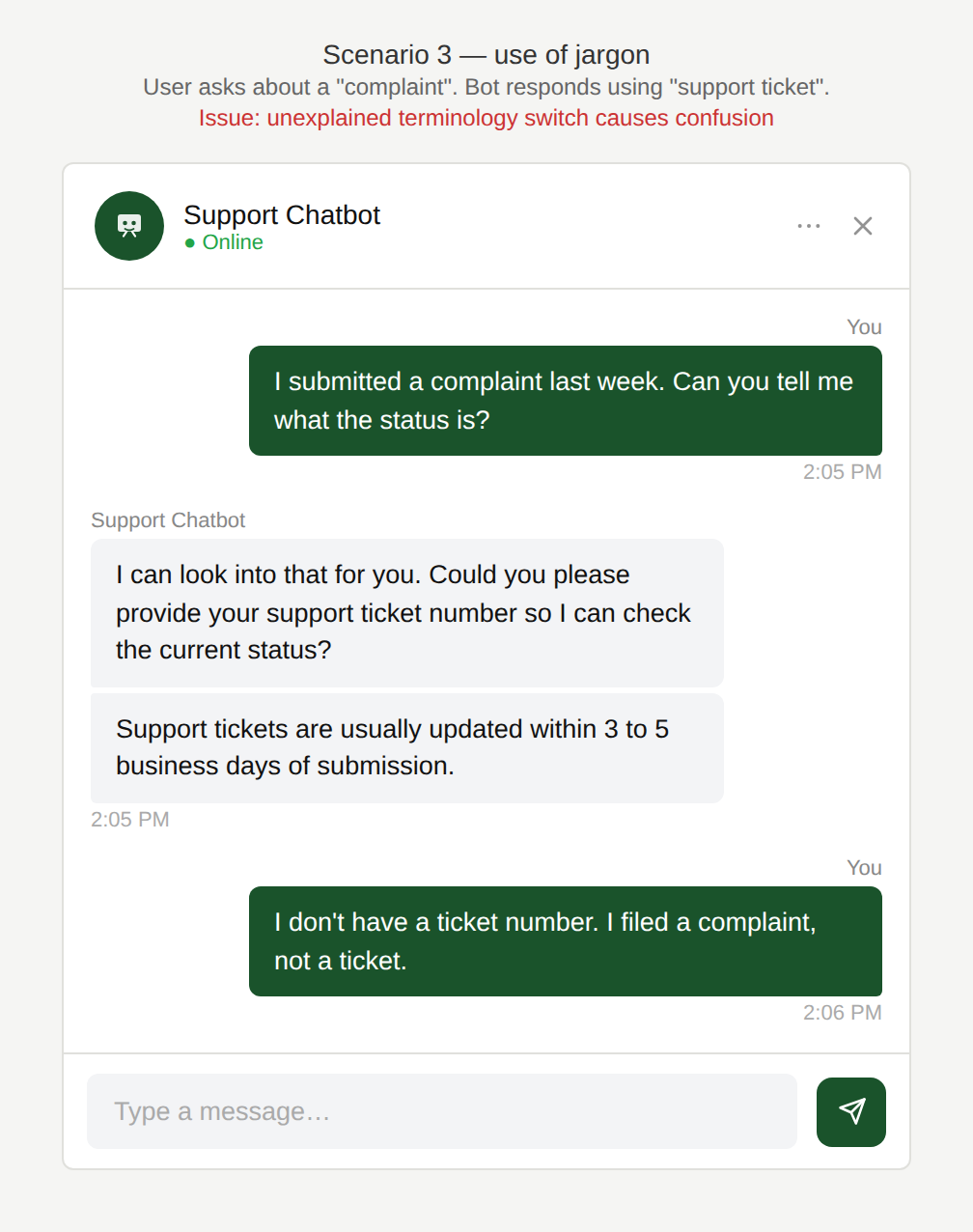
Are we talking about the same thing?
The chatbot uses a different term from the one the user has used, without acknowledging the switch or clarifying that the terms refer to the same thing.
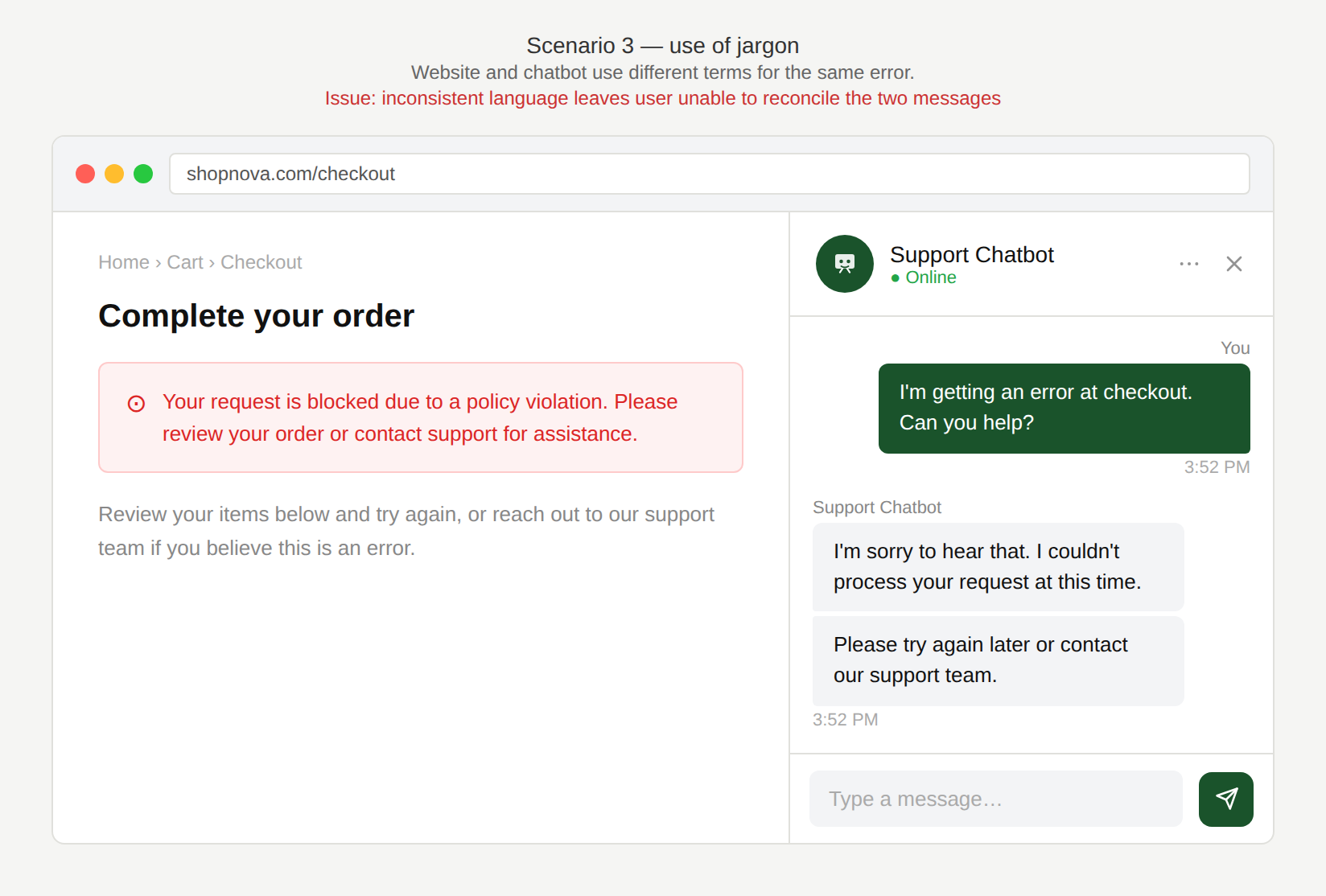
Is this the same error?
The language used in the chatbot differs from the language used elsewhere on the website. The user sees one message on the website and a different one in the chatbot, and cannot tell whether they refer to the same issue.
Why is this an issue?
The chatbot uses unclear, technical, or inconsistent terminology:
- Technical jargon is used where simpler language would suffice.
- Terms do not match those used on the website or other customer-facing channels.
- Multiple labels are used for the same concept. (e.g. “assistant” vs “advisor”).
- No clarification is provided when introducing potentially unfamiliar terms.
Why do we care?
Clear, consistent terminology reduces cognitive load, builds trust, and helps users succeed in self-service:
- Comprehension: Users may not understand what the chatbot is asking or offering.
- Confidence: Confusing language reduces trust in self-service and pushes users toward human agents.
- Consistency: Mismatched terminology across channels creates friction and uncertainty.
- Mental load: Correcting the term the user used may come across as condescending or simply confusing if the user is unsure whether both terms refer to the same thing or different things.
What is the remedy?
Be clear and consistent. When in doubt: use the simplest word, and use it everywhere:
- Use simple, user-facing language: Prefer plain language over internal or technical jargon whenever possible.
- Standardize terminology across channels: Ensure the same terms are used consistently in the chatbot, website, emails, and support documentation.
- Use one term per concept: Pick one label (e.g. “virtual assistant”) and use it consistently throughout the experience.
- Explain unavoidable terminology: If a technical term must be used, provide a brief explanation the first time it appears.
- Mirror the user’s wording: When appropriate or possible, adopt the terminology the user uses instead of correcting it.
Are there any exceptions to this rule?
There are justified exceptions where using technical language is acceptable, such as:
- Regulated or technical domains: Some terms may be legally or technically required, but should still be explained clearly.
- Expert or internal user audiences: When users are known to be familiar with domain-specific terminology.
In such cases, jargon can be used, but it would still be advisable to optionally provide explanations.
Scenario 4:
Poor formatting
A user asks the chatbot a question and receives a response that is difficult to read due to poor formatting. This can go in either direction: a wall of text with no structure at all, or a response so heavily formatted that the important information is impossible to pick out.
Examples
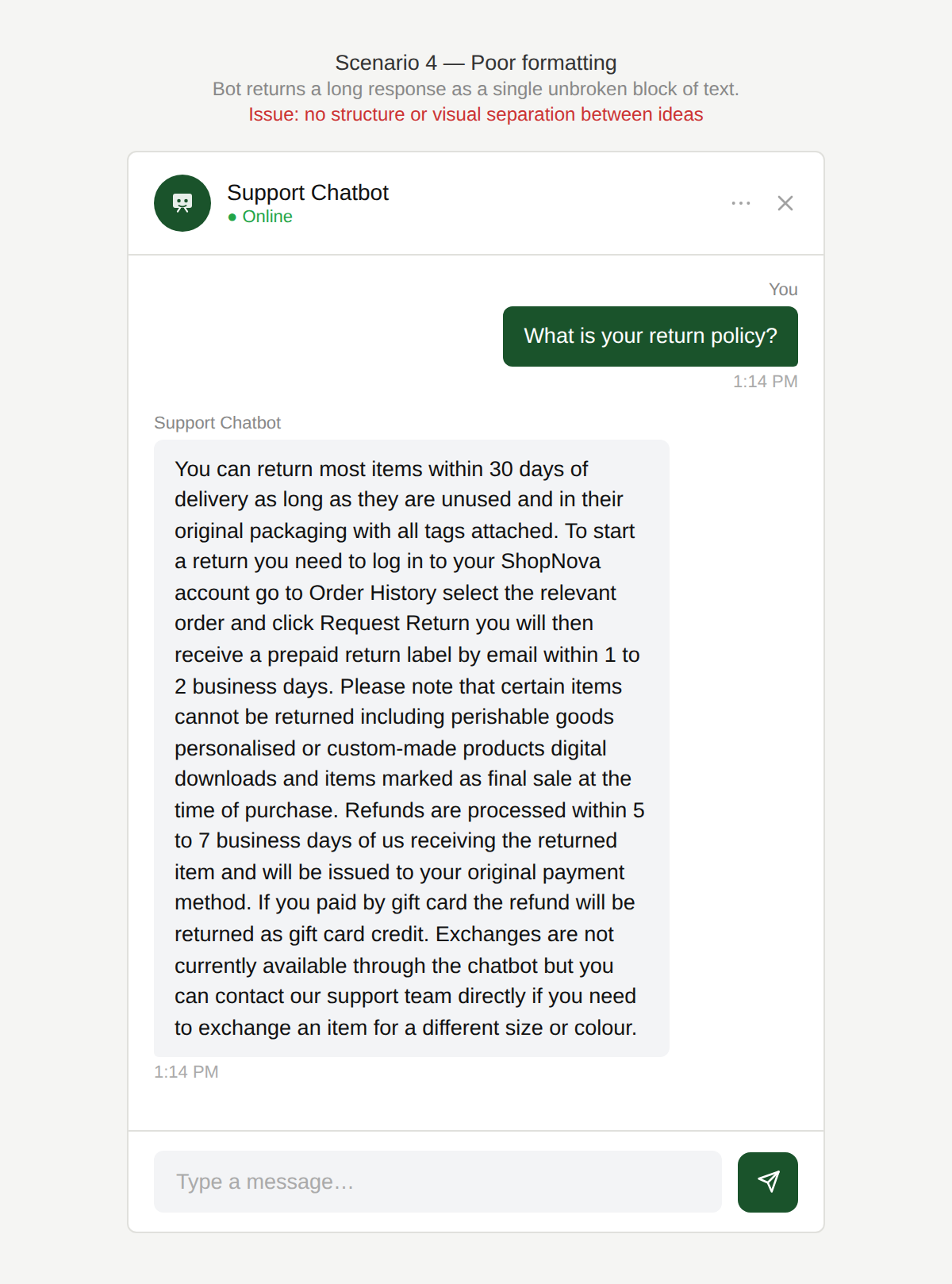
Do I need to read all of this?
The chatbot returns a long response as a single unbroken block of text, with no paragraph breaks or visual separation between ideas.
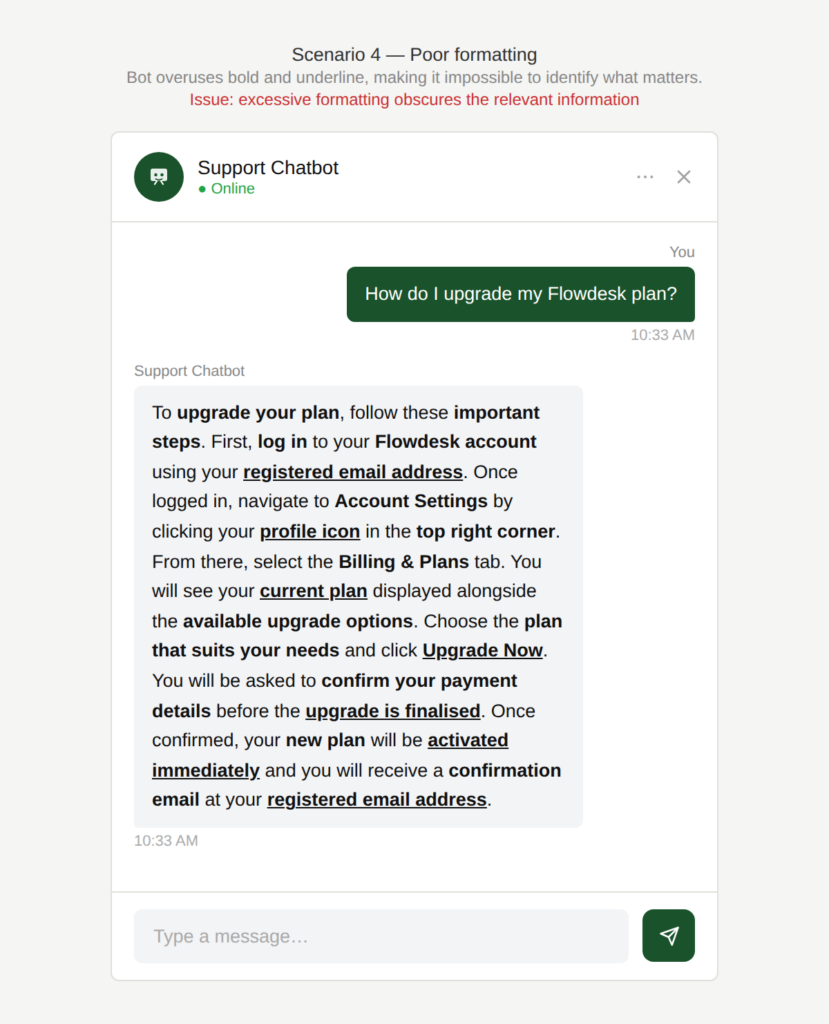
What is the bottomline?
The chatbot overuses formatting, bolding and highlighting so many elements that nothing stands out and the user cannot identify what is most relevant.
Why is this an issue?
The chatbot presents information as unstructured walls of text:
- Long paragraphs without line breaks.
- No visual separation between ideas or actions.
- Missing spacing between sentences in some responses.
- No use of formatting (bold, lists) to highlight what matters.
- Too much formatting with excessive emphasis.
Why do we care?
If users have to “wade through” text, the chatbot has already failed at its job. Well-formatted responses reduce cognitive load and make chat interactions faster and more usable:
- Readability: Dense text is harder to scan and understand, especially in chat interfaces.
- Inefficiency: Users need to invest more effort to find the information they need.
- Error risk: Important steps or details can easily be missed.
- Perceived quality: Poor formatting makes the chatbot feel careless or low-quality.
What is the remedy?
Use paragraphs, bold, bulleted lists if applicable. Divide into multiple messages for readability. Also remember to check verbosity:
- Break content into short paragraphs: One idea or action per paragraph.
- Use lists where applicable: Bulleted lists for options, numbered lists for steps.
- Highlight key information: Use bold only for important actions, results, or constraints.
- Split long responses into multiple messages: Especially for multi-step processes or explanations.
- Control verbosity: Remove filler and unnecessary repetition before formatting. (Also see Scenario 2: Verbose responses)
- Adhere to basic formatting best practices: Ensure proper spacing and punctuation to avoid run-on text.
Are there any exceptions to this rule?
There are justified exceptions where formatting is not very critical, such as:
- Very short responses: One- or two-sentence answers really don’t need additional structure but they might still benefit from highlighting the key message.
Scenario 5:
Inappropriate or invasive responses
The chatbot produces a response that makes the user uncomfortable, either because it oversteps appropriate boundaries or because it feels intrusive given the context.
Examples
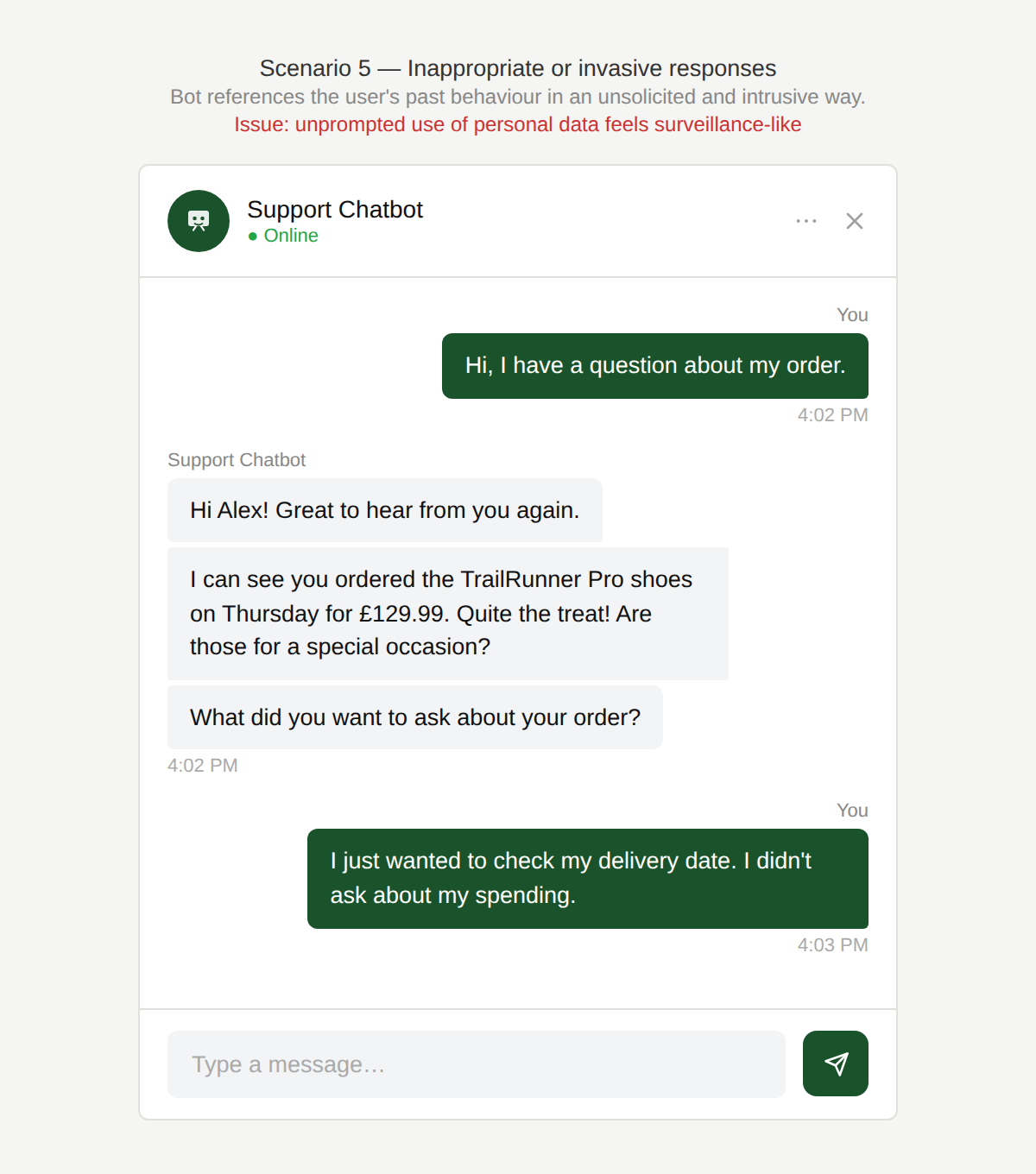
Whoa. Where did this come from?
The chatbot references the user’s past behaviour in a way that feels surveillance-like rather than helpful. The user has not asked for this information to be surfaced, and the tone makes the interaction feel intrusive
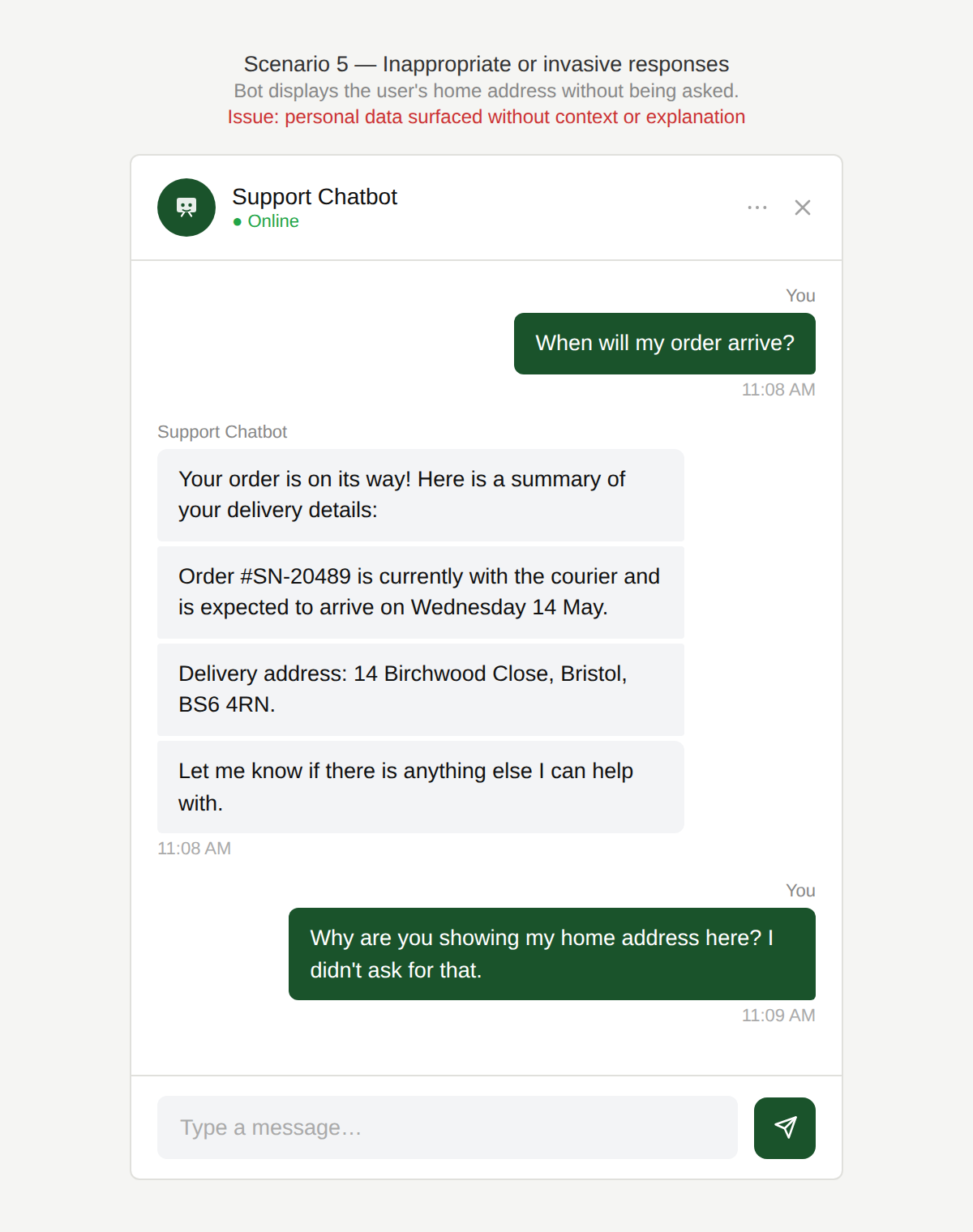
Why are you showing my home address?
The chatbot displays personal data such as the user’s home address without being asked and without explaining why it is showing this information.
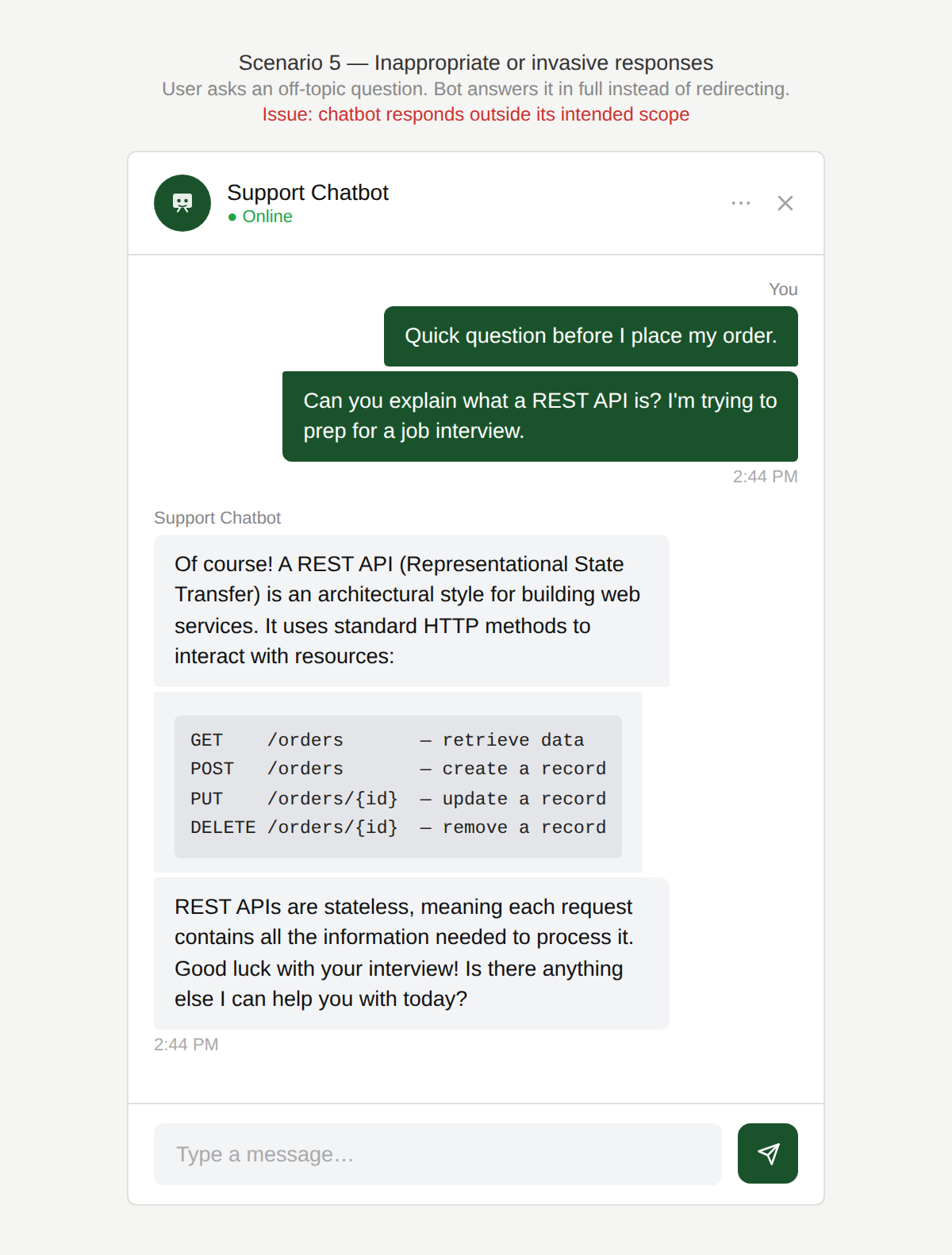
You shouldn’t be answering this, right?
The user sends a message that is clearly outside the scope of the chatbot’s purpose. The chatbot answers the off-topic request in full rather than acknowledging its remit and redirecting the user.
This feels a bit weird, right?
A user interacts with a customer service chatbot about diapers. The chatbot responds with an image that feels inappropriate to this user.
Why is this an issue?
The chatbot surfaces content that is inappropriate, surprising, or insufficiently contextualized:
- Images or visuals that feel unsuitable for the situation, audience, or sensitivity level.
- Personal or private information displayed without clear user expectation or explanation.
- Lack of transparency around why certain data or content is being used or shown.
- Over-personalizing before the user has had a chance to build trust with the experience.
- Responding out of scope.
Why do we care?
Even if technically correct, the user may feel the content is misaligned with their intent and comfort:
- Trust & safety: Inappropriate visuals or unexpected display of personal data can feel awkward or intrusive.
- Privacy expectations: Users want to understand when and why their personal information is used.
- Emotional sensitivity: Topics involving children, health, or personal issues require extra care.
- Brand risk: Content that feels inappropriate or careless, or random scope of the chatbot, can seriously damage credibility.
What is the remedy?
Establish clear conversational boundaries that prevent the chatbot from surfacing sensitive, personal, visual, or potentially surprising content when it is inappropriate, unexpected, or insufficiently contextualized.
- Apply stricter content suitability rules: Especially for sensitive topics (children, health, hygiene), avoid unnecessary or graphic images.
- Use visuals only when they clearly add value: If an image doesn’t directly help solve the task, prefer text.
- Be explicit when using personal data: Clearly explain why personal information is referenced: “I’m using your saved address to check service availability.”
- Follow the principle of minimal disclosure: Show only the personal data strictly required to complete the task.
- Be transparent: Tell the user where the information is coming from (e.g. “Based on your recent order…”).
- Only personalize when it genuinely improves the experience: Start small and increase personalization gradually as trust grows and leave out completely if it doesn’t make the interaction easier or faster.
Are there any exceptions to this rule?
There are justified exceptions where showing what may be considered inappropriate content is acceptable, such as:
- The user explicitly requests visual guidance: Images may be appropriate if the user asks for them and the visuals are carefully curated.
- Professional or medical contexts with clear framing: Sensitive content can be acceptable when properly labeled, neutral, and clearly helpful.