
Broken Conversations – A Practical Guide for Improving Chatbot UX
Actionability
Concerns user confidence in how their data is handled by both the brand and third-party platforms. Includes transparency around data usage, privacy, and training data for AI models.
Actionability in conversational AI comes in many flavors, yet its absence consistently leads to significant friction. When a chatbot lacks actionability, users cannot complete tasks successfully or smoothly. This often happens because the system fails to guide the user toward a specific goal, or lacks the functions a user naturally expects to see next. Such hurdles are frequently compounded by restrictive interfaces like quick-reply buttons that prohibit free-text input, or responses that remain too superficial for the user’s needs.
The result is always the same: a frustrated user.

Scenario 1: Inaccurate or incorrect external navigation
A user asks a chatbot a question, and the chatbot refers them to content outside the chat experience. This guidance may include general references to a page, specific step-by-step menu instructions, or direct links. However, the provided path is missing, incorrect, or fails to lead the user to the relevant information.

Scenario 2: Missing guidance for next step
A user interacts with a chatbot and receives a response they want to act on, but the chatbot does not provide a way to take the next logical step.

Scenario 3: Quick replies are insufficient; no free text input
A user asks the chatbot a question and the chatbot response only consists of quick reply buttons; there is no input field available for free text entry. The user cannot communicate their actual response if it does not match the predefined options.
Scenario 4: No added value beyond FAQs
A user asks a chatbot a question, and the chatbot refers them to content outside the chat experience. This guidance may include general references to a page, specific step-by-step menu instructions, or direct links. However, the provided path is missing, incorrect, or fails to lead the user to the relevant information.
Scenario 5: Poor error handling
A user interacts with a chatbot and receives a response they want to act on, but the chatbot does not provide a way to take the next logical step.
Scenario 1:
Inaccurate or incorrect external navigation
A user asks a chatbot a question, and the chatbot refers them to content outside the chat experience. This guidance may include general references to a page, specific step-by-step menu instructions, or direct links. However, the provided path is missing, incorrect, or fails to lead the user to the relevant information.

Examples
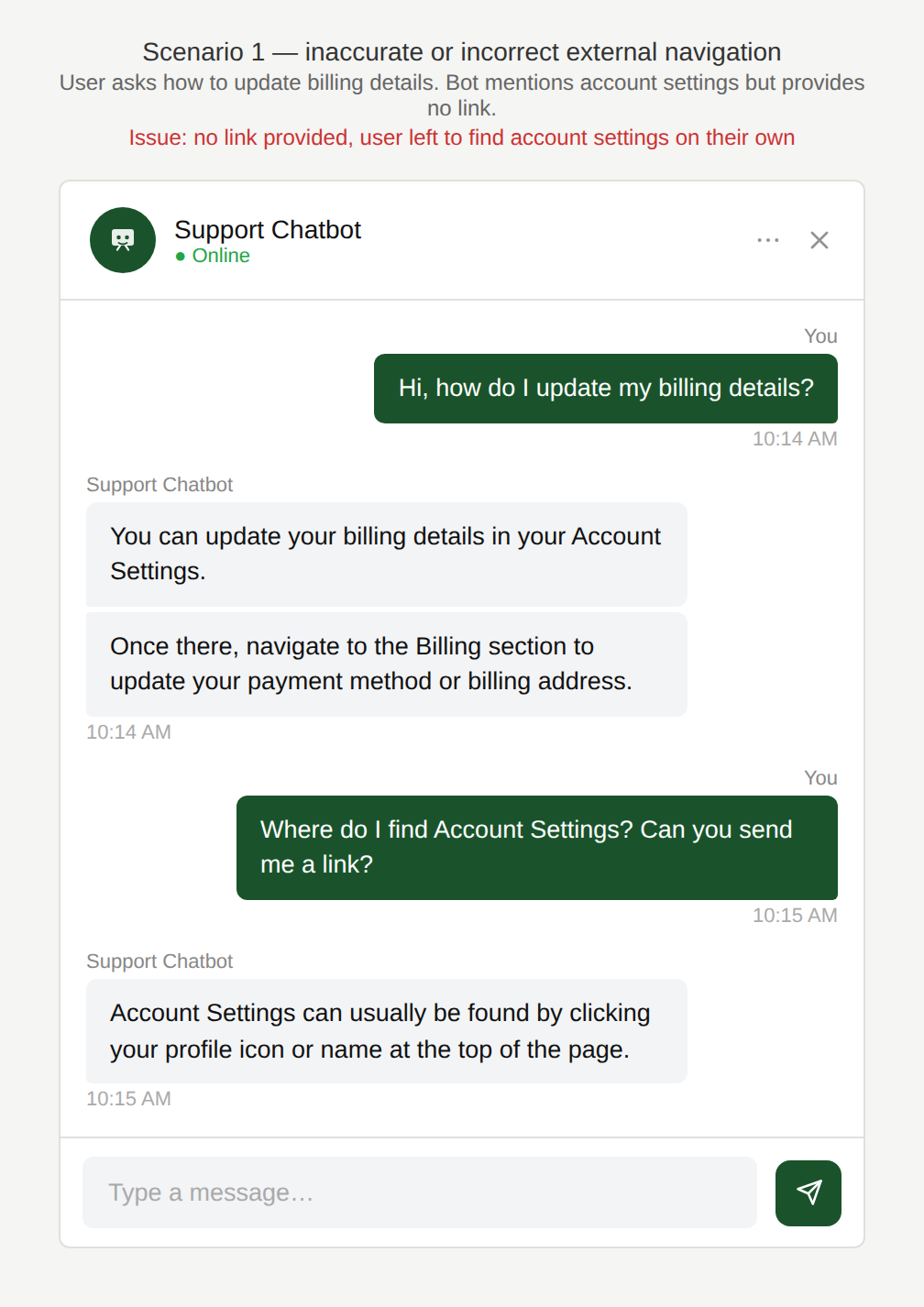
So I have to find my way there myself?
The chatbot tells the user that they can update their billing details in the account settings but does not provide a link to the account settings.
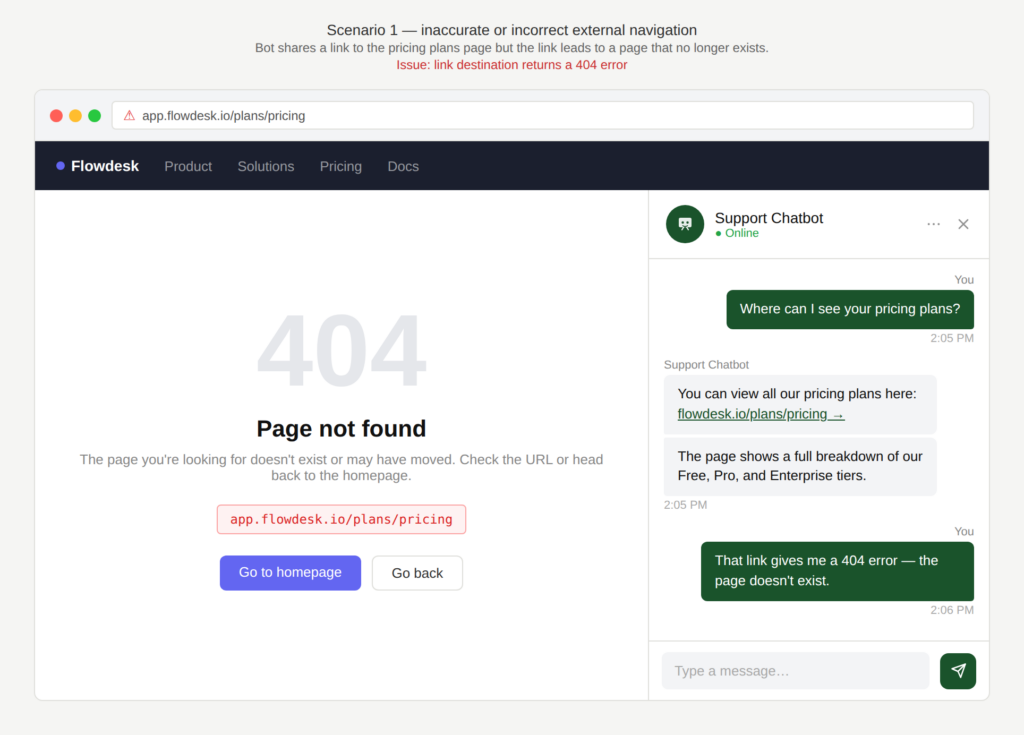
Is the link wrong or does the page not exist anymore?
The chatbot shares a link to pricing plans but when the user navigates to that link, the page does not exist.
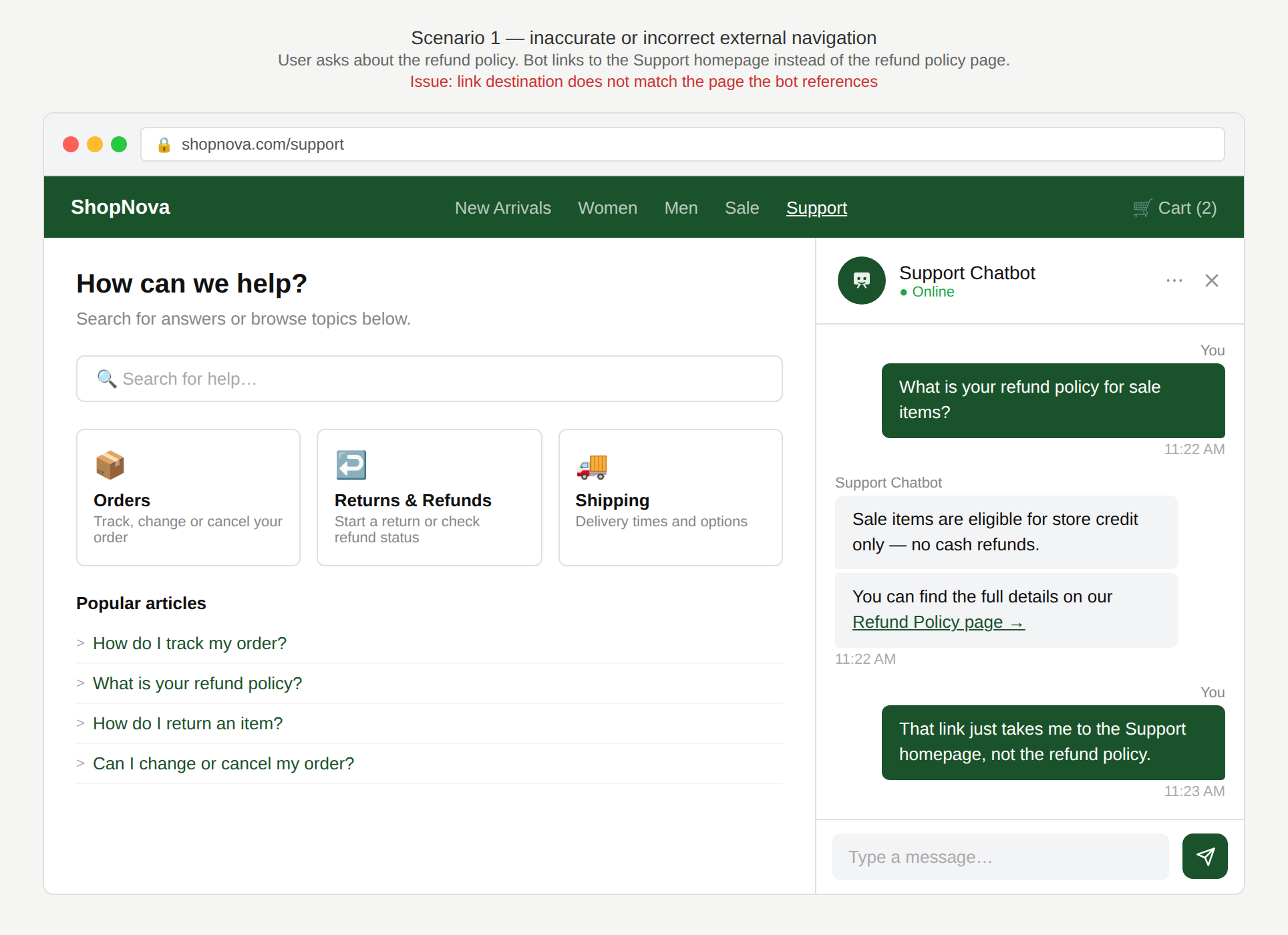
Can’t you link me straight to the right page?
The chatbot response refers to the refund policy page but the link it provides takes the user to the Help page and the user has to navigate from there to the refund policy page.
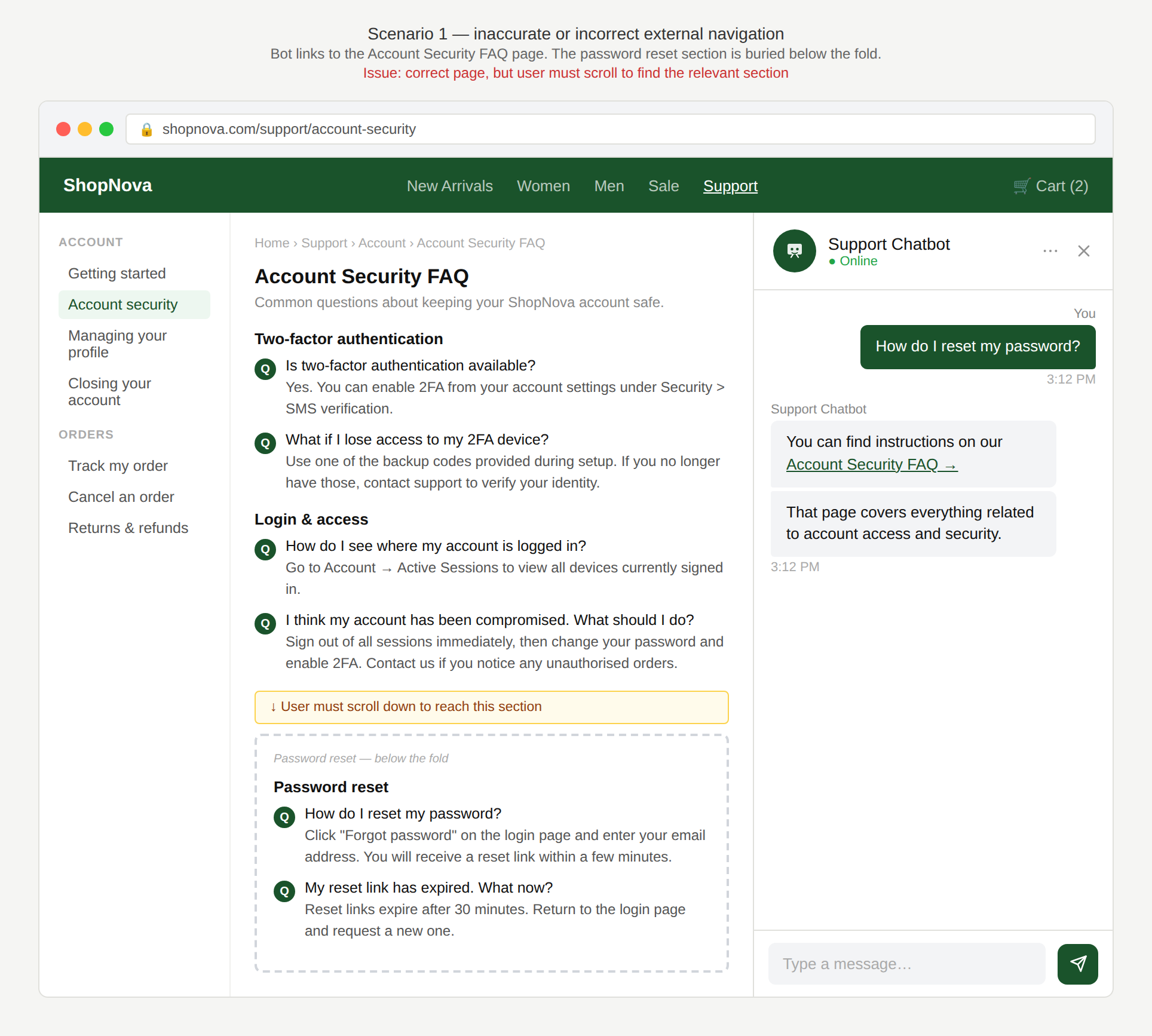
Where do I find the information on this page?
The chatbot provides a link to the FAQ page about account security and the user has to scroll to find the section about resetting their password that they originally asked about.
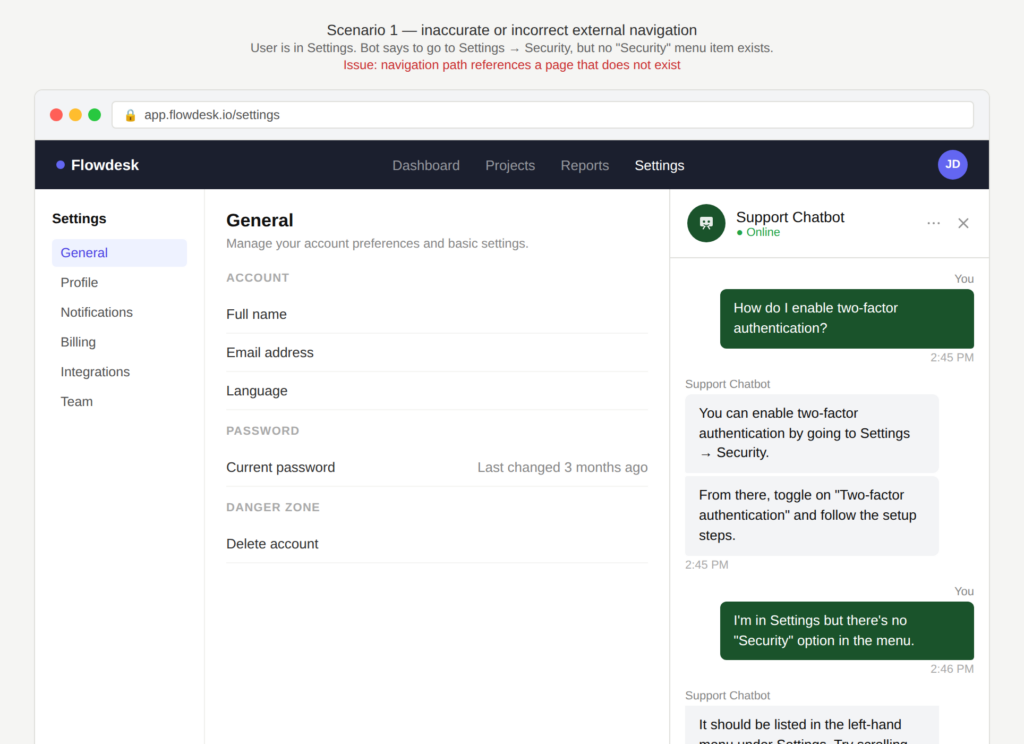
Where do I find the Security item you are referring to?
The chatbot tells the user to navigate to “Settings” -> “Security” but on the website, there is no menu item labeled “Security” in Settings.
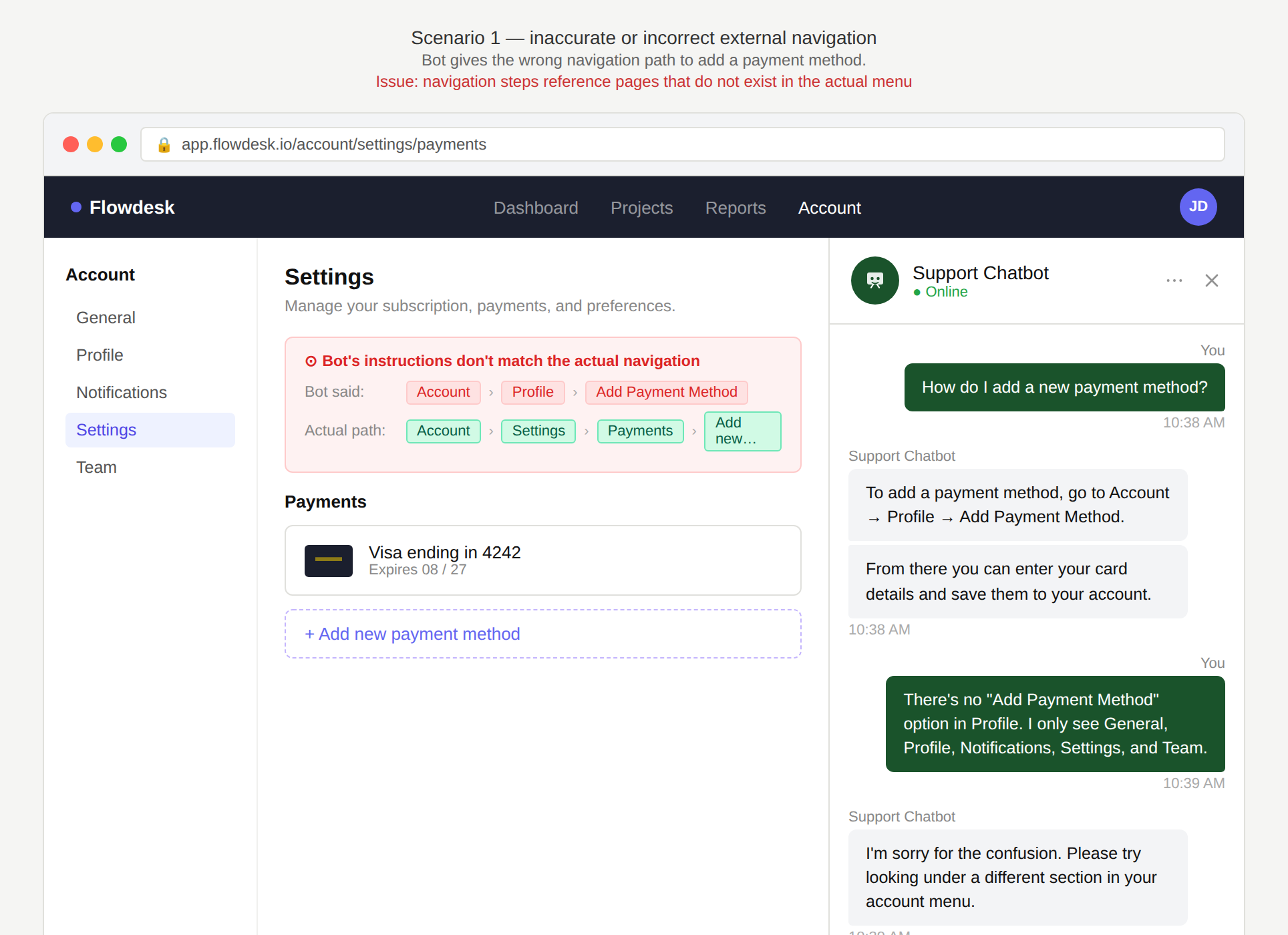
There is no Profile. Maybe under Settings instead?
The chatbot lists navigation steps to take to add a new payment method: “Click on Account -> Profile -> Add Payment method” but the actual navigation steps are: Account -> Settings -> Payments -> Add new payment method”.
Why is this an issue?
The chatbot response may appear helpful but it does not reliably guide the user to the information they are looking for.
- The user cannot directly access the relevant information via a single click.
- The user has to manually search or scroll on the target page to find the information.
- The user has to translate the chatbot’s navigation instructions to what might be their equivalent on the website.
Why do we care?
The chatbot has not helped the user efficiently and effectively complete their task:
- Task failure: The user may be unable to complete their task if they can’t access the target page.
- Frustration: Broken links, vague references, or incorrect navigation create immediate friction.
- Inefficiency: The user wastes time looking for the required information on the target page.
- Perceived quality: Mismatched navigation and outdated guidance quickly undermine confidence in the chatbot.
What is the remedy?
Ensure that the user receives proper and specific guidance to successfully execute their task. Users expect more than generic responses telling them to look up the answer themselves:
- Provide actionable guidance: Ideally, the key content is provided within the chatbot, formatted to fit the constraints of the chatbot real estate, so navigation to external sources becomes optional, not required.
- Improve link precision: Link to pages with anchors, highlights, or “jump to section” behavior to avoid scrolling. Link to the exact destination page, not a parent or generic help page.
- Reduce ambiguity before routing: When a user’s request could lead to multiple destinations, ask a short clarifying question to ensure you provide the correct link. For example: “Is this regarding your billing or your account settings?”
- Align with the live website: Check links and menu labels at runtime (or periodically) to avoid outdated guidance.
Are there any exceptions to this rule?
There are justified exceptions when providing a direct link might not be desired or possible, such as:
- Necessary sequential steps: Avoid deep links when they would circumvent required steps e.g. prerequisite steps for an onboarding flow.
- Access-controlled or personalized pages: Direct links may not work if content depends on authentication, permissions, or account state.

Scenario 2:
Missing guidance for next step
A user interacts with a chatbot and receives a response they want to act on, but the chatbot does not provide a way to take the next logical step.
Examples
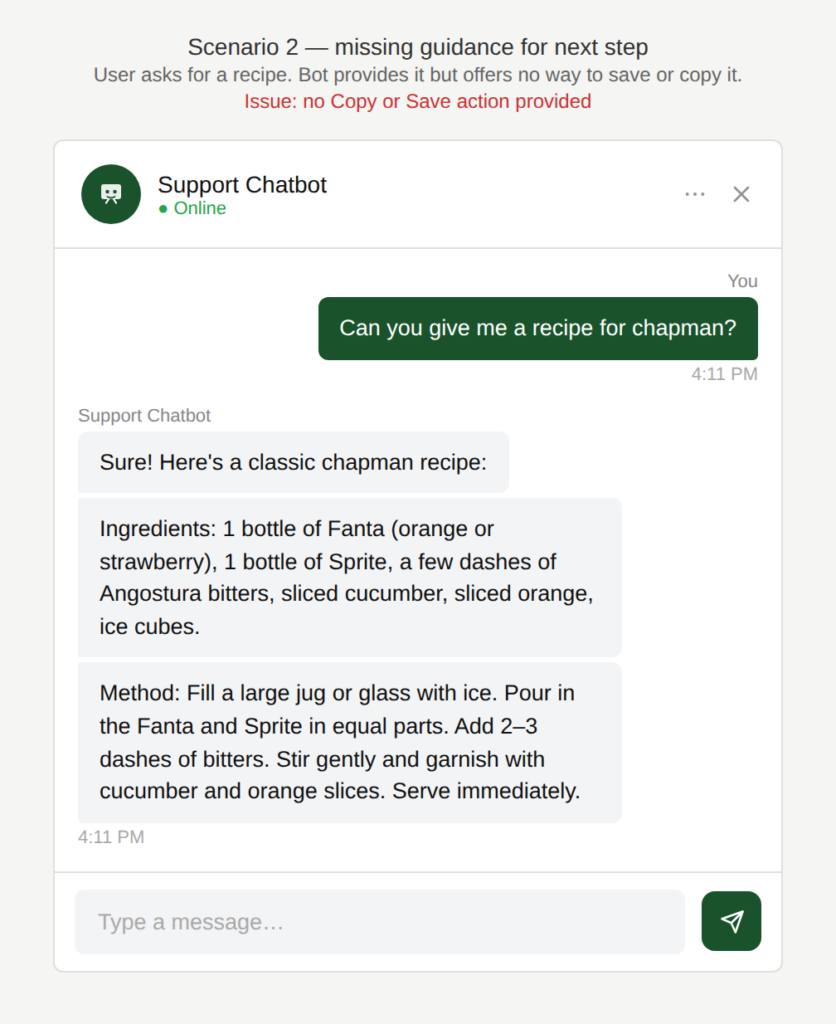
How can I share this with my friend?
The user asks for a recipe for chapman. The chatbot provides a detailed answer, but doesn’t provide a “Copy” or “Save” action to use that information outside of the chatbot.
Which of the options is it?
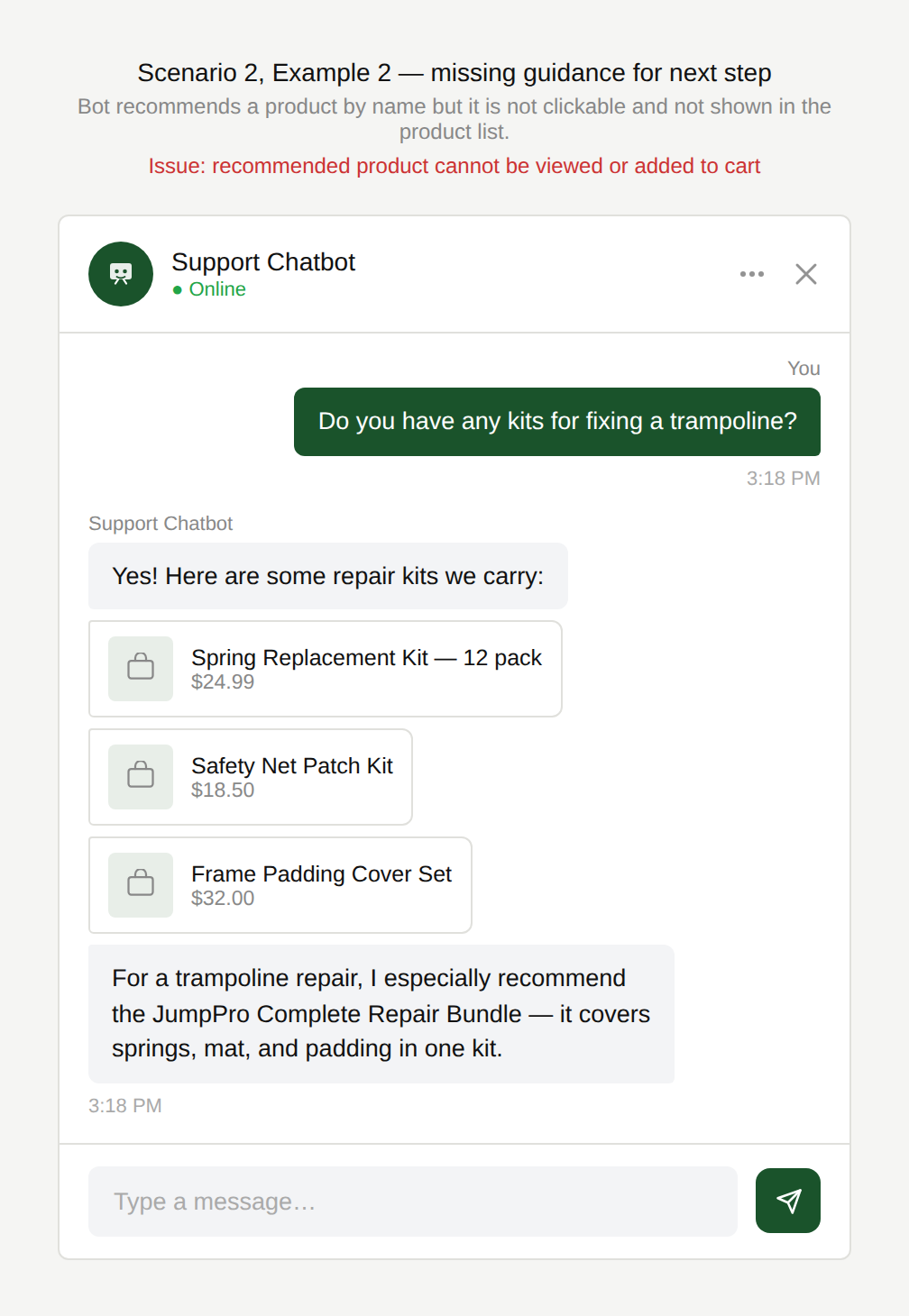
The user asks the chatbot to find kits for fixing a trampoline. The chatbot lists some products in response to the user’s question about and ends with a recommendation: “for a trampoline, I especially recommend product xyz”, but the product name is not clickable and the product name is also not visible in the list of products so the user cannot view the recommended product nor add it to their cart directly.
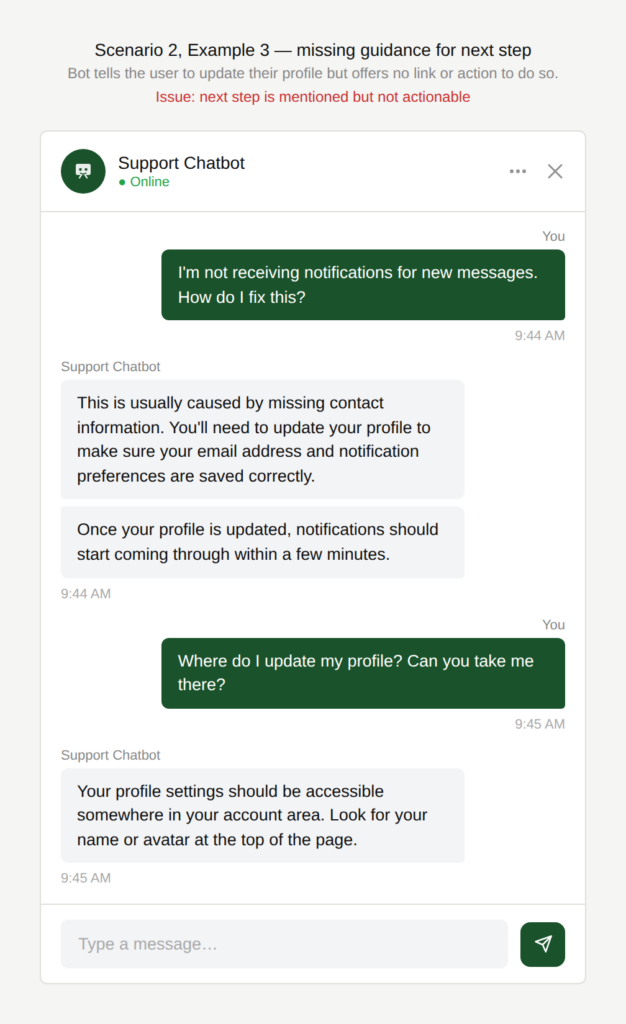
Where do I do that?
The chatbot suggests next steps (“You’ll need to update your profile”) without offering an action to do so.
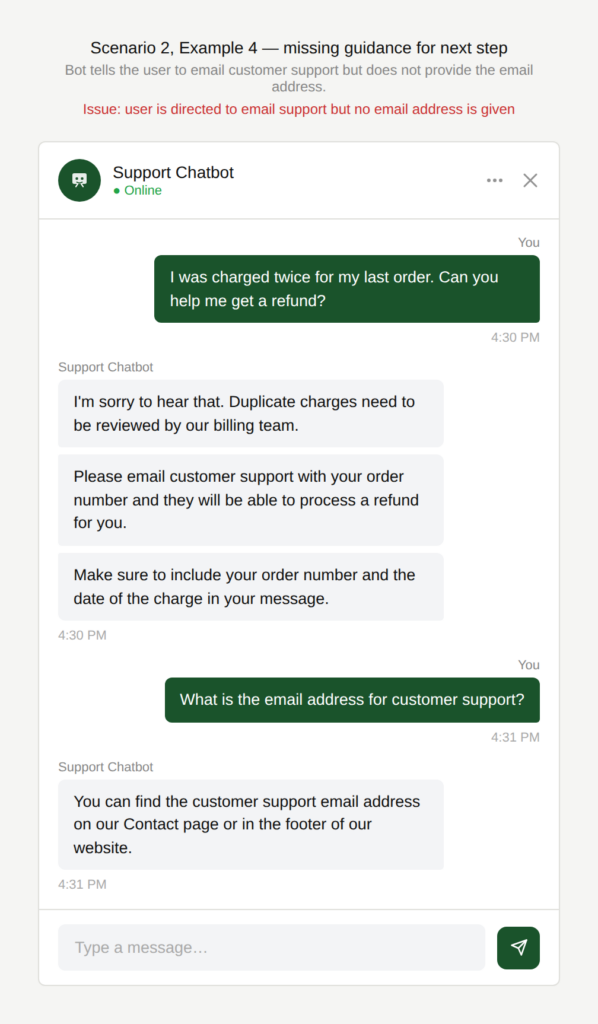
What is the email address?
The chatbot instructs the user to email customer support regarding their query but does not provide the email address.
Why is this an issue?
The chatbot does not anticipate or support the user’s most likely next actions:
- The interaction breaks at the moment when the user is most ready to act.
- The chatbot gives a response that is helpful but does not support the user entirely in completing their task.
- The user must rely on manual workarounds (text selection, navigation, re-searching).
Why do we care?
The conversation ends prematurely without the user having achieved their goal:
- Increased friction: Manual copying, extra navigation, or re-entry of information adds unnecessary effort.
- Task abandonment: Users may drop off when the next step is not obvious or convenient.
- Inefficiency: The chatbot creates work instead of reducing it.
- Expectation mismatch: Users assume the chatbot will help them act, not just inform.
What is the remedy?
Anticipate the most probable next actions and provide easy ways to trigger those:
- Surface likely next actions: Add common actions (copy, save, share, add to cart, compare) to relevant responses and show them when relevant (e.g. “Copy answer” for text, “Add to cart” for products).
- Enable immediate execution: Provide links, email addresses, or pre-filled actions when follow-ups are required.
- Support descriptions of natural actions: Allow follow-ups such as “Copy this,” “Add the first option to my cart,” or “Send this to my email”.
Are there any exceptions to this rule?
There are justified exceptions when offering possible next actions might not be desired or possible, such as:
- Low-frequency or edge case actions: Actions that are only used very seldomly can clutter the interface and reduce usability overall.
Scenario 3:
Quick replies are insufficient; no free text input
A user asks the chatbot a question and the chatbot response only consists of quick reply buttons; there is no input field available for free text entry. The user cannot communicate their actual response if it does not match the predefined options.
Examples
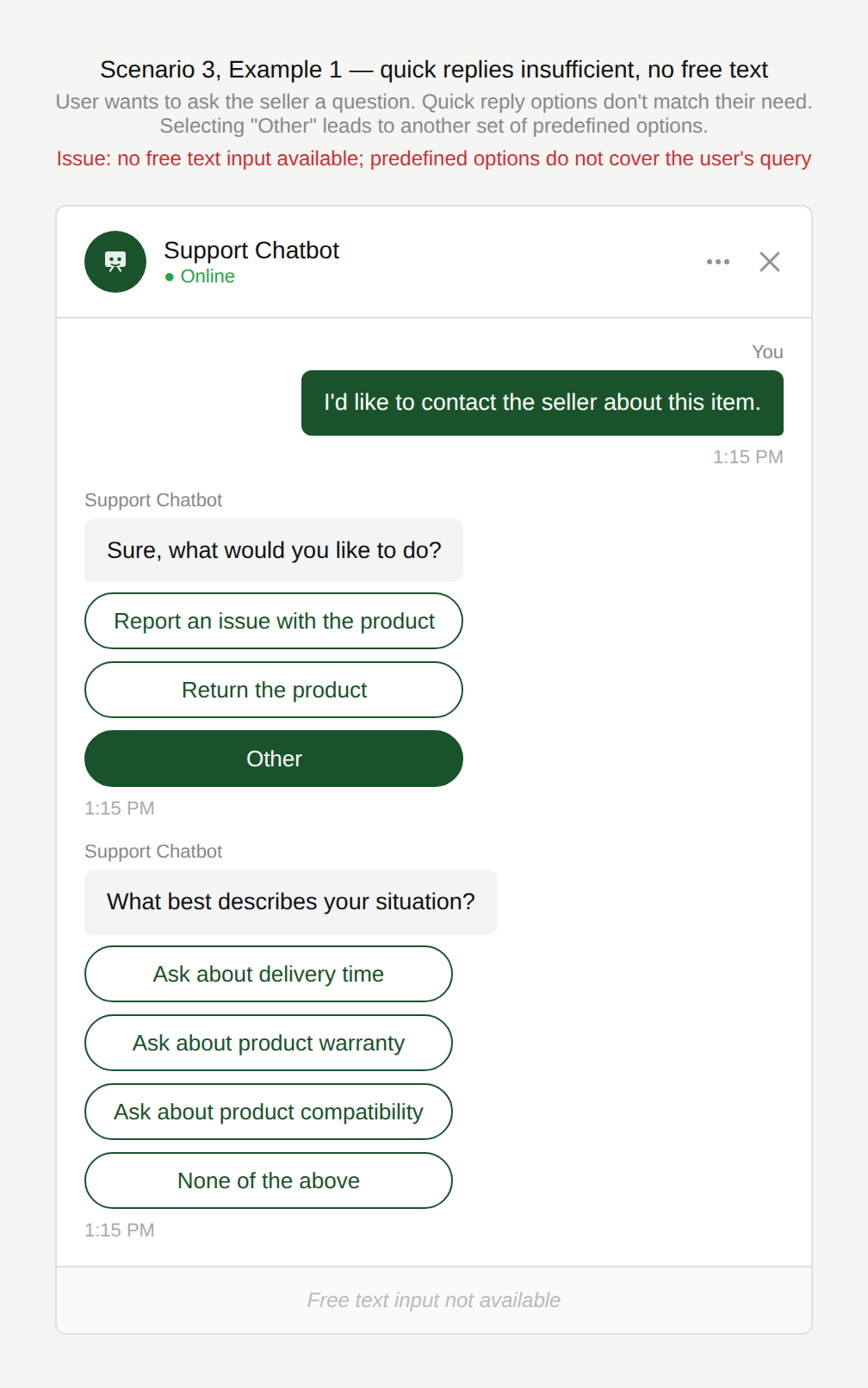
How do I say what my issue is?
The user wants to ask a question of the third-party seller on an e-commerce platform but the only options they can choose from are to “Report an issue with the product”, “Return the product” or “Other”. Selecting “Other” however leads to another set of predefined options which do not match the user’s requirement.
Why is this an issue?
The chatbot restricts users to predefined quick replies without allowing free text input:
- Quick reply options may not cover the user’s intent.
- The user cannot type their own response or question.
- The conversation forces the user down predefined paths.
- The user may select inaccurate options simply to proceed.
Why do we care?
Allowing free text input alongside predefined options ensures flexibility and improves task completion rates:
- Task failure: If the correct option is not available, the user cannot progress.
- Frustration: The user feels constrained or trapped by rigid conversation flows.
- User control (loss of expressiveness): The user cannot communicate their response or question accurately.
- Incorrect routing: Selecting the wrong option may lead to irrelevant information or an incorrect support path.
- Perceived lack of intelligence: The chatbot appears inflexible and unable to understand natural language.
What is the remedy?
Ensure that quick replies feel like shortcuts, not cages:
- Always allow free text input: Quick replies should accelerate, not replace, manual entry.
- Include a clear “Other” option: Allow users to type their request when none of the options apply.
- Offer progressive refinement: Start with broad options, then narrow through subsequent questions instead of displaying overly specific buttons.
- Allow easy recovery from incorrect selections: Provide options such as “Go back” or “Ask another question” throughout.
Are there any exceptions to this rule?
There are justified exceptions when allowing too much flexibility in the user’s input might not be desired or possible, such as:
- Highly structured flows: When flows are highly structured, they benefit from fixed responses only.
- Very simple tasks: Quick replies may be sufficient when responding to very simple tasks.
Scenario 4:
No added value beyond FAQs
A user interacts with a chatbot expecting direct assistance with a specific issue. Instead of leveraging available context or asking clarifying questions, the chatbot simply provides generic information identical to what is already found in the Help Center.
Examples
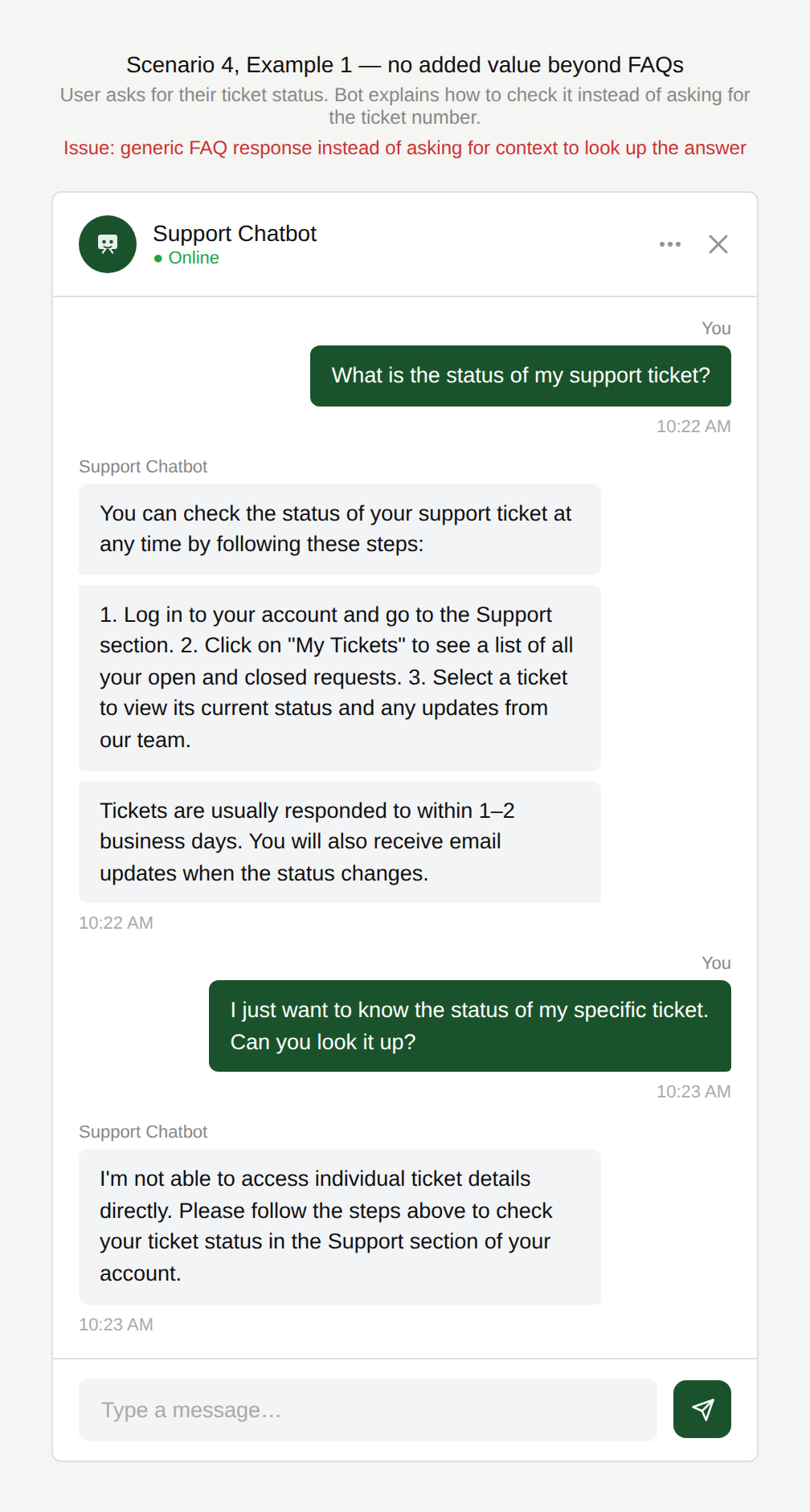
Can’t you just tell me?
The user asks: “What is the status of my support ticket?” The chatbot responds with instructions on how to check ticket status instead of asking for the ticket number.
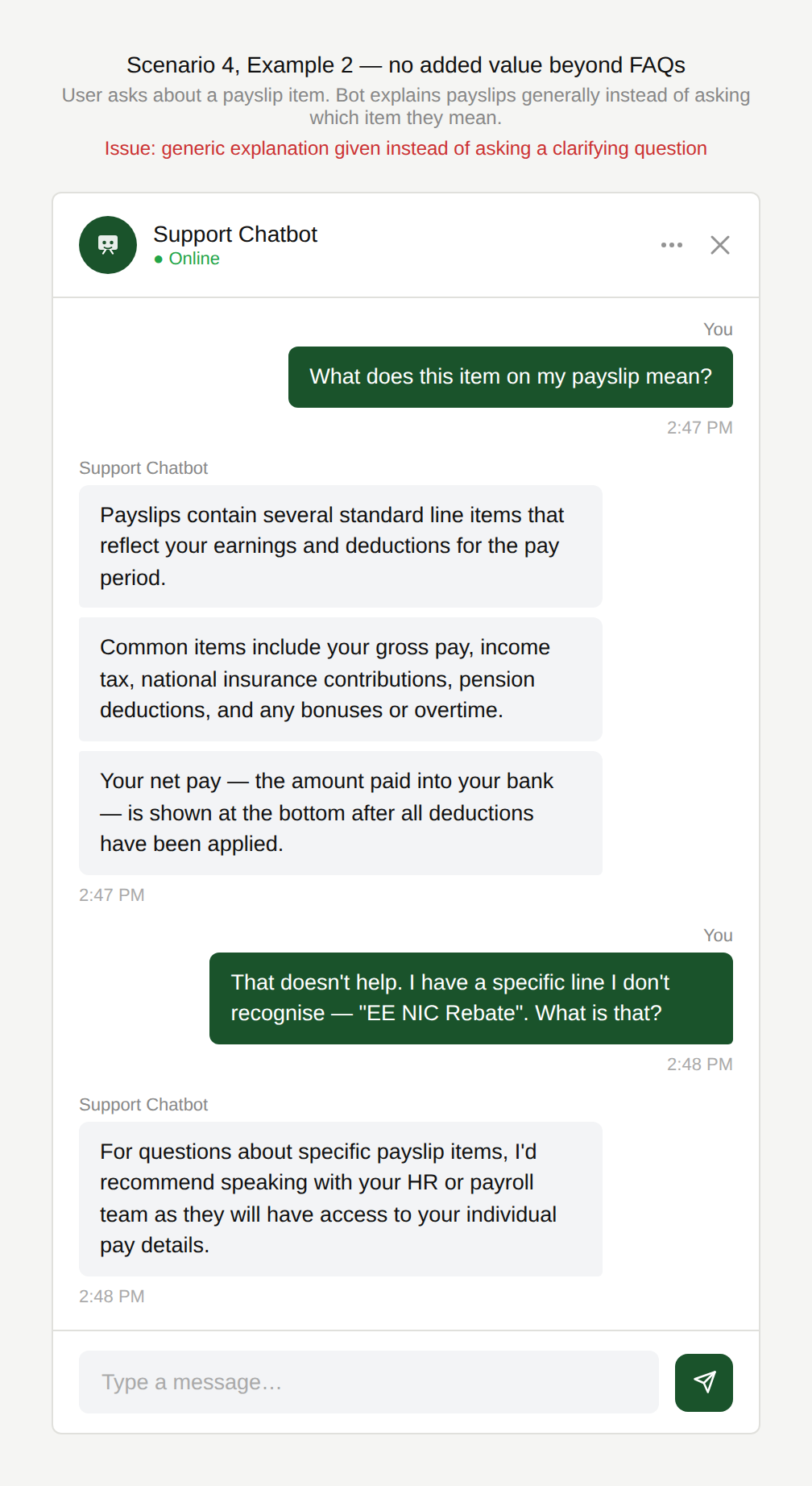
Don’t you know either?
The user asks: “What does this item on my payslip mean?” The chatbot explains generally what payslip items are but does not ask which item the user is referring to.
Why is this an issue?
The chatbot does not move beyond generic FAQ-style responses:
- Responses are broad and informational rather than tailored to the user’s situation.
- The chatbot does not ask follow-up questions needed to provide a specific answer.
- The conversation does not leverage available context or user data.
- The chatbot behaves like a search interface rather than an assistant.
Why do we care?
The conversation is inefficient and the user might have consulted the FAQs and received the same result with less effort:
- Reduced value of the chatbot: If responses are identical to FAQs, the user could find the same information faster through search.
- Missed opportunity for efficiency: Chatbots can gather details interactively to resolve issues faster than static documentation.
- User frustration: The user expects personalized help when interacting with a conversational interface.
- Increased support demand: When the chatbot fails to resolve specific requests, users may escalate unnecessarily to human agents.
What is the remedy?
Add value by personalizing, contextualizing, or resolving, not merely repeating documentation:
- Clearly indicate when the chatbot can go beyond FAQs: Suggest next actions when possible (“I can check your ticket status if you want”) or state when it’s not.
- Ask clarifying questions: Ask for missing identifiers early (ticket number, payslip label, date, period) or let users select a ticket or payslip item directly from a list shown in the chat.
- Use available context: If the user is logged in, retrieve relevant data such as recent tickets or account details.
- Provide case-specific responses: Address the user’s exact request rather than general instructions.
Are there any exceptions to this rule?
There are justified exceptions when an FAQ-type response to the user’s question might be acceptable, such as:
- When users don’t know or can’t provide identifiers: Generic guidance may be the only option when users don’t have the necessary identifiers at hand.
- General information queries: Some questions are inherently broad (e.g. “What is a payslip?”).
Scenario 5:
Poor error handling
A user chats with a chatbot to complete a task or get help. During the interaction, the request cannot be fulfilled because a backend system is unavailable, the chatbot cannot handle the request type, or something goes wrong technically. Instead of helping the user recover, the chatbot provides a vague response, repeats the same failed action, or leaves the user without a clear next step.
Examples
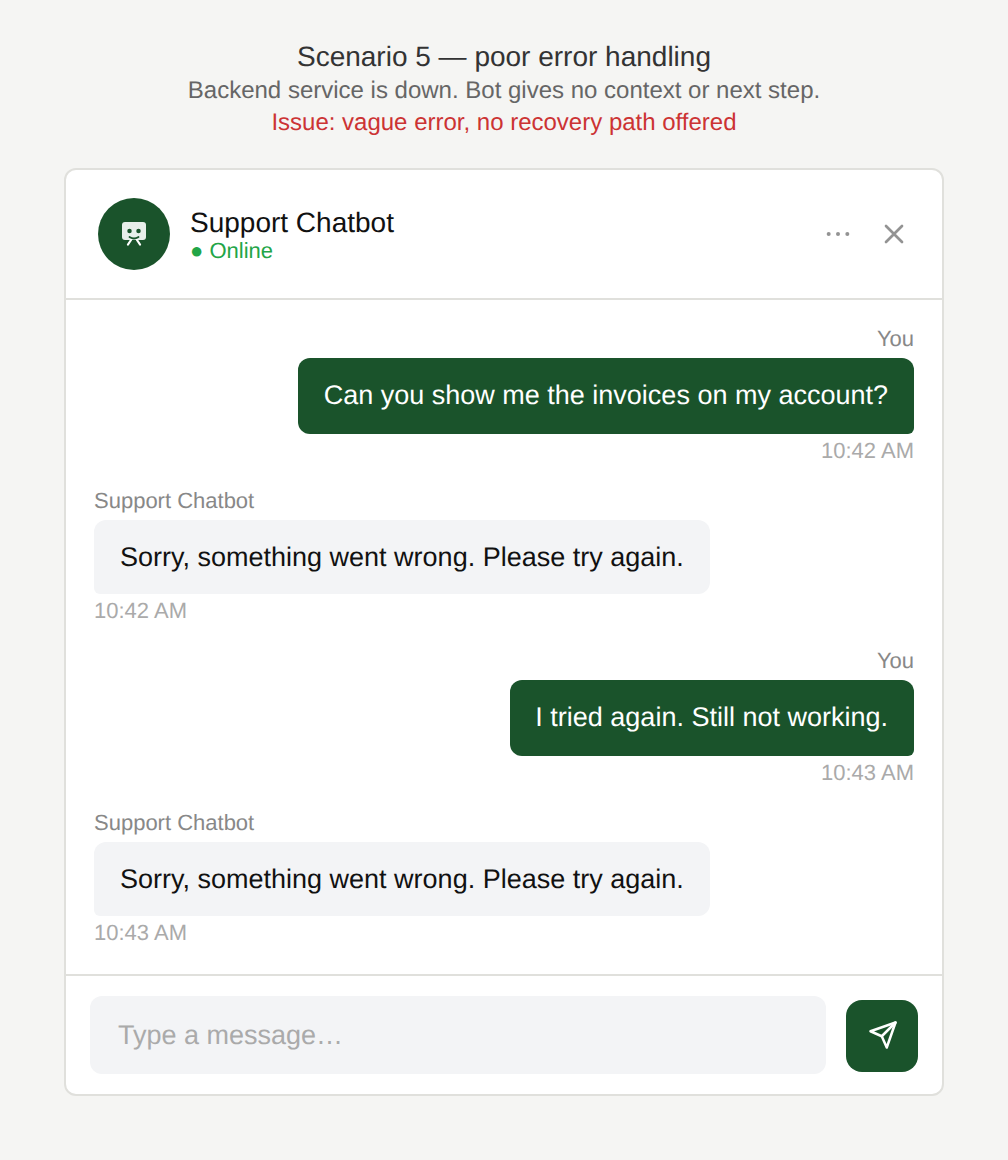
But why did it go wrong?
The chatbot cannot access account information because a backend service is down, but only replies: “Sorry, something went wrong.”
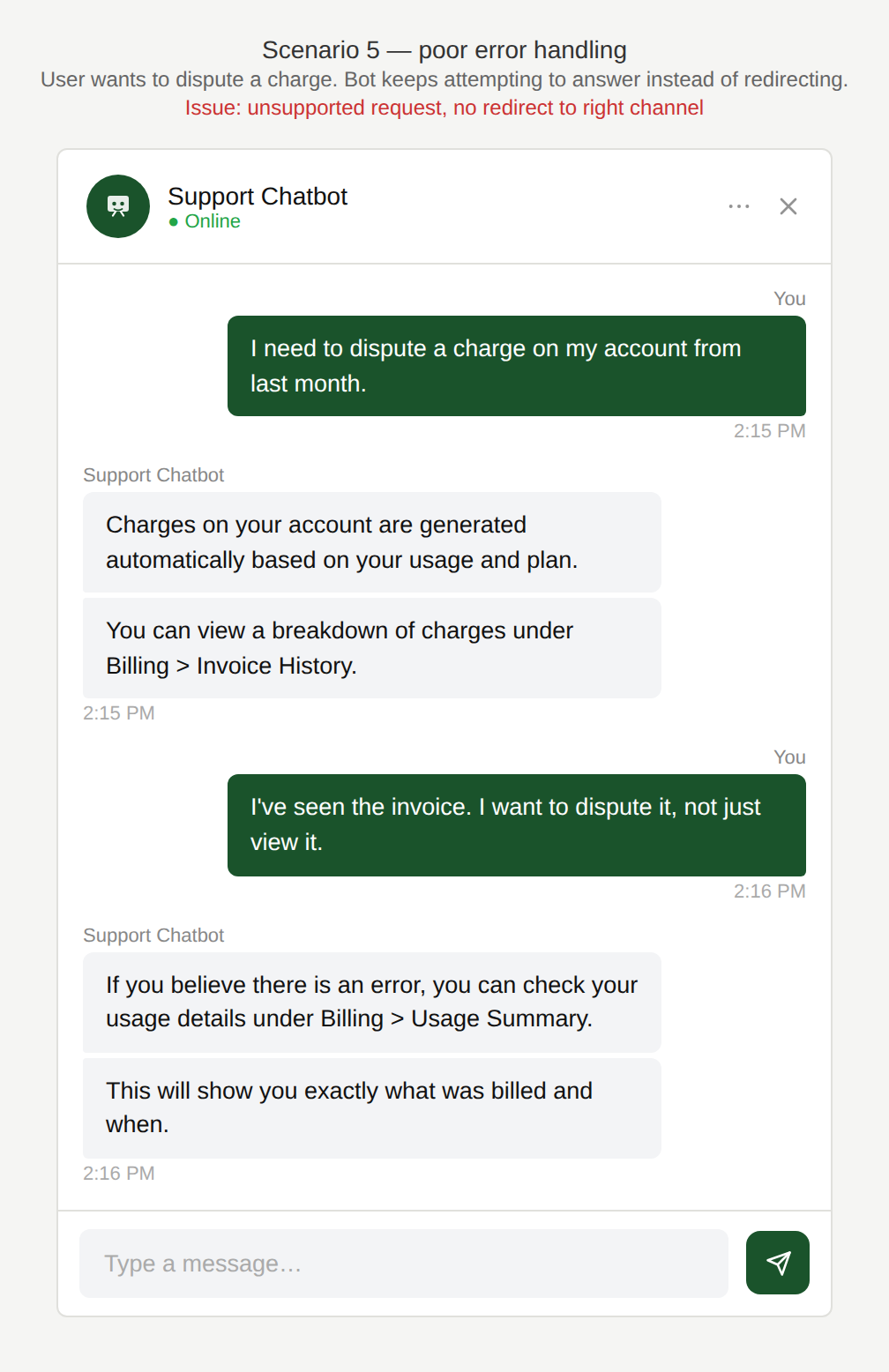
Why won’t you help me with
my actual question?
The user asks for a request the chatbot cannot support: disputing a charge, but the chatbot keeps trying to answer instead of redirecting to the right channel.
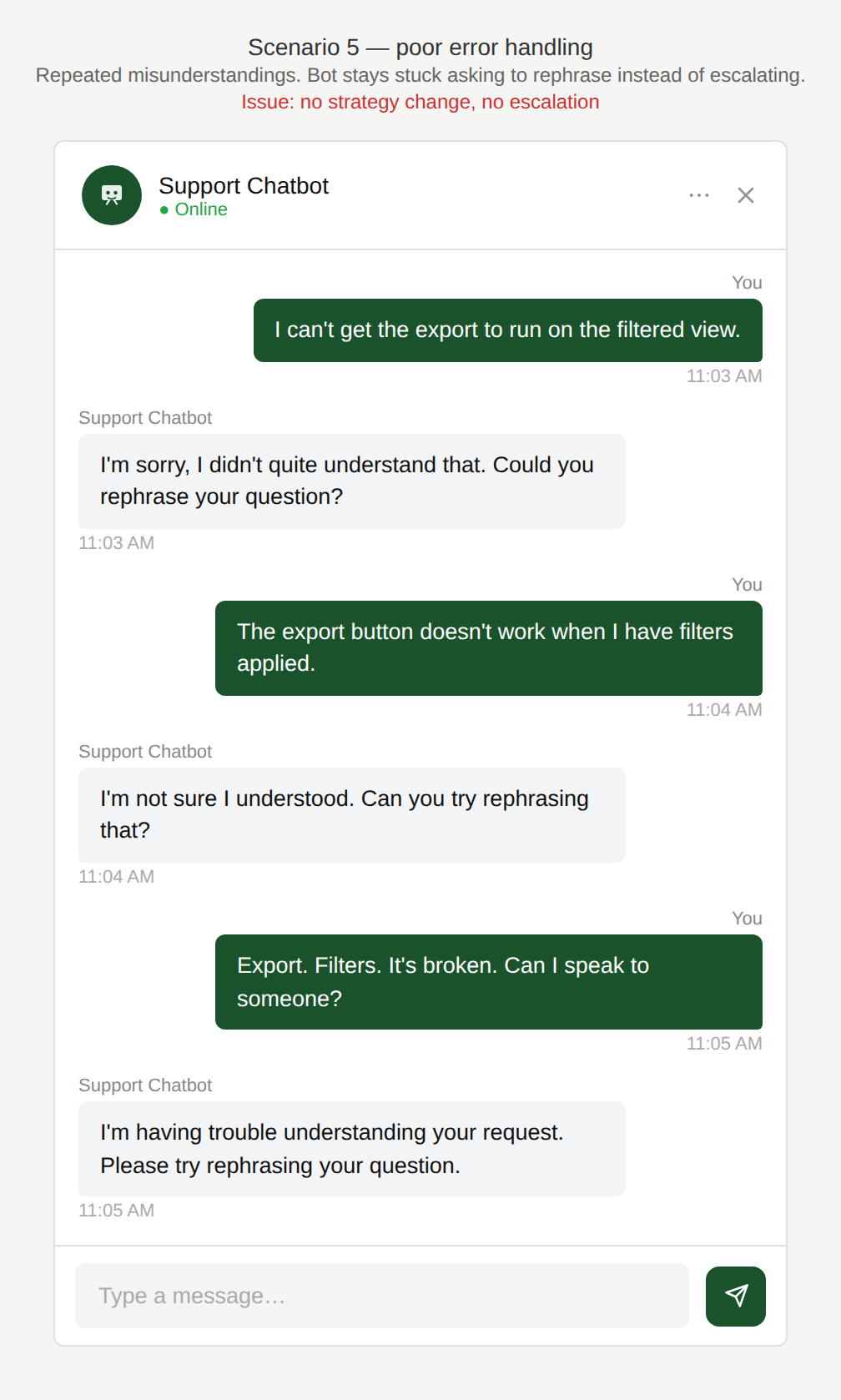
Why aren’t you understanding?
The chatbot encounters repeated misunderstandings and stays in error recovery mode (“Can you rephrase that?”) instead of changing strategy or escalating.
Could you provide more
helpful information?
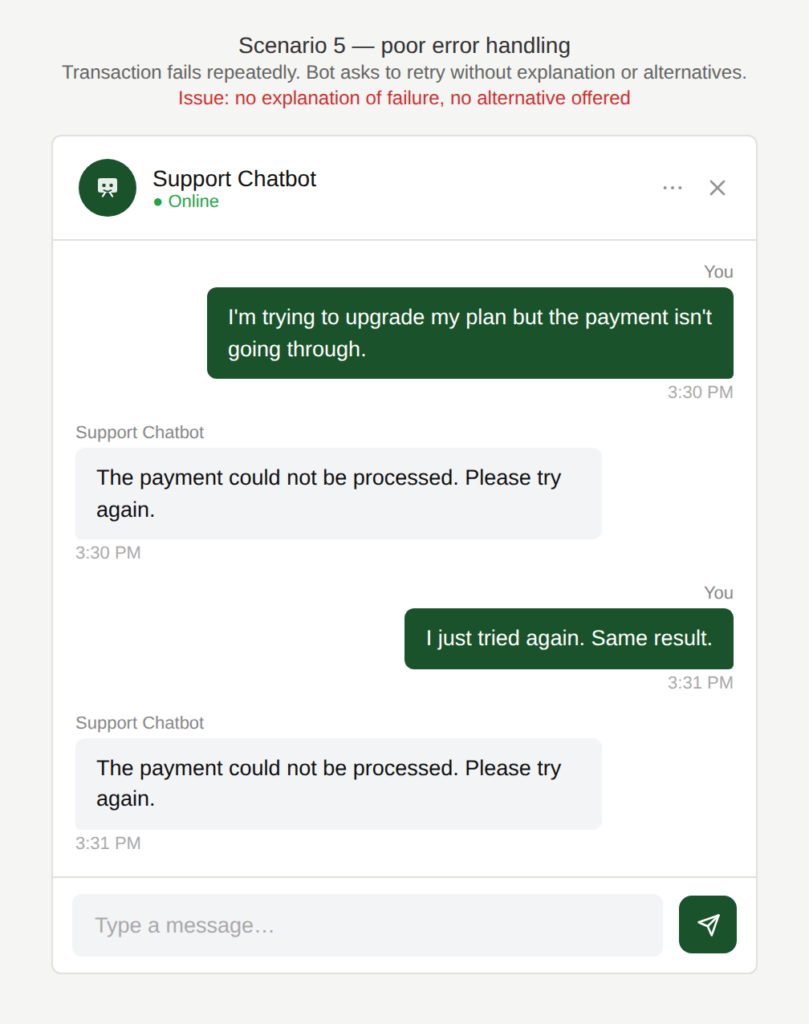
A transaction fails and the chatbot repeatedly asks the user to retry without explaining what happened or offering alternatives.
Why is this an issue?
The chatbot does not handle failure states intentionally or transparently:
- The chatbot only provides vague or generic error messages.
- There is no clear explanation of what failed.
- There are no actionable next steps for the user.
- Fallback paths are missing when the chatbot cannot help.
Why do we care?
Poor error handling turns recoverable problems into frustrating experiences:
- Task failure: the user is not able to complete their task.
- Erosion of trust: Generic responses signal that the chatbot is limited or unreliable.
- User frustration: Repeating the same answer creates a “computer says no” feeling and prevents the user from moving forward.
- Channel switching: The user may feel more comfortable switching to another channel and avoiding the chatbot entirely.
What is the remedy?
Design for recovery. When something fails, explain what happened, provide a clear next step, and offer alternatives rather than leaving users at a dead end:
- Give clear, actionable error messages: Explain what went wrong (when possible), whether the user can fix it and what to do next.
- Differentiate error types: Handle failures differently depending on cause e.g. for technical/system errors → acknowledge outage and provide alternatives and for capability limitations → be transparent about what the chatbot cannot do.
- Always provide fallback options: If the chatbot cannot resolve the issue, offer Human support, relevant help resources, alternative channels or workarounds in order to avoid dead ends.
- Design intentional recovery paths: After failure, guide users toward success (e.g. “Try this instead…”)
- Limit repeated retries and loops: Avoid repeatedly asking users to retry or rephrase. After one or two failed attempts, change strategy, simplify the request or escalate when appropriate.
Are there any exceptions to this rule?
There are justified exceptions when sharing details about the error might not be necessary or acceptable, such as:
- The failure is temporary and easily recoverable: A short connectivity issue, for example, where retrying is genuinely likely to work.
- Security or compliance reasons: There may be security reasons for not being explicit in the error handling such as for fraud detection.